Self-Hosted Live Chat Customer Support PHP Script
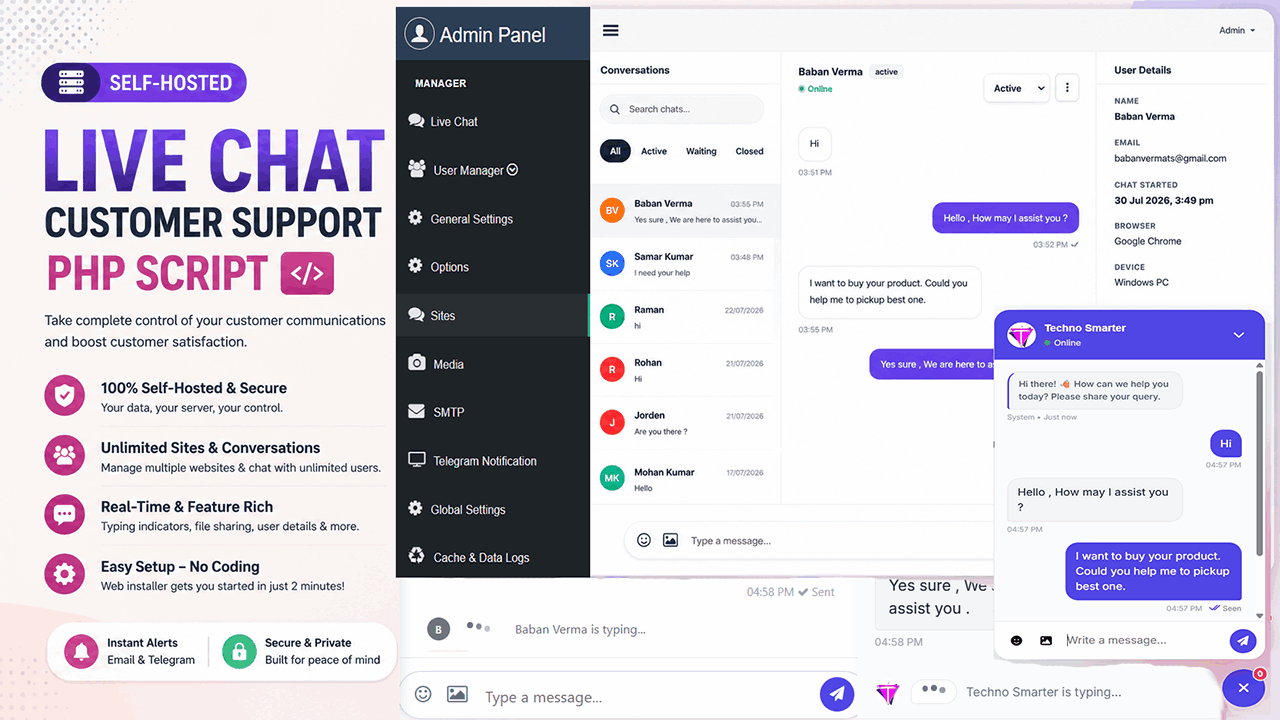
Transform your customer service experience and stop paying expensive monthly subscriptions for third-party live chat services!
Take complete control of your customer communications, data privacy, and lead generation with our Self-Hosted Live Chat Customer Support PHP Script. Designed for businesses, web agencies, and freelancers, this powerful PHP script allows you to provide real-time, seamless live chat support to your website visitors directly from your own server. Built in PHP and MySQL, this system puts you in 100% control of your customer data and privacy.
With our seamless form-based web installer, setting up your live support desk takes less than 2 minutes. No complex coding! Best of all? You can run Live chat and manage unlimited sites from one centralized admin panel, customizing the look and feel of the widget for every single domain independently.
Whether you want to generate leads, provide real-time technical support, or boost eCommerce sales, this contact and live chat script has every feature you need to succeed.
Core Superpowers & Key Benefits
1. Easy Web-Based Installer (No Coding Required!)
You don't need to be a server expert to get started. Our script comes with a highly intuitive, form-based web installer. Just upload the files, fill out your database details in the setup form, and your live support system is ready to go in under 2 minutes!
Enterprise-Grade Security & Data Protection
We built this script with security as a top priority so you can host it with complete peace of mind:
PDO & Prepared Statements: 100% protected against SQL Injection attacks.
XSS & CSRF Protection: All chat inputs and user data are strictly sanitized to prevent Cross-Site Scripting.
Domain Locking: The chat widget will ONLY load on the exact domain you register in the admin panel, preventing unauthorized use of your server resources.
Secure File Uploads: Strict MIME-type checking and file size limits protect your server from malicious scripts.
Auto-Generated Cryptographic Site Keys: Every registered site gets a unique, tamper-proof site key for API communication.
Features of Self-Hosted Live Chat Customer Support (Everything You See Is What You Get)
1. Multi-Site Management & Deep Widget Customization
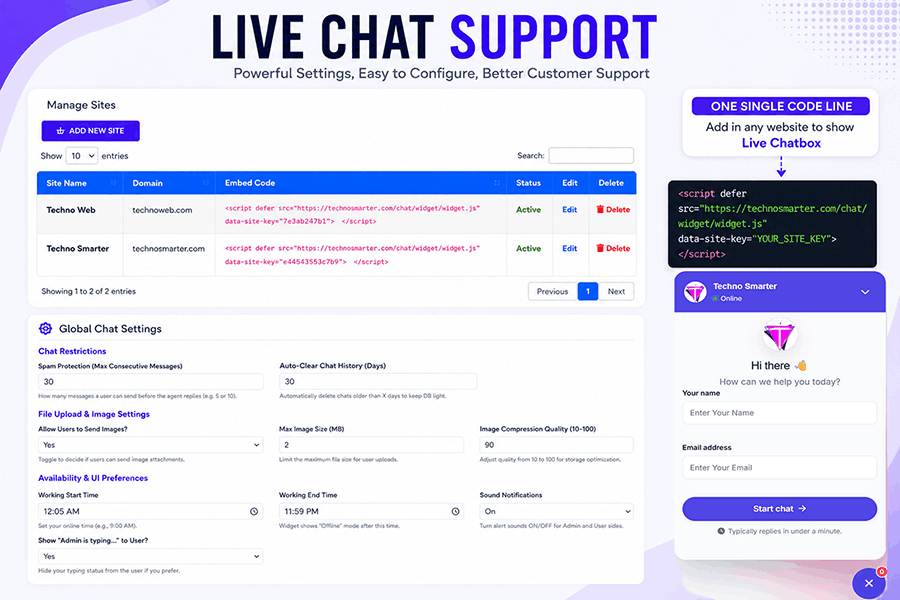
Are you an agency managing multiple client websites? The "Manage Sites" feature is an absolute game-changer. You can register unlimited domains and customize the widget for each site independently!
Auto-Generated Site Key: A secure, unique key is generated for every domain.
Custom Chat Box Header & Footer: Write your own personalized HTML welcome messages (e.g., Hi there ) and footer text (e.g., "Typically replies in under a minute").
Automated First Chat Message: Greet visitors instantly with a custom pre-set message as soon as they open the chat.
Brand Color Matcher: Use the built-in color picker to set a Primary Color that perfectly matches your client’s website theme.
Widget Position: Choose to display the chat widget on the Bottom Right or Bottom Left of the screen.
Custom Avatar/Logo: Upload a specific company logo or support avatar for every single domain.
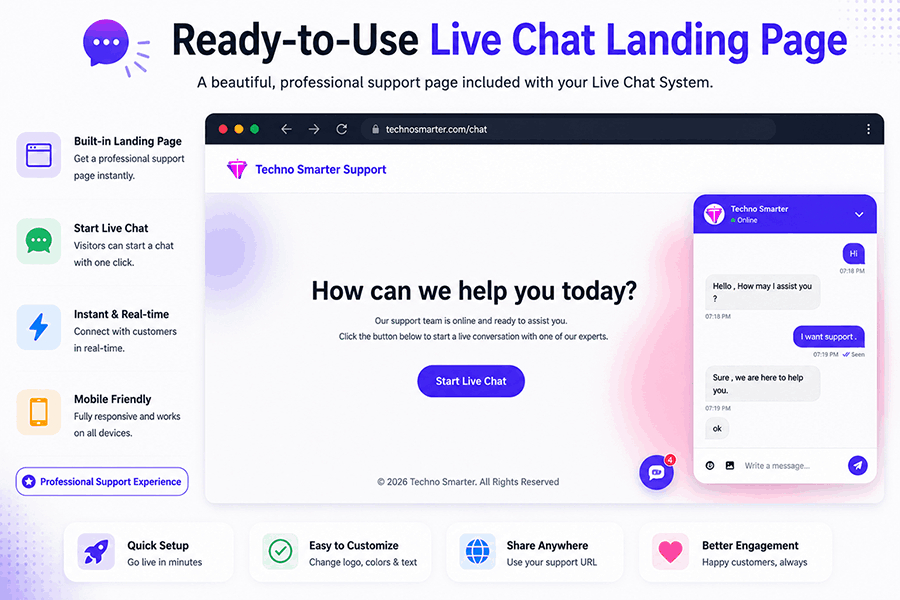
Single JS Embed Code: Once configured, just copy and paste a single lightweight line into any HTML, PHP, WordPress, or Shopify site!
2. The Ultimate "Live Chat" Dashboard
Your command center for real-time customer support. Engage with visitors instantly without ever refreshing the page.
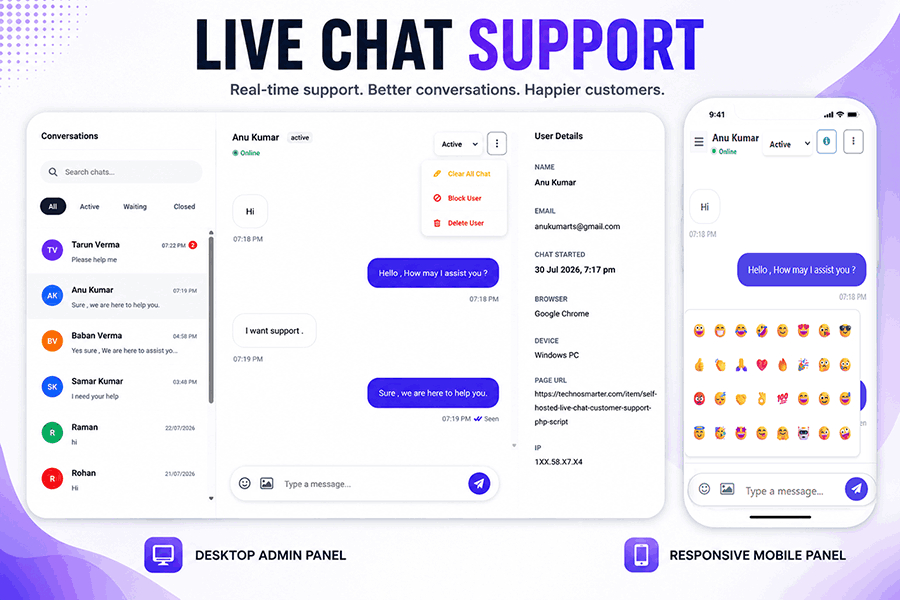
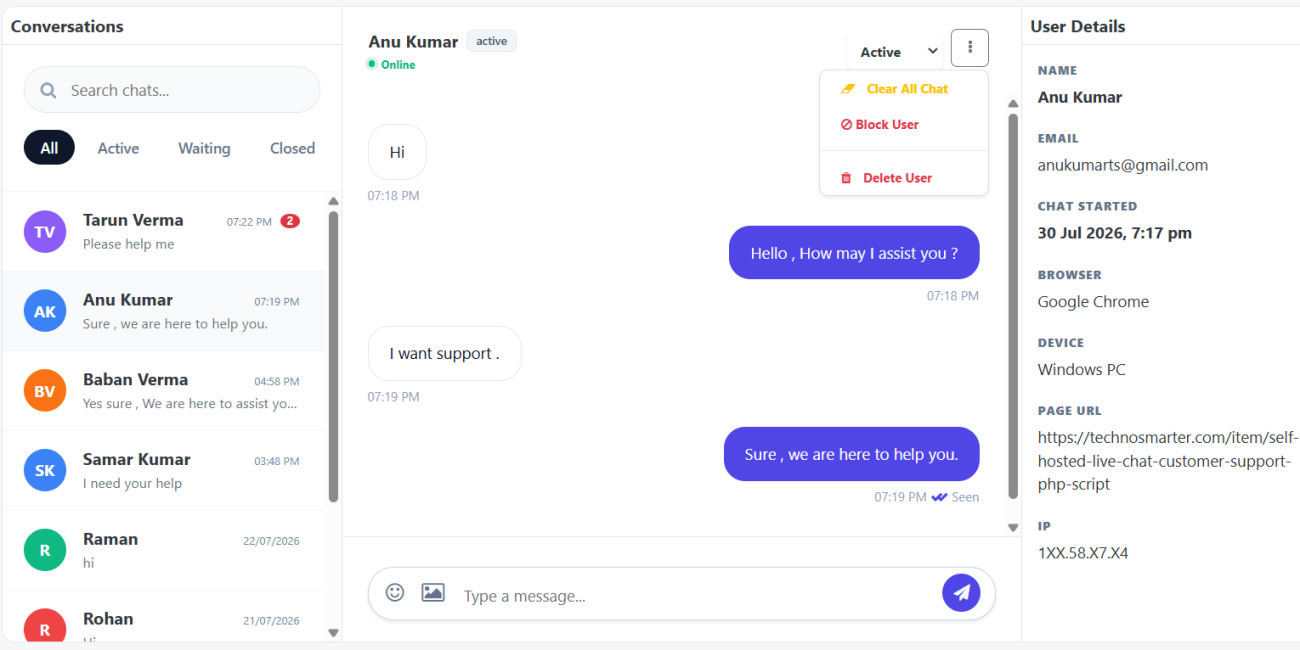
Smart Conversation Filters: Instantly filter your chat list by All, Active, Waiting, or Closed like Facebook Messenger (Business Suite) so no customer is ever left behind.
Rich Context "User Details" Panel: Never ask "Which page are you on?" again. On the right side of your chat screen, you instantly see the Visitor's Name, Email, Exact Chat Start Time, Browser, Device (Windows/Mobile), IP Address, and the Exact Page URL they are currently browsing!
Visitor Online/Offline status: Check whether a user is online or offline. The online/offline status will be displayed below the visitor name.
3. Advanced Chat Moderation & User Control
Keep your support environment professional and spam-free with quick-action moderation tools. Right from the active chat window, a simple click on the Action Menu (Three Dots) gives you instant power to:
Block User: Instantly ban spammers, trolls, or abusive IPs from contacting your support team again.
Clear All Chat: Quickly wipe the conversation history for a specific user.
Delete User: Completely remove a user and their data from your system with one click (Great for GDPR compliance). It will delete chat from the visitor side instantly.
Quick Status Toggle: Manually switch a conversation's status (Active, Waiting, Closed) on the fly.
4. Global Chat Settings (Total Control)
Customize how your overall system behaves.
Availability (Working Hours): Set your exact Working Start & End Times. Outside these hours, the widget automatically switches to an elegant offline mode.
Spam Protection: Set a limit on the "Max Consecutive Messages" a user can send before an agent replies to prevent chat bombing.
Auto-Clear Chat History: Keep your database fast by automatically deleting chats older than a specific number of days.
Typing Indicators: Real-time "Admin is typing..." and "User is typing..." indicators make the conversation feel natural and alive.
5. Advanced File Upload & Media Library
Media Settings: Toggle "Allow Users to Send Images" to Yes/No.
Storage Optimization: Set the Max Image Size (MB) and define the Image Compression Quality (10-100) to save your server space automatically!
Centralized Media Tab: A dedicated gallery where admins can view all uploaded files, preview images, and see the exact user details associated with the file.
6. Instant Telegram & SMTP Email Alerts
Provide lightning-fast support even when you are away from your desk.
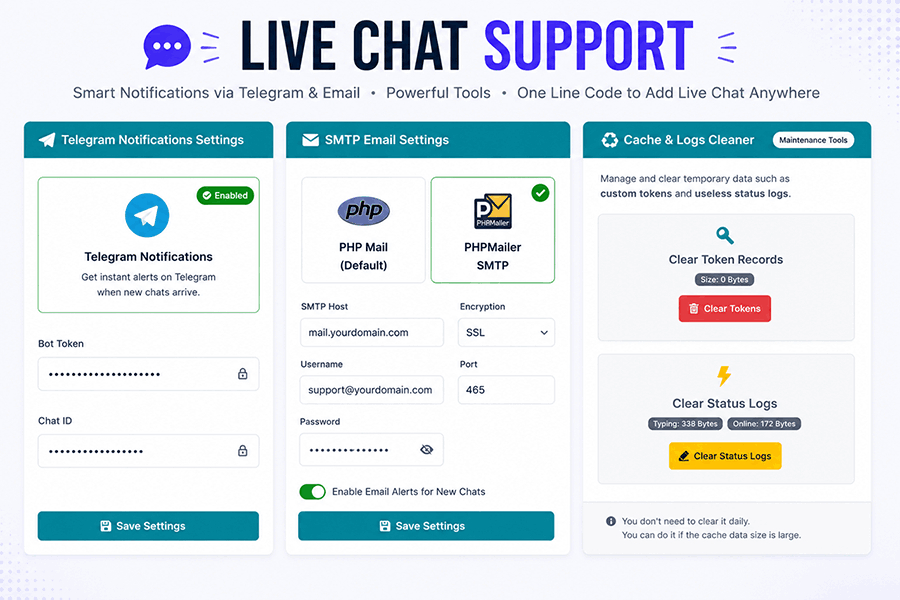
Telegram Notifications: Enter your Telegram Bot Token and Chat ID. The moment a visitor initiates a live contact request, your phone will buzz with an instant alert!
Robust SMTP Mail Settings: Choose between default PHP Mail or secure PHPMailer SMTP (SSL/TLS supported) to get instant email notifications for new chats.
7. Team Management & Maintenance Tools
Scale your support team effortlessly and keep your server fast.
Admin Users Manager: Add unlimited team members to the dashboard with their own secure login credentials.
Cache & Data Logs Cleaner: Safely clear temporary custom tokens and useless status logs with a single click (displays exact byte size) to keep your database incredibly lightweight.
Why is this the best PHP Live Chat Script on the market?
Zero Monthly Subscriptions: Pay once, own it forever.
Agency Ready: Manage 100s of different websites; live chat support from one admin panel.
Developer Friendly (GPL): Clean, unencrypted PHP code ready for custom modifications.
Mobile-Optimized UI: The chat window handles mobile keyboards beautifully without frustrating page jumps or zooming.
Supercharge your customer contact strategy today. Buy the Self-Hosted Live Chat Customer Support PHP Script and turn your website visitors into loyal customers in real-time!
1. SERVER REQUIREMENTS
To run this script smoothly, your server must meet the following:
- PHP 7.4, 8.0, 8.1
- Standard Web Server (Apache / Nginx / LiteSpeed)
2. HOW TO INSTALL (WEB INSTALLER)
We have included a highly intuitive, 1-minute web installer.
No manual database imports are required!
- Step 1: Unzip the downloaded package.
- Step 2: Upload all the extracted files to your server (e.g., inside a folder named "chat" or "support" →
yourdomain.com/chat/). - Step 3: Create a new, empty MySQL Database and a Database User in your hosting control panel.
- Step 4: Open your web browser and navigate to the folder where you uploaded the files.
- Step 5: The Web Installer will automatically appear. Fill in your Database Name, Database User, and Password.
- Step 6: Create your Admin Login credentials when prompted.
- Step 7: Click "Install". The system will automatically build the database!
3. HOW TO USE & EMBED THE CHAT WIDGET
- Step 1: Log in to your Admin Panel using the credentials you created.
- Step 2: Go to the "Sites" or "Manage Sites" tab in the left sidebar (Must Set your path from general setting like
example.com/chat/). - Step 3: Click "Add New Site" and enter your website's domain name.
- Step 4: The system will generate a unique JavaScript Embed Code.
- Step 5: Copy that
scriptcode and paste it into the HTML of your website, ideally just before the body closing tag.
Your live chat widget will now appear on your website!
4. SETTING UP TELEGRAM ALERTS
- Step 1: Open the Telegram App and search for "BotFather".
- Step 2: Send the
/newbotcommand and follow the steps to create a bot. - Step 3: Copy the "HTTP API Token" provided by BotFather.
- Step 4: Go to your Admin Panel → "Telegram Notification".
- Step 5: Paste the Token and your Chat ID, then click Save.
Enjoy your new live chat system!