PHP Digital Business Card QR Generator + Admin Source Code
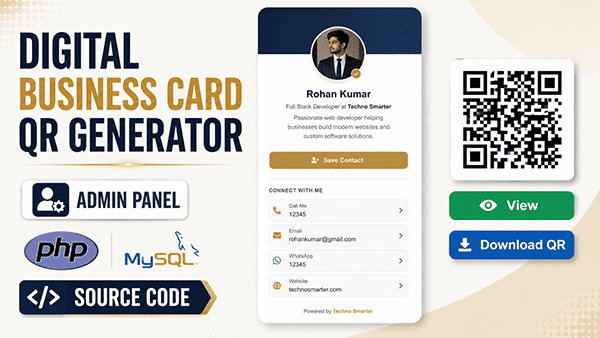
Looking for the complete, bug-free, and working source code of the PHP Digital Business Card QR Generator with Admin Panel? You are at the right place.
This is the official, ready-to-deploy PHP full project built for our complete video tutorial: How to Create a Dynamic QR Code Generator for vCard in PHP.

Why Buy This Premium Source Code?
You can always watch our 1:15-hour free tutorial and type the code manually. However, writing hundreds of lines of PHP code can take hours and often leads to frustrating syntax errors, database connection issues, and deprecated library errors.
By purchasing this PHP full project zip file, you get:
• Instant Peace of Mind: Save 6+ hours of manual typing and video pausing.
• 100% Tested & Working Code: Pre-configured and tested on XAMPP/WAMP local servers.
• Submission / Client Ready: Clean, well-commented standard PHP code that is very easy to present for your college projects or deploy for a freelance client.
How This Dynamic vCard System Works:
In a basic static QR code, once you print a visiting card, you cannot change the phone number or email. But in this Dynamic QR Generator system, if a user updates their mobile number or job title inside the admin panel tomorrow, the existing QR Code updates automatically!
When someone scans the QR code using any mobile camera, it opens a beautiful digital profile card and provides a "Save to Contacts" button to download a standard .vcf (vCard) file directly into their phonebook.
Key Features of the Project:
- Secure Admin Panel: A clean control center to add, edit, delete, and manage all digital business cards.
- Complete vCard Fields: Input User Name, Designation, Company Name, Mobile Number, Email Address, Website URL, and Office Address.
- Dynamic QR Code Generator: Automatically binds the user ID to a high-resolution, scannable QR code.
- Clean Mobile Preview: A responsive digital visiting card layout designed specifically for smartphone screens.
- Instant Contact Download (.vcf): One-click button for visitors to save the contact details to their phone.
- Download QR Image: Users can save their unique QR code as an image file to print on ID cards, office desks, or brochures.
- 100% Open Source: Built in standard core PHP. You can easily modify the CSS colors, logos, and text to turn it into your own custom portfolio project.
What is Included inside the ZIP File?
1. Complete PHP, HTML, CSS, and JS project folders.
2. vcard.sql database import file.
3. Pre-integrated PHP QR Code Library folder.
4. Step-by-step installation text guide.
System Requirements:
• XAMPP, WAMP, Laragon, or any cPanel Live Server.
• PHP 7.4 or PHP 8+
• MySQL Database
How to Install and Run on Localhost (XAMPP):
1. Download the source code zip file after successful payment and extract it.
2. Copy the extracted project folder and paste it inside your XAMPP htdocs directory.
3. Open your web browser and go to http://localhost/phpmyadmin.
4. Create a new database named vcard.
5. Click on the "Import" tab and upload the vcard.sql file provided inside the database folder.
6. Set connection credentials in the config.php file. Run the project in your browser: http://localhost/your-folder-name.
Default Admin Login Credentials:
• Username: technosmarter
• Password: admin123 (Please change this password after live installation)
Get Instant Access:
Stop wasting your valuable time debugging syntax errors. Click the 'Pay & Download' button, complete the secure checkout, and get your digital business card source code instantly!