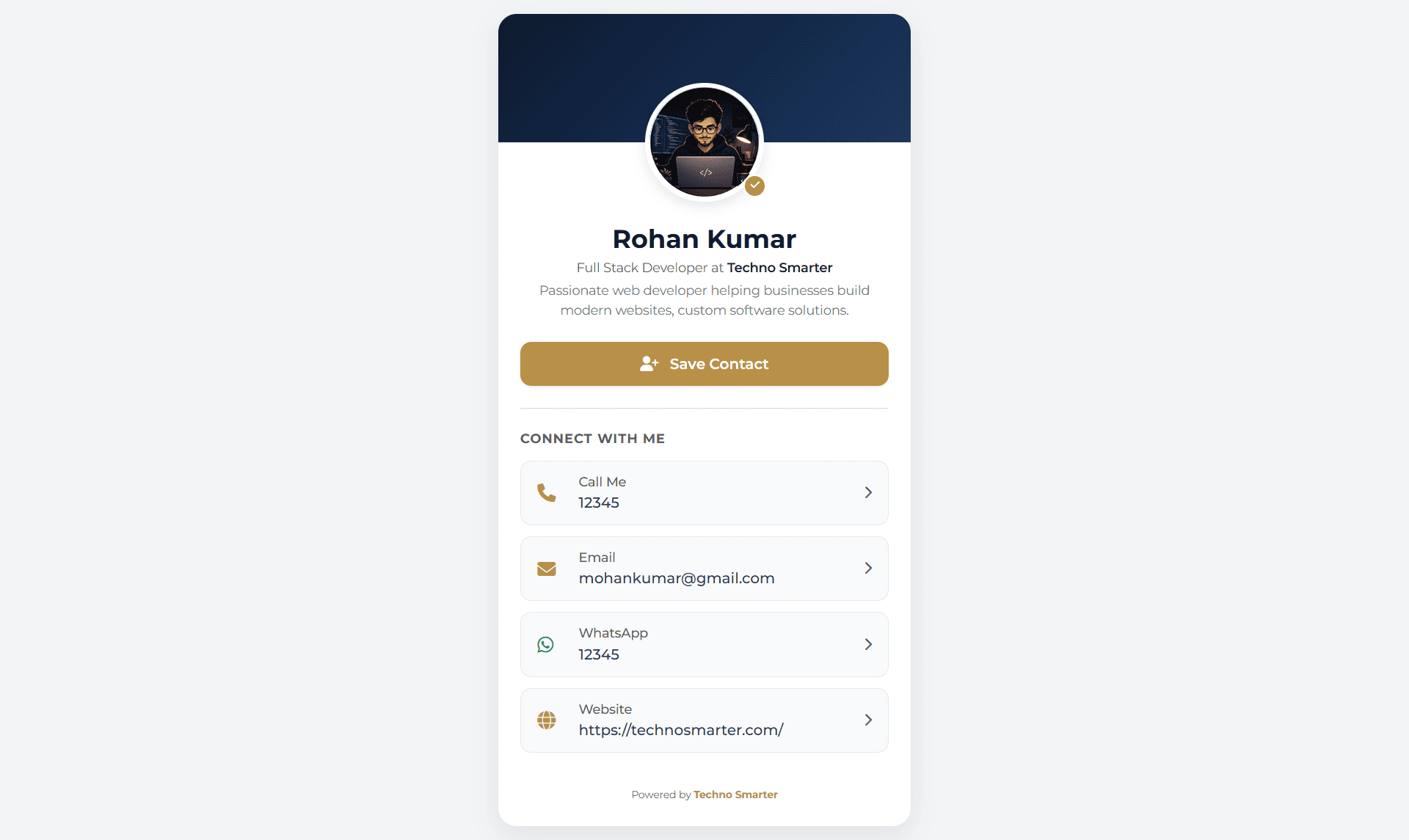
In this tutorial, we will learn how to create a dynamic QR Code generator for a business vCard with an admin panel in PHP. A business vCard (Virtual Card) is used to show business-related details like name, designation, bio, company, phone number, WhatsApp, website, etc.Anyone can scan the QR code to check the live digital business card.
In the current digital era, the demand for digital business cards is increasing day by day. In this system, we will learn the complete database structure and coding required for users to create a card (vCard) and manage it from the admin dashboard. We will create a smart structure for both the QR code and the card. As you know, many QR code systems save data directly into the QR code itself, but there is an issue with that approach: you cannot update the data after downloading it. To solve this, we will create a system that allows you to update the card information at any time. You won’t need to update the QR code; you can use the same downloaded QR code to check the updated file. Just scan the QR code and see the live card.
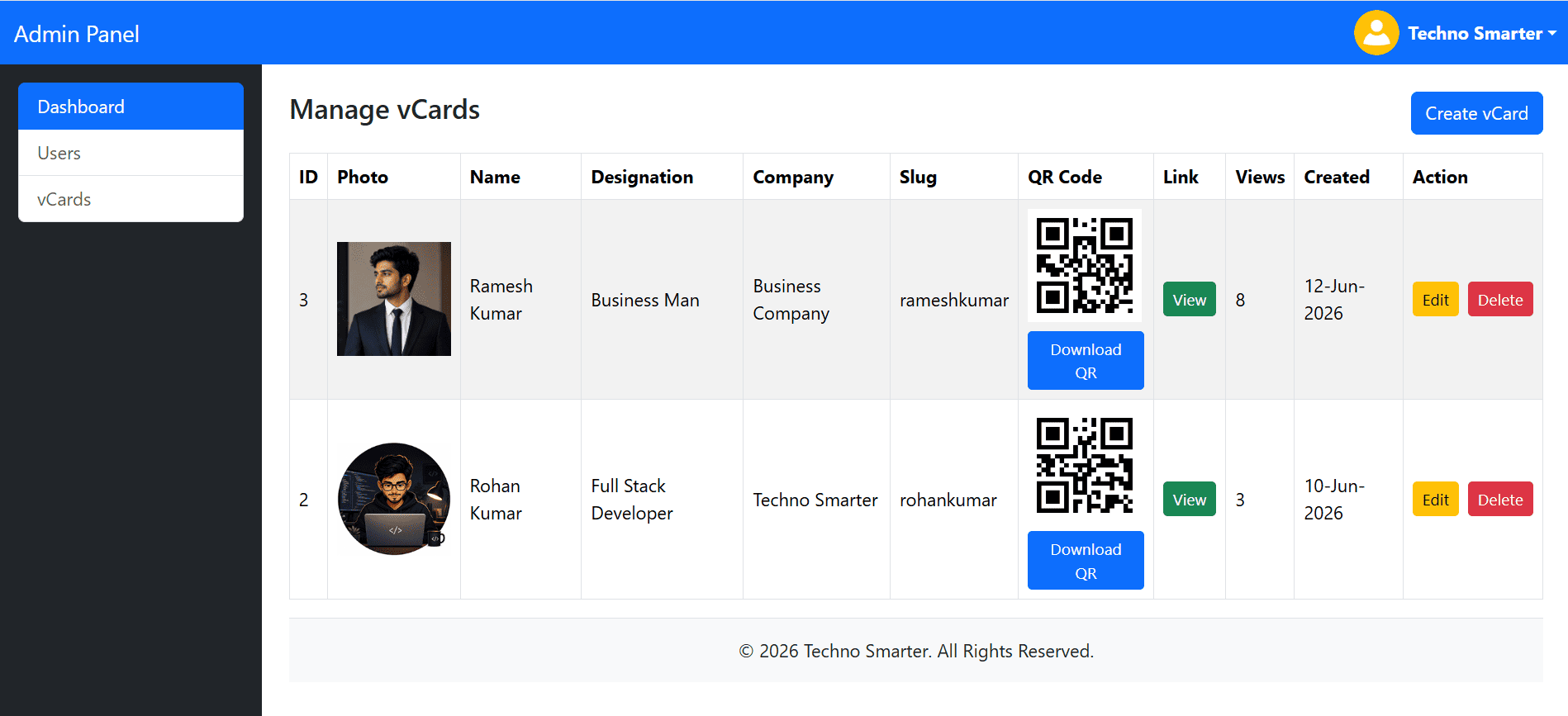
In this tutorial, we will use Bootstrap to create a responsive admin panel and business card (vCard), since most users scan and open the card link on mobile devices. The card's design will have a professional look and feel.
Project File Structure
vcard(Root folder)/
├── admin/
│   ├── footer.php
│   ├── header.php
│   ├── index.php
│   ├── login.php
│   ├── logout.php
│   ├── qrcode.php
│   ├── users.php
│   └── vcard.php
├── assets/
│   ├── css/
│   │   └── style.css
│   └── uploads/
├── .htaccess
├── config.php
├── download_vcard.php
└── vcard.php
Let’s create a dynamic QR Code generator for a card in PHP –
1. Create database tables –
First, we will create database tables for the admin users and the vCards:
users
CREATE TABLE `users` (
  `uid` int(11) NOT NULL PRIMARY KEY AUTO_INCREMENT,
  `fname` varchar(100) DEFAULT NULL,
  `username` varchar(100) DEFAULT NULL,
  `email` varchar(100) DEFAULT NULL,
  `password` varchar(255) DEFAULT NULL,
  `udate` datetime DEFAULT NULL
);
vcard
CREATE TABLE `vcard` (
  `vid` int(11) NOT NULL PRIMARY KEY AUTO_INCREMENT,
  `image` varchar(255) DEFAULT NULL,
  `fname` varchar(50) DEFAULT NULL,
  `designation` varchar(255) DEFAULT NULL,
  `company_name` varchar(255) DEFAULT NULL,
  `short_bio` varchar(355) DEFAULT NULL,
  `slug` varchar(355) DEFAULT NULL,
  `phone_number` varchar(20) DEFAULT NULL,
  `email` varchar(50) DEFAULT NULL,
  `whatsapp` varchar(20) DEFAULT NULL,
  `website` varchar(100) DEFAULT NULL,
  `views` int(11) DEFAULT 0,
  `created_at` datetime DEFAULT NULL
) ;
The users table will be used to create and save admin user data, such as name, email, username, and password. The vCard table is the most important table, as it will be used to generate the business card with business-related details like name, designation, bio, company, phone number, WhatsApp, website, etc.
Insert first admin -
INSERT INTO `users` (`uid`, `fname`, `username`, `email`, `password`, `udate`) VALUES
(1, 'Techno Smarter', 'technosmarter', 'technosmarterinfo@gmail.com', '$2y$04$jtZaFby6oxJu.eM3WbApp.CYDWq1cY8JPHL9MaaIJG2Mz0ZXJ5sdW', '2026-06-27 18:30:05');
Username: technosmarter
Password: admin123
2. PHP database Connection file –
The connection file is used to connect the PHP page to the MySQL database. In this project, we will use PHP PDO (PHP Data Objects) with prepared statements because it is highly secure and protects your application against SQL injection.
config.php
<?php  session_start();
define('DBNAME','vcard');
define('DBUSER','root');
define('DBPASS','');
define('DBHOST','localhost');
try {
 $dbc = 'mysql:host=' .DBHOST . ';dbname=' . DBNAME.';utf8';
 $dbc= new PDO($dbc,DBUSER,DBPASS,array(PDO::MYSQL_ATTR_INIT_COMMAND => "SET NAMES utf8"));
   $dbc->setAttribute(PDO::ATTR_ERRMODE, PDO::ERRMODE_WARNING);
  //echo "Your page is connected with the database successfully.";
} catch(PDOException $e) {
  //echo "Issue -> Connection failed: " . $e->getMessage();
}
?>
Define your host, database name, database user, and password. If you are using XAMPP or WAMP, use these details:
host: localhost
dbname: [your created database name]
dbuser: root
dbpass: [leave empty / no password]
3. Login process for vCard Admin panel –
As we already discussed above, we will create an admin panel for this business card project. The login form will be used to access the control panel (admin panel). From there, the admin can easily log in and manage the vCard data records.
Create an admin folder, and inside it, create a login.php file.
admin/login.php
<?php require("../config.php"); ?>
<!DOCTYPE html>
<html lang="en">
<head>
    <meta charset="utf-8">
    <meta name="viewport" content="width=device-width, initial-scale=1">
    <title>Admin Login - Techno Smarter</title>

    <link href="https://cdn.jsdelivr.net/npm/bootstrap@5.3.8/dist/css/bootstrap.min.css" rel="stylesheet">
</head>
<body style="background: #f1f1f1;">

<div class="container vh-100 d-flex justify-content-center align-items-center">
    <div class="card shadow-sm" style="max-width: 400px; width: 100%;">
        <div class="card-body p-4">

            <h3 class="text-center mb-4">Admin Panel</h3>
            <?php
            if(isset($_POST['submit']))
            {
                $login_val=$_POST['login_val'];
                $password=$_POST['password'];
              $stmt = $dbc->prepare("SELECT count(*) from users WHERE username=:username OR email=:email limit 1");
                   $stmt->execute(['username'=>$login_val,'email'=>$login_val]);
        $count_user= $stmt->fetchColumn();
            if($count_user>0){
              $stmt = $dbc->prepare("SELECT uid,password,fname from users WHERE username=:username OR email=:email limit 1");
              $stmt->execute(['username'=>$login_val,'email'=>$login_val]);
                  $row = $stmt->fetch(PDO::FETCH_ASSOC);
               if(password_verify($password,$row['password'])){
           $_SESSION["logged_in"]="1";
             $_SESSION["uid"]= $row['uid'];
             $_SESSION['fname']=$row['fname'];
             header("location:index.php");
          }
else
   {
 echo '<div class="alert alert-warning" role="alert">
    Please enter valid password.
</div>';
   }
            }
            else
               {
   echo '<div class="alert alert-warning" role="alert">
    Please enter a valid username or email.
</div>';
               }

            }
            ?>

            <form action="" method="POST">
                <div class="mb-3">
                    <label class="form-label">Username or Email </label>

                    <input type="text"  name="login_val" value="<?php if(isset($login_val)){ echo $login_val;};?>" class="form-control" required>
                </div>

                <div class="mb-3">
                    <label class="form-label">Password</label>
                    <input type="password" name="password" class="form-control" required>
                </div>

                <button type="submit" name="submit" class="btn btn-primary w-100">
                    Login
                </button>
                <br><br>
            </form>

        </div>
    </div>
</div>

</body>
</html>
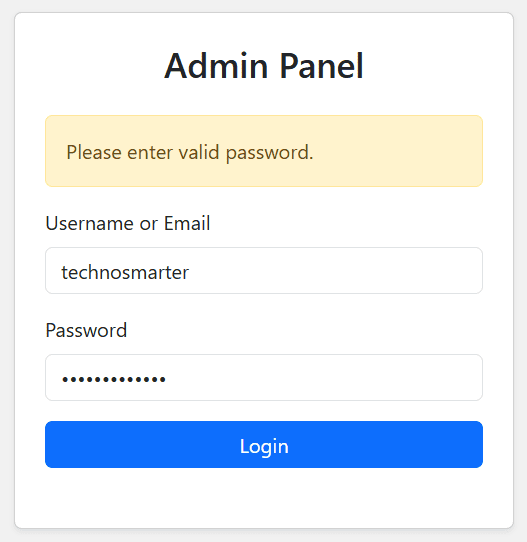
As you can see in the above code, we stored the user ID and full name (fname) in different session variables. This allows us to use them on any page of the admin panel to display the user's full name and fetch data from the database users table using the user ID.
4. Business Card Admin Panel dashboard –
An admin panel is essential for every PHP project, providing a secure place from which the admin can control the complete data record. The admin can create new admin users and generate QR codes for digital business cards (vCards). From this control panel, the admin can also easily create, update, and delete business cards. The admin can update card details without changing the QR code because the QR code remains the same; it is created only once, meaning there is no need to update the QR code when updating business card information.
Let’s create the admin panel dashboard home page and its supporting files:
index.php
<?php require("../config.php");
if(!isset($_SESSION['logged_in']))
{
    header("location:login.php");
    exit;
}
   include("header.php");
    ?>
<!-- Main Content -->
        <div class="col-md-9 col-lg-10 p-4">

            <h2>Dashboard</h2>


            <div class="row mt-4">

                <div class="col-md-4 mb-3">
                    <div class="card">
                        <div class="card-body">
                            <h5>Total Users</h5>
                            <h3>
                                <?php  $stmt=$dbc->prepare("SELECT count(*) from users");
                    $stmt->execute(); echo  $stmt->fetchColumn(); ?>

                            </h3>
                        </div>
                    </div>
                </div>


                <div class="col-md-4 mb-3">
                    <div class="card">
                        <div class="card-body">
                            <h5>Total VCards</h5>
                            <h3> <?php  $stmt=$dbc->prepare("SELECT count(*) from vcard");
                    $stmt->execute(); echo  $stmt->fetchColumn(); ?></h3>
                        </div>
                    </div>
                </div>


            </div>


        </div>

    </div>
   <?php include("footer.php"); ?>
header.php
<!DOCTYPE html>
<html lang="en">
<head>
    <meta charset="utf-8">
    <meta name="viewport" content="width=device-width, initial-scale=1">
    <title>Admin Panel - Techno Smarter</title>

    <link href="https://cdn.jsdelivr.net/npm/bootstrap@5.3.8/dist/css/bootstrap.min.css" rel="stylesheet">
    <script src="https://cdn.jsdelivr.net/npm/bootstrap@5.3.8/dist/js/bootstrap.bundle.min.js"></script>
</head>
<body>

<!-- Main Layout -->
<div class="container-fluid">
    <div class="row">
<!-- Top Navbar -->


<nav class="navbar navbar-expand-lg navbar-dark bg-primary">
    <div class="container-fluid">

        <a class="navbar-brand" href="#">
           Admin Panel
        </a>

        <div class="d-flex align-items-center ms-auto">

            <div class="dropdown">
                <a href="#"
                   class="d-flex align-items-center text-white text-decoration-none dropdown-toggle"
                   data-bs-toggle="dropdown">

                    <img src="https://technosmarter.com/qa/assets/image/avatar.png"
                         alt="Admin"
                         width="40"
                         height="40"
                         class="rounded-circle me-2">

                    <strong><?php echo $_SESSION['fname']; ?></strong>

                </a>

                <ul class="dropdown-menu dropdown-menu-end">
                    <li><a class="dropdown-item" href="#">Profile</a></li>
                    <li><a class="dropdown-item" href="#">Settings</a></li>
                    <li><hr class="dropdown-divider"></li>
                    <li><a class="dropdown-item" href="logout.php">Logout</a></li>
                </ul>
            </div>

        </div>

    </div>
</nav>

        <!-- Sidebar -->
        <div class="col-md-3 col-lg-2 bg-dark text-white min-vh-100  p-3">


            <div class="list-group">
                <a href="index.php" class="list-group-item list-group-item-action active">
                    Dashboard
                </a>

                <a href="users.php" class="list-group-item list-group-item-action">
                    Users
                </a>


                <a href="vcards.php" class="list-group-item list-group-item-action">
                vCards
                </a>

            </div>

        </div>
        <div class="col-md-9 col-lg-10 p-4">
footer.php
 <footer class="bg-light text-center py-3 border-top">
    © <?php echo date('Y'); ?> Techno Smarter. All Rights Reserved.
</footer>
</div>
</div>
</div>
</body>
</html>
We will also need the admin logout process PHP file:
logout.php
<?php session_start();
unset($_SESSION['logged_in']); unset($_SESSION['uid']);
header("location:login.php");
?>
On this admin dashboard, we display the total count of users and the total count of vCards. There is a sidebar, a footer, and a header that includes an avatar image and a logout feature.
5. Admin user management in Admin Panel –
To keep the system secure from unknown users, the admin can add, update, and delete users. In a previous tutorial, we created an admin panel with multi-role features. You can check it out here:
Create a Certificate Generator with QR Code Verification & Admin Panel in PHP
Let’s create user management:
admin/users.php
<?php require '../config.php';

if(!isset($_SESSION['logged_in']))
{
    header("location:login.php");
    exit;
}

include("header.php");
$detect = $_GET['detect'] ?? '';


switch($detect)
{
//add user
case 'add':

if(isset($_POST['submit']))
{
    $stmt = $dbc->prepare("SELECT count(*) FROM users WHERE username=:username OR email=:email LIMIT 1 ");
    $stmt->execute([
        'username'=>trim($_POST['username']),
        'email'=>trim($_POST['email'])
    ]);

    $count_user = $stmt->fetchColumn();

    if($count_user==0)
    {
        $stmt = $dbc->prepare("INSERT INTO users(fname,username,email,password,udate)VALUES(:fname,:username,:email,:password,:udate)");
         $stmt->execute([
            'fname'=>trim($_POST['fname']),
            'username'=>trim($_POST['username']),
            'email'=>trim($_POST['email']),
            'password'=>password_hash($_POST['password'],PASSWORD_DEFAULT),
            'udate'=>date('Y-m-d H:i:s')
        ]);

        echo '<div class="alert alert-success">User added successfully.</div>';
    }
    else
    {
        echo '<div class="alert alert-danger">Username or email already exists.</div>';
    }
}
?>

<div class="card">
    <div class="card-header">
        Add User
    </div>

    <div class="card-body">

        <form method="post">

            <div class="mb-3">
                <label class="form-label">Full Name</label>
                <input type="text" name="fname" class="form-control" required>
            </div>

            <div class="mb-3">
                <label class="form-label">Username</label>
                <input type="text" name="username" class="form-control" required>
            </div>

            <div class="mb-3">
                <label class="form-label">Email</label>
                <input type="email" name="email" class="form-control" required>
            </div>


            <div class="mb-3">
                <label class="form-label">Password</label>
                <input type="password" name="password" class="form-control" required>
            </div>

            <button type="submit" name="submit" class="btn btn-primary">
                Add User
            </button>

        </form>

    </div>
</div>

<?php
break;
case 'edit':
//edit user
$uid = intval($_GET['uid']);
$stmt = $dbc->prepare("SELECT * FROM users WHERE uid=:uid LIMIT 1");
$stmt->execute(['uid'=>$uid]);
$user = $stmt->fetch(PDO::FETCH_ASSOC);
if(!$user)
{
    echo '<div class="alert alert-danger">User not found.</div>';
    break;
}
if(isset($_POST['update']))
{
 $stmt = $dbc->prepare("UPDATE users SET fname=:fname,username=:username,email=:email WHERE uid=:uid LIMIT 1");
   $stmt->execute([
        'fname'=>trim($_POST['fname']),
        'username'=>trim($_POST['username']),
        'email'=>trim($_POST['email']),
        'uid'=>$uid
    ]);
    echo '<div class="alert alert-success">User updated successfully.</div>';
    $stmt = $dbc->prepare("SELECT * FROM users WHERE uid=:uid LIMIT 1");
    $stmt->execute(['uid'=>$uid]);
    $user = $stmt->fetch(PDO::FETCH_ASSOC);
}
?>

<div class="card">
    <div class="card-header">
        Edit User
    </div>

    <div class="card-body">

        <form method="post">

            <div class="mb-3">
                <label class="form-label">Full Name</label>
                <input type="text" name="fname" value="<?php echo htmlspecialchars($user['fname']); ?>" class="form-control">
            </div>

            <div class="mb-3">
                <label class="form-label">Username</label>
                <input type="text" name="username" value="<?php echo htmlspecialchars($user['username']); ?>" class="form-control">
            </div>

            <div class="mb-3">
                <label class="form-label">Email</label>
                <input type="email" name="email" value="<?php echo htmlspecialchars($user['email']); ?>" class="form-control">
            </div>
            <button type="submit" name="update" class="btn btn-success">
                Update User
            </button>

        </form>

    </div>
</div>

<?php
break;
//delete user
case 'del':

$uid = intval($_GET['uid']);

$stmt = $dbc->prepare("
DELETE FROM users
WHERE uid=:uid
LIMIT 1
");

$stmt->execute([
    'uid'=>$uid
]);

header("location:users.php");
exit;
break;
default:
//Users List

$stmt = $dbc->prepare("SELECT * FROM users ORDER BY uid DESC");
$stmt->execute();
$users = $stmt->fetchAll(PDO::FETCH_ASSOC);
?>
<div class="d-flex justify-content-between mb-3">
<h4>Manage Users</h4>

    <a href="?detect=add" class="btn btn-primary">
        Add User
    </a>

</div>

<div class="table-responsive">

    <table class="table table-bordered table-striped">

        <thead>
        <tr>
            <th>ID</th>
            <th>Name</th>
            <th>Username</th>
            <th>Email</th>
            <th>Action</th>
        </tr>
        </thead>

        <tbody>

        <?php foreach($users as $row){ ?>

        <tr>

            <td><?php echo $row['uid']; ?></td>
            <td><?php echo htmlspecialchars($row['fname']); ?></td>
            <td><?php echo htmlspecialchars($row['username']); ?></td>
            <td><?php echo htmlspecialchars($row['email']); ?></td>


            <td>

                <a href="?detect=edit&uid=<?php echo $row['uid']; ?>"
                   class="btn btn-sm btn-warning">
                    Edit
                </a>

                <a href="?detect=del&uid=<?php echo $row['uid']; ?>"
                   onclick="return confirm('Delete User?')"
                   class="btn btn-sm btn-danger">
                    Delete
                </a>

            </td>

        </tr>

        <?php } ?>

        </tbody>

    </table>

</div>

<?php
break;
}
include("footer.php");
?>
6. Generate QR code & business vCard Management –
This is the main part of the admin control panel. The admin can manage and supervise all digital cards and QR codes using this feature.
Here is the QR code and business card management workflow:
QR Code Control: The admin can generate and download a new QR code for a business card or edit and delete that business card's details if needed.
Tracking: The admin can check the live view count on the card to see how many times it has been opened and scanned.
admin/vcards.php
<?php require '../config.php';

if(!isset($_SESSION['logged_in']))
{
    header("location:login.php");
    exit;
}

include("header.php");

$detect = $_GET['detect'] ?? '';

switch($detect)
{

case 'add':

if(isset($_POST['submit']))
{
    $stmt = $dbc->prepare("SELECT COUNT(*) FROM vcard WHERE slug=:slug LIMIT 1
    ");

    $stmt->execute([
        'slug'=>trim($_POST['slug'])
    ]);

    if($stmt->fetchColumn()>0)
    {
        echo '<div class="alert alert-danger">Slug already exists.</div>';
    }
    else
    {
        $image='';

        if(!empty($_FILES['image']['name']))
        {
            $ext = strtolower(pathinfo($_FILES['image']['name'], PATHINFO_EXTENSION));

            $image = time().rand(111111,999999).'.'.$ext;

            move_uploaded_file($_FILES['image']['tmp_name'],'../assets/uploads/'.$image);
        }

        $stmt = $dbc->prepare("INSERT INTO vcard(image,fname,designation,company_name,short_bio,slug,phone_number,email,whatsapp,website,created_at)VALUES(:image,:fname,:designation,:company_name,:short_bio,:slug,:phone_number,:email,:whatsapp,:website,:created_at)");
            $stmt->execute([
            'image'=>$image,
            'fname'=>trim($_POST['fname']),
            'designation'=>trim($_POST['designation']),
            'company_name'=>trim($_POST['company_name']),
            'short_bio'=>trim($_POST['short_bio']),
            'slug'=>trim($_POST['slug']),
            'phone_number'=>trim($_POST['phone_number']),
            'email'=>trim($_POST['email']),
            'whatsapp'=>trim($_POST['whatsapp']),
            'website'=>trim($_POST['website']),
            'created_at'=>date('Y-m-d H:i:s')
        ]);

        echo '<div class="alert alert-success">vCard created successfully.</div>';
    }
}
?>

<div class="card">
<div class="card-header">Create vCard</div>

<div class="card-body">

<form method="post" enctype="multipart/form-data">

<div class="mb-3">
<label class="form-label">Profile Image</label>
<input type="file" name="image" class="form-control">
</div>

<div class="mb-3">
<label class="form-label">Full Name</label>
<input type="text" name="fname" class="form-control" required>
</div>

<div class="mb-3">
<label class="form-label">Designation</label>
<input type="text" name="designation" class="form-control">
</div>

<div class="mb-3">
<label class="form-label">Company Name</label>
<input type="text" name="company_name" class="form-control">
</div>

<div class="mb-3">
<label class="form-label">Short Bio</label>
<textarea name="short_bio" class="form-control"></textarea>
</div>

<div class="mb-3">
<label class="form-label">Slug</label>
<input type="text" name="slug" class="form-control" required>
</div>

<div class="mb-3">
<label class="form-label">Phone</label>
<input type="text" name="phone_number" class="form-control">
</div>

<div class="mb-3">
<label class="form-label">Email</label>
<input type="email" name="email" class="form-control">
</div>

<div class="mb-3">
<label class="form-label">WhatsApp</label>
<input type="text" name="whatsapp" class="form-control">
</div>

<div class="mb-3">
<label class="form-label">Website</label>
<input type="text" name="website" class="form-control">
</div>

<button type="submit" name="submit" class="btn btn-primary">
Create vCard
</button>

</form>
</div>
</div>

<?php
break;
case 'edit':

$vid = intval($_GET['vid']);

$stmt = $dbc->prepare("SELECT * FROM vcard WHERE vid=:vid LIMIT 1");
$stmt->execute([
    'vid' => $vid
]);

$vcard = $stmt->fetch(PDO::FETCH_ASSOC);

if(!$vcard)
{
    echo '<div class="alert alert-danger">vCard not found.</div>';
    break;
}

if(isset($_POST['update']))
{
    $slug = trim($_POST['slug']);

    // Check duplicate slug
    $stmt = $dbc->prepare("
    SELECT COUNT(*)
    FROM vcard
    WHERE slug=:slug
    AND vid!=:vid
    ");

    $stmt->execute([
        'slug' => $slug,
        'vid'  => $vid
    ]);

    if($stmt->fetchColumn() > 0)
    {
        echo '<div class="alert alert-danger">Slug already exists.</div>';
    }
    else
    {
        $image_name = $vcard['image'];

        if(!empty($_FILES['image']['name']))
        {
            $ext = strtolower(pathinfo($_FILES['image']['name'], PATHINFO_EXTENSION));

            $image_name = time().rand(100000,999999).".".$ext;

            move_uploaded_file(
                $_FILES['image']['tmp_name'],
                "../assets/uploads/".$image_name
            );

            if(!empty($vcard['image']) &&
               file_exists("../assets/uploads/".$vcard['image']))
            {
                unlink("../assets/uploads/".$vcard['image']);
            }
        }

        $stmt = $dbc->prepare("UPDATE vcard SET image=:image, fname=:fname,designation=:designation,company_name=:company_name,short_bio=:short_bio,slug=:slug,phone_number=:phone_number,email=:email,whatsapp=:whatsapp,website=:website WHERE vid=:vid LIMIT 1");
        $stmt->execute([
            'image'         => $image_name,
            'fname'         => trim($_POST['fname']),
            'designation'   => trim($_POST['designation']),
            'company_name'  => trim($_POST['company_name']),
            'short_bio'     => trim($_POST['short_bio']),
            'slug'          => $slug,
            'phone_number'  => trim($_POST['phone_number']),
            'email'         => trim($_POST['email']),
            'whatsapp'      => trim($_POST['whatsapp']),
            'website'       => trim($_POST['website']),
            'vid'           => $vid
        ]);

        echo '<div class="alert alert-success">
        vCard updated successfully.
        </div>';

        $stmt = $dbc->prepare("SELECT * FROM vcard WHERE vid=:vid LIMIT 1 ");

        $stmt->execute([
            'vid' => $vid
        ]);

        $vcard = $stmt->fetch(PDO::FETCH_ASSOC);
    }
}
?>

<div class="card">
    <div class="card-header">
        Edit vCard
    </div>

    <div class="card-body">

        <form method="post" enctype="multipart/form-data">

            <div class="mb-3">

                <?php if(!empty($vcard['image'])){ ?>
                <img src="../assets/uploads/<?php echo $vcard['image']; ?>"width="100"class="img-thumbnail mb-2">

                <?php } ?>

                <label class="form-label">
                    Profile Image
                </label>

                <input type="file" name="image" class="form-control">

            </div>

            <div class="mb-3">
                <label class="form-label">Full Name</label>

                <input type="text" name="fname" value="<?php echo htmlspecialchars($vcard['fname']); ?>" class="form-control" required>
            </div>

            <div class="mb-3">
                <label class="form-label">Designation</label>

                <input type="text" name="designation" value="<?php echo htmlspecialchars($vcard['designation']); ?>" class="form-control">
            </div>

            <div class="mb-3">
                <label class="form-label">Company Name</label>

                <input type="text" name="company_name" value="<?php echo htmlspecialchars($vcard['company_name']); ?>" class="form-control">
            </div>

            <div class="mb-3">
                <label class="form-label">Short Bio</label>

                <textarea name="short_bio" class="form-control" rows="4"><?php echo htmlspecialchars($vcard['short_bio']); ?></textarea>
            </div>

            <div class="mb-3">
                <label class="form-label">Slug</label>

                <input type="text" name="slug" value="<?php echo htmlspecialchars($vcard['slug']); ?>" class="form-control" required>
            </div>

            <div class="mb-3">
                <label class="form-label">Phone Number</label>

                <input type="text" name="phone_number" value="<?php echo htmlspecialchars($vcard['phone_number']); ?>" class="form-control">
            </div>

            <div class="mb-3">
                <label class="form-label">Email</label>

                <input type="email" name="email" value="<?php echo htmlspecialchars($vcard['email']); ?>" class="form-control">
            </div>

            <div class="mb-3">
                <label class="form-label">WhatsApp</label>

                <input type="text" name="whatsapp" value="<?php echo htmlspecialchars($vcard['whatsapp']); ?>" class="form-control">
            </div>

            <div class="mb-3">
                <label class="form-label">Website</label>

                <input type="text" name="website" value="<?php echo htmlspecialchars($vcard['website']); ?>" class="form-control">
            </div>

            <button type="submit" name="update" class="btn btn-success"> Update vCard </button>

        </form>

    </div>
</div>

<?php
break;
case 'del':

$vid = intval($_GET['vid']);

$stmt = $dbc->prepare("SELECT image FROM vcard WHERE vid=:vid LIMIT 1");

$stmt->execute([
    'vid'=>$vid
]);

$row = $stmt->fetch(PDO::FETCH_ASSOC);

if($row)
{
    if(!empty($row['image']) &&
       file_exists("../assets/uploads/".$row['image']))
    {
        unlink("../assets/uploads/".$row['image']);
    }

    $stmt = $dbc->prepare("
    DELETE FROM vcard
    WHERE vid=:vid
    LIMIT 1
    ");

    $stmt->execute([
        'vid'=>$vid
    ]);
}

header("location:vcards.php");
exit;

break;


break;
default:

$stmt = $dbc->prepare("
SELECT *
FROM vcard
ORDER BY vid DESC
");

$stmt->execute();

$vcards = $stmt->fetchAll(PDO::FETCH_ASSOC);
?>

<div class="d-flex justify-content-between mb-3">

    <h4>Manage vCards</h4>

    <a href="?detect=add" class="btn btn-primary">
        Create vCard
    </a>

</div>

<div class="table-responsive">

<table class="table table-bordered table-striped align-middle">

    <thead>
        <tr>
            <th>ID</th>
            <th>Photo</th>
            <th>Name</th>
            <th>Designation</th>
            <th>Company</th>
            <th>Slug</th>
            <th>QR Code</th>
            <th>Link</th>
            <th>Views</th>
            <th>Created</th>
            <th>Action</th>
        </tr>
    </thead>

    <tbody>

    <?php foreach($vcards as $row){ ?>

    <tr>

        <td><?php echo $row['vid']; ?></td>

        <td>

            <?php if(!empty($row['image'])){ ?>

            <img src="../assets/uploads/<?php echo $row['image']; ?>"
                 width="100"
                 height="100"
                 >

            <?php } ?>

        </td>

        <td><?php echo htmlspecialchars($row['fname']); ?></td>

        <td><?php echo htmlspecialchars($row['designation']); ?></td>

        <td><?php echo htmlspecialchars($row['company_name']); ?></td>


        <td><?php echo htmlspecialchars($row['slug']); ?></td>


 <td>
    <img src="qrcode.php?text=<?php echo urlencode($row['slug']); ?>" height="100" class="d-block mb-2">

    <a href="qrcode.php?text=http://localhost/vcard/vcard/<?php echo urlencode($row['slug']); ?>"
       download="qrcode_<?php echo $row['fname']; ?>.png"
       class="btn btn-sm btn-primary">
       Download QR
    </a>
</td>
<td><a href="http://localhost/vcard/vcard/<?php echo htmlspecialchars($row['slug']); ?>"  class="btn btn-sm btn-success"> View</a></td>
        <td><?php echo $row['views']; ?></td>

        <td>
            <?php echo date('d-M-Y',strtotime($row['created_at'])); ?>
        </td>
        <td>

            <div class="d-flex gap-2">

                <a href="?detect=edit&vid=<?php echo $row['vid']; ?>"
                   class="btn btn-sm btn-warning">
                    Edit
                </a>

                <a href="?detect=del&vid=<?php echo $row['vid']; ?>"
                   onclick="return confirm('Delete vCard?')"
                   class="btn btn-sm btn-danger">
                    Delete
                </a>

            </div>

        </td>

    </tr>

    <?php } ?>

    </tbody>

</table>

</div>

<?php
break;
}
include("footer.php");
?>
Create a folder named uploads inside the assets folder in your project's root directory.
assets/uploads
7. phpqrcode library installation –
To generate a QR code, we can use multiple methods. For example, you can use the QR Server API, which we used in our previous tutorial, but in this tutorial, we will use a standard method: the phpqrcode library.
Go to the
PHPQRCode GitHub repository
And download the ZIP file. Extract the ZIP file inside your admin folder. Make sure the folder name is exactly phpqrcode. If the extracted folder has a different name, like phpqrcode-master, rename it to phpqrcode and move it inside the admin folder.
Now, create a QR code support file. In this PHP file, we will include the phpqrcode library and use the png() function to generate a QR code PNG file. You can easily download this business card QR code and use it anywhere.
admin/qrcode.php
<?php include 'phpqrcode/qrlib.php';
$text = $_GET['text'] ?? '';
$size = isset($_GET['size']) ? (int) $_GET['size'] : 200;
if ($text != '') {
    QRcode::png($text, false, QR_ECLEVEL_L, $size, 2);
}
?>
The $text variable will be used to embed the business card link into the QR code.
Now, run the vcards.php file from the admin panel and generate a new QR code for your business card.
8. Digital business card public page –
Our digital business card public page is a modern and highly responsive profile solution that makes networking effortless. When a user scans the QR code, they are redirected to a mobile-friendly landing page for the card. On this page, your professional contact details, name, social media links, and portfolio are displayed in an organized manner. Any visitor can easily save your contact details directly to their mobile phone by downloading a VCF file using the "Save Contact" button.
Create a vcard.php file in the root folder (not in the admin folder):
vcard.php
<?php require("config.php");
$slug='';
 if(isset($_GET['slug']))
 {
    $slug=$_GET['slug'];
 }
   $stmt = $dbc->prepare("SELECT * FROM vcard WHERE slug=:slug LIMIT 1 ");

        $stmt->execute([
            'slug' => $slug
        ]);

        $vcard = $stmt->fetch(PDO::FETCH_ASSOC);
if(!$vcard)
{
    echo ' No record found..';
}
else
{
    $stmt = $dbc->prepare("UPDATE vcard SET views = views + 1 WHERE slug = :slug LIMIT 1
");

$stmt->execute([
    'slug' => $slug
]);


?>
<!DOCTYPE html>
<html lang="en">
<head>
    <meta charset="UTF-8">
    <meta name="viewport" content="width=device-width, initial-scale=1.0">
    <title><?php echo htmlspecialchars($vcard['fname']);?> - Digital Business Card</title>
    <link href="https://cdn.jsdelivr.net/npm/bootstrap@5.3.0/dist/css/bootstrap.min.css" rel="stylesheet">
    <link href="https://cdnjs.cloudflare.com/ajax/libs/font-awesome/6.4.0/css/all.min.css" rel="stylesheet">
    <link href="https://fonts.googleapis.com/css2?family=Montserrat:wght@400;500;600;700&display=swap" rel="stylesheet">
    <link rel="stylesheet" type="text/css" href="../assets/css/style.css">
</head>
<body>

<div class="vcard-wrapper">
    <div class="vcard-cover"></div>

    <div class="vcard-avatar-box">
        <img class="vcard-avatar" src="../assets/uploads/<?php echo htmlspecialchars($vcard['image']);?>" alt="Profile Picture">
        <div class="verified-badge" title="Verified Account">
            <i class="fa fa-check"></i>
        </div>
    </div>

    <div class="p-4 text-center">
        <h3 class="fw-bold mb-1" style="color: #0c1a30;">
            <?php echo htmlspecialchars($vcard['fname']);?>
        </h3>

        <p class="text-muted small mb-1">
            <?php echo htmlspecialchars($vcard['designation']);?>
            at
            <span class="fw-semibold text-dark">
                <?php echo htmlspecialchars($vcard['company_name']);?>
            </span>
        </p>

        <p class="text-secondary small px-3 mb-4">
            <?php echo htmlspecialchars($vcard['short_bio']);?>
        </p>

        <div class="d-grid mb-4">
            <a href="../download_vcard.php?user=<?php echo urlencode($vcard['slug']);?>" class="btn btn-vcard-save shadow-sm">
                <i class="fa fa-user-plus me-2"></i> Save Contact
            </a>
        </div>

        <hr class="text-muted opacity-25 mb-4">

        <div class="text-start">
            <h6 class="fw-bold text-muted text-uppercase mb-3 small" style="letter-spacing: 1px;">
                Connect with me
            </h6>

            <a href="tel:<?php echo $vcard['phone_number'];?>" class="social-link-item">
                <i class="fa-solid fa-phone social-icon"></i>
                <div class="flex-grow-1">
                    <span class="d-block small text-muted">Call Me</span>
                    <span><?php echo htmlspecialchars($vcard['phone_number']);?></span>
                </div>
                <i class="fa fa-chevron-right text-muted small"></i>
            </a>

            <a href="mailto:<?php echo $vcard['email'];?>" class="social-link-item">
                <i class="fa-solid fa-envelope social-icon"></i>
                <div class="flex-grow-1">
                    <span class="d-block small text-muted">Email</span>
                    <span><?php echo htmlspecialchars($vcard['email']);?></span>
                </div>
                <i class="fa fa-chevron-right text-muted small"></i>
            </a>

            <a href="https://wa.me/<?php echo $vcard['whatsapp'];?>?text=Hi%20there!" target="_blank" class="social-link-item">
                <i class="fa-brands fa-whatsapp social-icon text-success"></i>
                <div class="flex-grow-1">
                    <span class="d-block small text-muted">WhatsApp</span>
                    <span><?php echo htmlspecialchars($vcard['whatsapp']);?></span>
                </div>
                <i class="fa fa-chevron-right text-muted small"></i>
            </a>

            <a href="<?php echo htmlspecialchars($vcard['website']);?>" target="_blank" class="social-link-item">
                <i class="fa-solid fa-globe social-icon"></i>
                <div class="flex-grow-1">
                    <span class="d-block small text-muted">Website</span>
                    <span><?php echo htmlspecialchars($vcard['website']);?></span>
                </div>
                <i class="fa fa-chevron-right text-muted small"></i>
            </a>
        </div>

        <div class="mt-4 pt-2">
            <span class="text-muted small" style="font-size:11px;">
                Powered by
                <a href="https://technosmarter.com" class="text-decoration-none fw-bold" style="color:#b89047;">
                    Techno Smarter
                </a>
            </span>
        </div>
    </div>
</div>
</body>
</html>
<?php
}
?>
To make SEO-friendly URLs, we can use an .htaccess file. Create a .htaccess file in the same root folder and use the code below:
.htaccess
RewriteEngine On
RewriteRule ^vcard/([^/]+)/?$ vcard.php?slug=$1 [L,QSA]
Let's design a digital business card using a CSS stylesheet -
assets/css/style.css
body{
    margin:0;
    min-height:100vh;
    display:flex;
    place-content:center;
    place-items:center;
    background:#f3f4f6;
    font-family:Montserrat,sans-serif;
}

.vcard-wrapper{
    max-width:450px;
    margin:15px;
    background:#fff;
    border-radius:20px;
    overflow:hidden;
    box-shadow:0 10px 30px rgba(0,0,0,.08);
}

.vcard-cover{
    height:140px;
    background:linear-gradient(135deg,#0c1a30,#1a365d);
}

.vcard-avatar-box{
    margin-top:-65px;
    text-align:center;
    position:relative;
}

.vcard-avatar{
    width:130px;
    aspect-ratio:1;
    border-radius:50%;
    object-fit:cover;
    border:5px solid #fff;
    box-shadow:0 5px 15px rgba(0,0,0,.1);
}

.verified-badge{
    position:absolute;
    right:35%;
    bottom:5px;
    width:25px;
    aspect-ratio:1;
    display:grid;
    place-items:center;
    border-radius:50%;
    background:#b89047;
    color:#fff;
    border:2px solid #fff;
    font-size:11px;
}

.btn-vcard-save{
    padding:12px 25px;
    border:0;
    border-radius:12px;
    font-weight:600;
    color:#fff;
    background:#b89047;
}

.btn-vcard-save:hover{background:#0c1a30;color:#fff}

.social-link-item{
    display:flex;
    align-items:center;
    gap:10px;
    padding:12px 18px;
    margin-bottom:12px;
    border:1px solid #e2e8f0;
    border-radius:12px;
    background:#f8fafc;
    color:#334155;
    text-decoration:none;
    font-weight:500;
}

.social-link-item:hover{
    background:#f1f5f9;
    color:#0c1a30;
}

.social-icon{
    width:35px;
    font-size:20px;
    color:#b89047;
}
9. Download business card contact details in VCF format –
Here is the corrected version of your final section, fixing the typos, grammar, and sentence transitions while keeping your original tone:
When a user clicks on the "Save Contact" button, they will need a VCF downloader file. This PHP file handles downloading the contact as a VCF file and saving it directly to your mobile or computer contacts.
download_vcard.php
<?php require 'config.php';
$slug = $_GET['user'] ?? '';
$stmt = $dbc->prepare("SELECT * FROM vcard WHERE slug=:slug LIMIT 1");
$stmt->execute([
    'slug' => $slug
]);

$vcard = $stmt->fetch(PDO::FETCH_ASSOC);

if(!$vcard)
{
    exit('vCard not found');
}

$filename = preg_replace('/[^a-zA-Z0-9]/', '_', $vcard['fname']);

header('Content-Type: text/vcard');
header('Content-Disposition: attachment; filename="'.$filename.'.vcf"');
echo "BEGIN:VCARD\r\n";
echo "VERSION:3.0\r\n";
echo "FN:".$vcard['fname']."\r\n";
echo "ORG:".$vcard['company_name']."\r\n";
echo "TITLE:".$vcard['designation']."\r\n";
echo "TEL;TYPE=CELL:".$vcard['phone_number']."\r\n";
echo "EMAIL:".$vcard['email']."\r\n";
echo "URL:".$vcard['website']."\r\n";
echo "NOTE:".$vcard['short_bio']."\r\n";
echo "END:VCARD\r\n";
exit;
?>
Any public visitor can save your contact details in VCF format simply by clicking the "Add Contact" button on your digital business card.
And that’s it! Now you can easily build your own dynamic QR code generator for digital business cards using PHP and MySQL with a full admin dashboard.
⚡ Want the complete source code as an instant ZIP download?
Buy & Download Source Code
The complete tutorial is already provided above if you'd rather implement it yourself.
Recommended Posts:-
