
 I have a table of marks containing (RollNO subject and obtained marks). I want to delete just RollNo 1 record subject only biology and obtained marks 54, not the whole records of RollNo1 not RollNo1 Chemistry I Just Delete eg:- bio or chemistry not the whole
MySQL database table structure -

An insert HTML form and data displaying in the table with an edit and delete button.
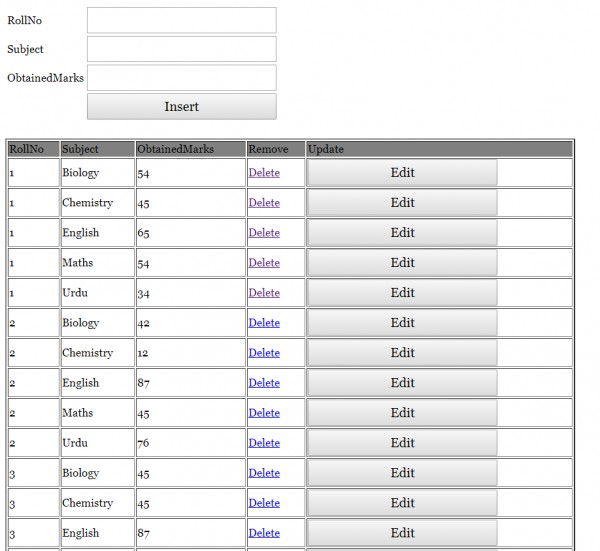
I tried this code. HTML code and PHP code .
<html>
<head>
    <title>Insert Data</title>
    <style>
    form{
          font-family: "Georgia";
          text-align: center;
          font-size: 26px;

          }
    input{
           font-family: "Georgia";
           width: 290px;
           height: 40px;
           font-size: 20px;}
    td {
    font-size: 17px;
    font-family: "Georgia";
    }
   </style>
</head>

  <body>

    <br/><br/>

    <form action="" method="post" name="form1">
        <table width="25%" border="0">
            <tr>
                <td>RollNo</td>
                <td><input type="number" min = 1  name="RollNo"></td>
            </tr>
            <tr>
                <td>Subject</td>
                <td><input type="text" pattern="[a-zA-Z][a-zA-Z ]{2,}" name="Subject"></td>
            </tr>
            <tr>
                <td>ObtainedMarks</td>
                <td><input type="number" min = 1 name="ObtainedMarks"></td>
            </tr>
            <tr>
                <td></td>
                <td><input type="submit" name="Submit" value="Insert"></td>
            </tr>
        </table>
    </form>
</body>
</html>

<html>
<head>

</head>

<body>
<?php
//including the database connection file
$cser=mysqli_connect("localhost","root","","dmc") or die("connection failed:".mysqli_error());

if(isset($_POST['Submit'])) {
    $RollNo = $_POST['RollNo'];
    $Subject = $_POST['Subject'];
    $ObtainedMarks = $_POST['ObtainedMarks'];


    // checking empty fields
    if(empty($RollNo) || empty($Subject) || empty($ObtainedMarks)) {
        if(empty($RollNo)) {
            echo "<font color='red'>RollNo field is empty.</font><br/>";
        }

        if(empty($Subject)) {
            echo "<font color='red'>Subject field is empty.</font><br/>";
        }

        if(empty($ObtainedMarks)) {
            echo "<font color='red'>ObtainedMarks field is empty.</font><br/>";
        }

        //link to the previous page
        echo "<br/><a href='javascript:self.history.back();'>Go Back</a>";
    } else {
        // if all the fields are filled (not empty)
        //insert data to database
        $result = mysqli_query($cser, "INSERT INTO marks(RollNo,Subject,ObtainedMarks) VALUES('$RollNo','$Subject','$ObtainedMarks')");

        //display success message
        echo "<font color='green'>Data added successfully.";

    }
}
?>
</body>
</html>
<?php
//including the database connection file
$cser=mysqli_connect("localhost","root","","dmc") or die("connection failed:".mysqli_error());

//fetching data in descending order (lastest entry first)

$result = mysqli_query($cser, "SELECT * FROM marks ORDER BY RollNo "); // using mysqli_query instead
?>

<html>
<head>
    <title>Homepage</title>
</head>

<body>


    <table width='70%' height="50%" border=2 >
        <tr bgcolor='grey'>
            <td>RollNo</td>
            <td>Subject </td>
            <td>ObtainedMarks </td>
            <td>Remove </td>
            <td>Update</td>

        </tr>
        <?php

        while($res = mysqli_fetch_array($result)) {
            echo "<tr>";
            echo "<td>".$res['RollNo']."</td>";
            echo "<td>".$res['Subject']."</td>";
            echo "<td>".$res['ObtainedMarks']."</td>";
            echo"<td> <a href=\"delete1.php?RollNo=$res[RollNo]\" onClick=\"return confirm('Are you sure you want to delete?')\">Delete</a></td>";
            echo "<td><a href=\"edit1.php?RollNo=$res[RollNo]\"><input type='submit' value='Edit'></a>";

         echo "</tr>";
        }
        ?>

    </table>
</body>
</html>
 osama
(90 Points)
osama
(90 Points)
 shakti
(9.7K Points)
shakti
(9.7K Points)
You can delete data using id and column. Yes, this possible for a particular table using SQL query. Use Alter query and id.
Like this -
ALTER TABLE table_name DROP column_name where id ;
Alter query will help you delete a particular subjects. You can define id or click on the button .
vishalrana1
(7.4K Points)
vishalrana1
(7.4K Points)
1. Add a new column id at the beginning of the MYSQL table and tick AI ( Auto increment) and save.
2. Change this line -
echo"<td> <a href=\"delete1.php?RollNo=$res[RollNo]\" onClick=\"return confirm('Are you sure you want to delete?')\">Delete</a></td>"
to
echo"<td> <a href=\"delete1.php?id=$res[id\" onClick=\"return confirm('Are you sure you want to delete?')\">Delete</a></td>"
You can delete data by id. One by one row. Never use the roll number. The roll number is containing the same 1,1,1, rows. It deletes 3 rows. That's why create a unique id.
Now go to delete the PHP file and change the line.
$result = mysqli_query($cser, "DELETE FROM marks WHERE RollNo=$RollNo");
to
$result = mysqli_query($cser, "DELETE FROM marks WHERE id=$id");
It will help you. Comment me if the error will occur.
priyasharma4005
(4.3K Points)
The id column is missing in your MySQL table. You should add an id column with auto increment.
PHP operations-
1. Update by id - ( Id should be AI ) auto increment.
2. Delete by id- ( Id should be AI ) auto increment.
You should focus on id importances.
Reference for Update and delete by id -
CRUD application using PHP and MYSQL database
Start learning and understand the id concept using PHP CRUD application.
