
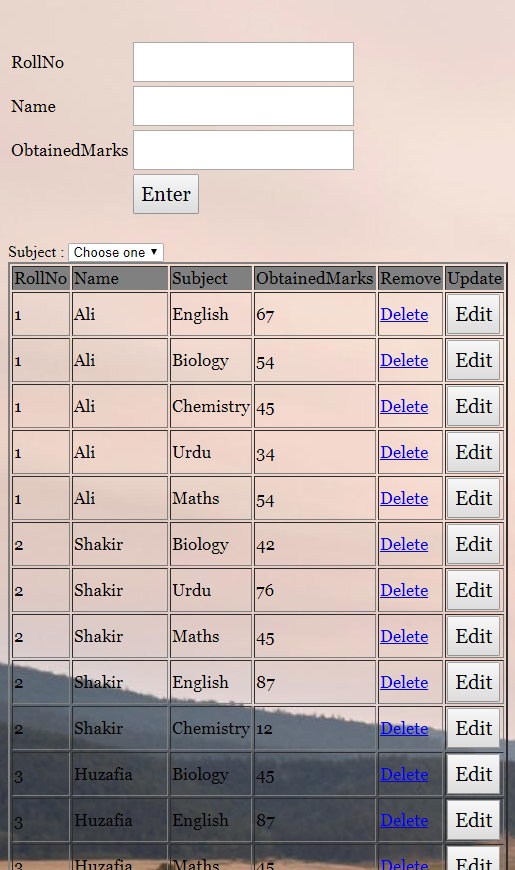
It is working but the subject and Choose, I want to place Combobox after RollNo & this is my code please check when I enter subject and rollno and obtained marks the result is not showing eg:- its shows roll no name obtained marks and not subject I send you my code please check
 osama
(90 Points)
osama
(90 Points)
 shakti
(9.7K Points)
shakti
(9.7K Points)
I answered you. You have to simply change the code like this -
Change <form></form> code -
form></form> code -
<form action="" method="post" name="form1">
        <table width="25%" border="0">
            <tr>
                <td>RollNo</td>
                <td><input type="number" min = 1  name="RollNo"></td>
            </tr>
<tr><td>
<?php
$cser=mysqli_connect("localhost","root","","test") or die("connection failed:".mysqli_error());
$result = mysqli_query($cser,"SELECT pname FROM crud2") or die(mysql_error());
if (mysqli_num_rows($result)!=0)
{
echo 'Subject Name : </td><td><select name="pname">
      <option value=" " selected="selected">Choose one</option>';
   while($drop_2 = mysqli_fetch_array( $result ))
{
  echo '<option value="'.$drop_2['pname'].'">'.$drop_2['pname'].'</option>';
}
echo '</select>';
}
?>
</td>
</tr>
            <tr>
                <td>Name</td>
                <td><input type="text" pattern="[a-zA-Z][a-zA-Z ]{2,}"  name="Name"></td>
            </tr>
            <tr>
                <td>ObtainedMarks</td>
                <td><input type="number" min = 1 name="ObtainedMarks"></td>
            </tr>
            <tr>
                <td></td>
                <td><input type="submit" name="Submit" value="Enter"></td>
            </tr>
        </table>
    </form>
Change the PHP database name, column name.
This is form code. Search form code inside the insert code and replace complete form code to this.
