🖼️ Smart Image Compressor Online
Compress and resize JPEG, PNG, and WEBP images from MBs down to KBs in milliseconds without losing visual quality. Protected by local browser privacy!
Click or Drag & Drop Your Image Here
Supports PNG, JPG, WEBP up to 25 MB. Your photo is processed locally and never sent to any server!
How to Compress Photos from MB to KB Without Losing Quality?
In today's fast-paced digital world, heavy 5 MB or 10 MB images are the number one enemy of website loading speeds, email attachments, and government portal uploads. Whether you are attempting to upload a photograph for an official exam application (like UPSC, SSC, or banking jobs) that strictly demands a file size under 50 KB, or you are a web developer looking to boost your Google PageSpeed Insights score, the Techno Smarter Image Compressor solves your problem instantly. By utilizing advanced browser-based HTML5 Canvas algorithms, our tool compresses and resizes your images directly on your device with razor-sharp visual fidelity.
Why Our Client-Side Canvas Compressor Beats Cloud Tools
Traditional online image reducers force you to upload your confidential photographs to remote cloud servers. Not only does this consume your mobile internet data and take agonizingly long over slow connections, but it also creates serious privacy risks regarding who stores your files. Our intelligent compressor utilizes your browser's native **HTML5 Canvas Engine (`canvas.toBlob`)**. When you drop an image here, your computer or smartphone GPU instantly recalculates color quantization and strips out invisible camera metadata locally. Your files never touch our servers, ensuring 100% data privacy and 0.2-second lightning-fast downloads.
📐 Smart Resolution Scaling
Modern smartphone cameras shoot photos at massive 4,000+ pixel resolutions—far larger than standard computer screens. Our built-in resolution scaler smartly resizes 4K photos down to Full HD (1920 px), cutting file weight by 80% automatically.
🔄 Next-Gen WEBP Export
Convert heavy PNG or JPEG photos into Google's modern **WEBP format** with a single click. WEBP files provide 30% superior compression over traditional formats while maintaining crystal-clear quality and transparent backgrounds.
🎯 Signature & Exam Ready
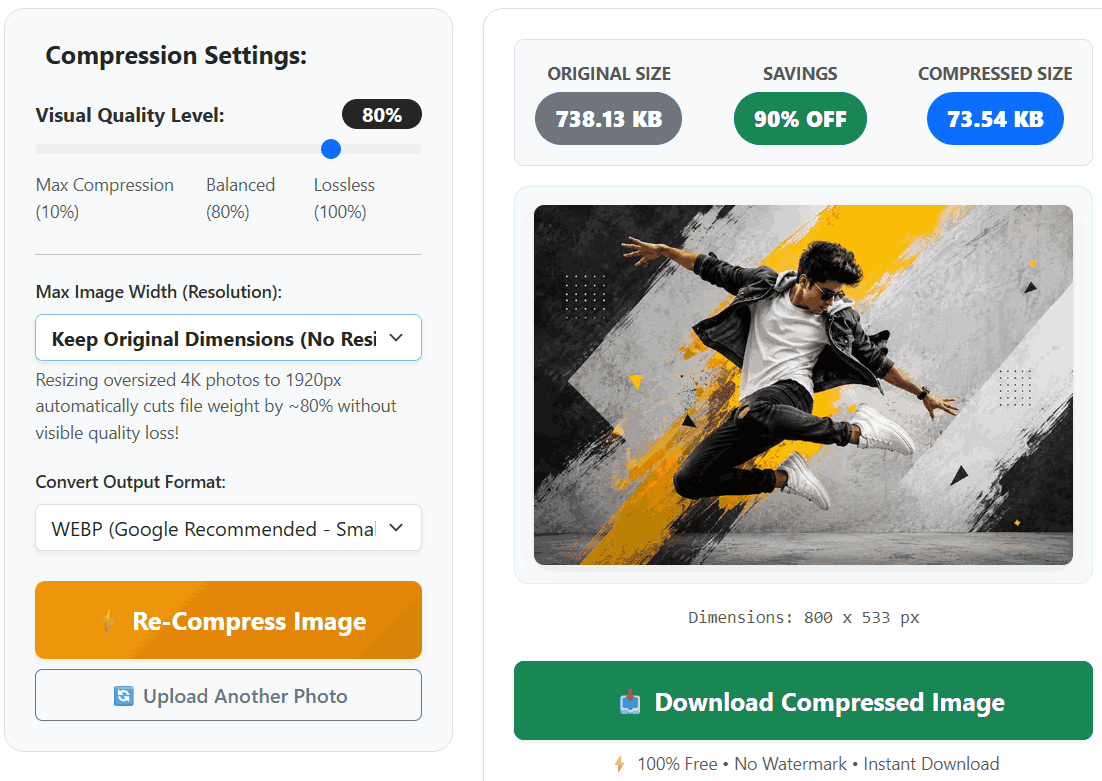
Struggling to compress your passport photo or scanned signature to exactly 20 KB or 50 KB for online forms? Use our interactive quality slider to fine-tune the output weight in real-time until it hits your exact target size.
How to Reduce Image Size Online (Step-by-Step Guide):
- Step 1: Upload Your Image: Click the selection button or drag-and-drop any JPEG, PNG, or WEBP photo into the upload box. Our tool instantly loads images up to 25 MB.
- Step 2: Adjust Visual Quality: Use the live Quality Level slider. For most web purposes, keeping the slider between **75% and 80%** provides the perfect balance—reducing MBs to KBs without any visible pixelation.
- Step 3: Select Resolution (Optional): If you are compressing an oversized camera photo, select 'Full HD (1920 px)' or 'HD Ready (1280 px)' from the width dropdown to shed massive file weight.
- Step 4: Download Instantly: Check the real-time savings badge to see how much space you saved, then click "Download Compressed Image" to save the lightweight file directly to your device.
Frequently Asked Questions (FAQs)
Q: Why does PNG format sometimes not compress as small as JPEG?
PNG is a "lossless" format designed primarily for logos and graphics with transparent backgrounds; it resists aggressive compression. If you are compressing a realistic photo saved as PNG, change the 'Convert Output Format' dropdown to **WEBP or JPEG**—you will instantly see the file size drop by up to 90%!
Q: Are there any daily usage limits or watermarks on downloaded photos?
No! Because our tool runs 100% locally on your computer's browser, there are zero server costs for us. You can compress unlimited images all day long completely free, and we will never add annoying watermarks to your pictures.
Q: How do I compress a photo to under 50 KB for government exam portals?
To hit strict small sizes like 20 KB or 50 KB: First, select **'Small (500 px)' or 'Medium (800 px)'** from the Max Image Width dropdown. Then, slowly drag the Quality Slider down toward **40% or 50%** while watching the live 'Compressed Size' badge until it drops below your required KB limit.