🔒 Free WhatsApp Web Blur Chrome Extension
Protect your sensitive chats from prying eyes at office desks, cafes, or during screen-sharing sessions. Automatically blur messages, contacts, and profile images!
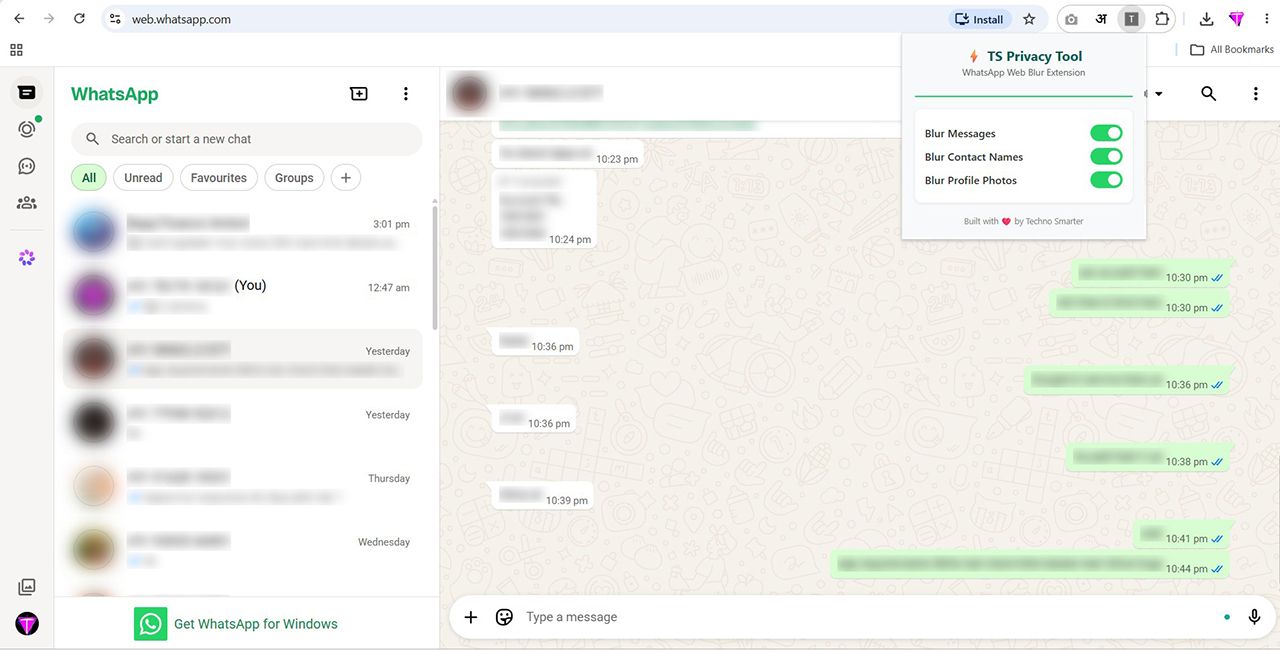
Download WhatsApp Privacy Shield
Get the ultra-lightweight ZIP file (No signup required). Enjoy instant visual protection on WhatsApp Web with zero data tracking.
📥 Download Extension ZIP (Free)Why Do You Need the WhatsApp Web Blur Tool?
Using WhatsApp Web on a desktop monitor in an open-office environment or public space makes your private conversations vulnerable to shoulder-surfers. Our extension acts as a digital curtain.
1. Instant Message Blurring
Automatically applies a secure Gaussian blur filter over your active chat messages and recent conversation previews so bystanders cannot read your private text.
2. Hide Avatars & Contact Names
Prevents embarrassing situations during office meetings or projector screen-shares by masking contact names, phone numbers, and profile display pictures.
3. Smart Hover-to-Reveal
You remain in total control! Simply move your mouse cursor over any blurred message or profile image to clearly view the contents, which re-blurs instantly when you move away.
How to Install & Use the Extension in Chrome?
Since this is a privacy-focused developer tool distributed directly without third-party app store tracking, follow these simple steps to install it in Google Chrome within 30 seconds:
Download & Extract the ZIP
Click the download button above to save the ZIP file, then right-click and select "Extract All" to unzip the folder on your computer.
Open Chrome Extensions Page
Open your Google Chrome browser, type chrome://extensions/ in the URL address bar, and hit Enter.
Enable Developer Mode
Look at the top-right corner of the Extensions page and toggle on the switch labeled "Developer mode".
Load Unpacked Folder
Click on the "Load unpacked" button that appears at the top-left, select the unzipped extension folder, and refresh your WhatsApp Web tab!
🔒 Absolute Data Privacy Guaranteed
In an era of invasive data mining, we believe your personal chats belong exclusively to you. Here is how our extension protects your security:
- No Network Requests: The extension does not connect to the internet or send a single byte of your chat data anywhere.
- Zero Keylogging or Reading: It never reads the text of your messages; it simply applies an HTML/CSS visual blur overlay on top of the web page.
- Open Source Transparency: Since you download the unpacked files directly, any developer can inspect the clean JavaScript code to verify complete safety.
Frequently Asked Questions
Common queries regarding our WhatsApp Web screen privacy tool.
Q: Will this extension work on Brave, Edge, or Opera browsers?
Yes! Because Microsoft Edge, Brave, Vivaldi, and Opera are built on the same Chromium engine as Google Chrome, you can install and use this extension seamlessly following the exact same "Load unpacked" steps.
Q: How do I temporarily disable the blurring effect?
To turn off the blur without uninstalling, simply click the extension icon in your Chrome toolbar or go back to chrome://extensions/ and toggle off the blue switch next to the extension name.
Q: Why do I need to use 'Developer Mode' to install this?
To keep this tool 100% free and avoid delays caused by third-party app store review policies, we provide the clean, raw source code directly to users. Google Chrome requires 'Developer Mode' to be enabled whenever loading standalone, offline extensions.