
My CSS code is not working properly. The input box label text is not placed in alignment. I tried many solutions for HTML form CSS but did not get the best solution. I am using the HTML table and CSS to design the HTML form. The input box text is shown below the input box type text.
This is my HTML form
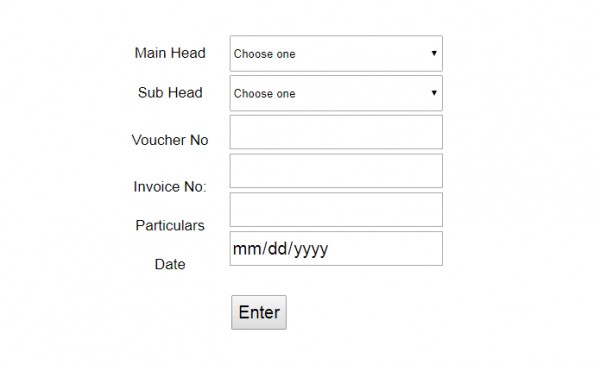
HTML code -
<form action="" method="post" name="form1">

        <table align="center" width="50%" border="0">

<tr>

<td>Voucher No</td>

<td><input type="number" min=1 name="Voucher"></td>

</tr>  <tr>

<td>Invoice No:</td>

<td><input type="number" min=1 name="Invoice"></td>

</tra>

 <tr>

<td>Particulars</td>

 <td><input type="text" pattern="[a-zA-Z][a-zA-Z ]{2,}"  name="particulars"></td>

 </tr>

<tr>

<td>Date</td>

<td><input type="date" name="Date"></td>

 </tr>

 <tr>

 <td></td>

 <td><input type="submit" name="Submit" value="Enter"></td>

 </tr> </table>
I have tried this CSS code -
<style>
    form{
          font-family: sans-serif;
          font-size: 26px;

          }
    input{
           font-family: sans-serif;
           height: 40px;
           font-size: 20px;}
    td {
    font-size: 17px;
    font-family: sans-serif;
    }
    td select {
         width: 247px;
         height: 42px;
         margin-left:-246px;

    }

    body {
           margin-bottom: 23%;
         }
    input[type="text"]
    {
        margin-left:-246px;
     }
    input[value="Enter"]
    {
        margin-left:-424px;
        margin-bottom:20px;
        margin-top: 10px;
     }
    input[name="Voucher"]
    {
        margin-left:-246px;
        margin-bottom:20px;
        margin-top: 0px;
     }
    input[name="Invoice"]
    {
        margin-left:-246px;
        margin-bottom:20px;
        margin-top: -19px;
     }
    input[name="particulars"]
    {
        margin-left:-246px;
        margin-bottom:20px;
        margin-top: -19px;
     }
    input[name="Date"]
    {
        margin-left:-246px;
        margin-bottom:20px;
        margin-top: -19px;
        width:247px;
     }


    table {
                margin-left:100px;
                text-align: center;
          }
    table[id="tables"]
    {
                margin-left:420px;
    }
    select {
                 margin-left:-248px;
    }
           </style>
How to solve my CSS problem for HTML form?
 osama
(90 Points)
osama
(90 Points)
 shakti
(9.7K Points)
shakti
(9.7K Points)
You are doing complex CSS. We do not need to do it. Change your CSS code to -
<style>


input[type=text] {

  width: 100%;

  padding: 12px 20px;

  margin: 8px 0;

  box-sizing: border-box;

}

input[type=date] {

  width: 100%;

  padding: 12px 20px;

  margin: 8px 0;

  box-sizing: border-box;

}


input{

    width: 100%;


           height: 40px;

           font-size: 20px;}


</style>
No need to add CSS for one input box. You can manage CSS by input type
Add CSS code for HTML form .
vishalrana1
(7.4K Points)
First of thinking about HTML form designing using CSS.
1. You can use CSS for HTML form design using input type.
If you want to design a type number, then use this type of CSS.
input[type=number] {

Your CSS attributes

 }
2. You can design an HTML form text using this type of CSS .
input[type=text] {

Your CSS attributes

 }
3. You can design the date box using the CSS method. change type date.
input[type=date ] {

Your CSS attributes

 }
4. If you want to design an HTML submit button form, then use type submit.
input[type=submit] {

Your CSS attributes

 }
5 . Design a email input box use type = email .
You can design HTML form using CSS type.
priyasharma4005
(4.3K Points)
This is not a way to design an HTML form. I am understanding your problem. You can solve this issue using the code below. Replace your CSS code with this.
<style>

input[type=text] {

  width: 100%;

  padding: 10px 10px;

  margin: 8px 0;

  box-sizing: border-box;

}

input[type=date] {

  width: 100%;

  padding: 10px 10px;

  margin: 8px 0;

  box-sizing: border-box;

}

input[type=number] {

  width: 100%;

  padding: 10px 10px;

  margin: 8px 0;

  box-sizing: border-box;

}

input[type=submit] {

  width: 20%;

  padding: 10px 10px;

  margin: 8px 0;

  box-sizing: border-box;

  background-color:blue;

}

</style>
It will help to design your HTML form.
