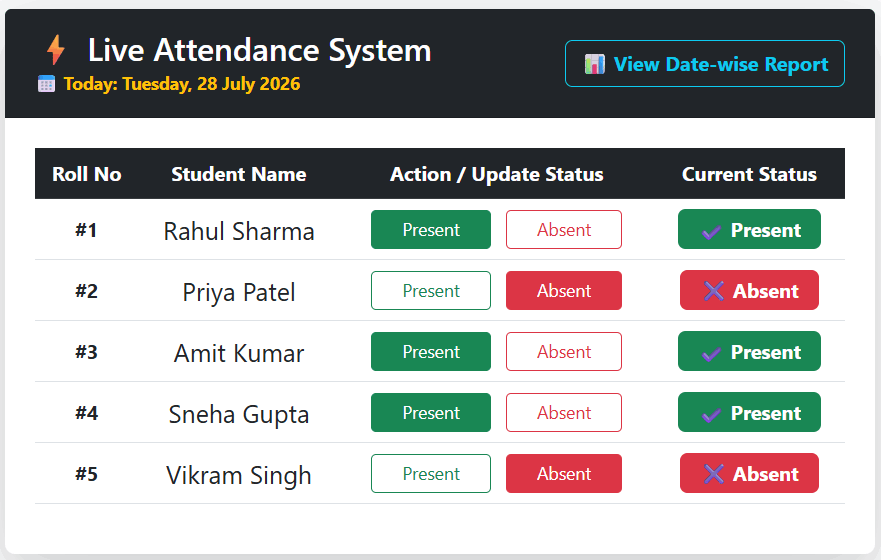
A live attendance system is very important for any company, school, or college. If your website has a live attendance system, you can easily submit the daily attendance of students or employees to the database and check which students were present or absent on a particular date. In the same way, a company can check how many employees were present and how many were absent on any date.
In this tutorial, we will create a live attendance system using PHP, MySQL, and AJAX. We will also create a filter where you can check the attendance record and see how many students are present, how many are absent, or, according to the company, how many employees are present and absent.
Before creating a live attendance system, we first need to store the student data in the database. If you are creating it for employees, then you need to store the employee data in the database. Based on that data, we will submit the daily attendance, whether the student or employee is present or absent.
Here we will use Bootstrap to create a responsive live attendance system with PHP and MySQL.
Along with this, we will also create a filter. After selecting a date, you will be able to see how many students are present, how many are absent, their names, and on which dates they were present.
Here we will learn how to create a live attendance system for students. In the same way, you can also create a live attendance system for company employees.
To create the attendance system, we first create two tables. The first table is for students, where all student registration details are stored. The second table is the attendance table where student attendance will be recorded date-wise.
1. Create database tables for student attendance records
students
CREATE TABLE `students` (
  `id` int(11) NOT NULL PRIMARY KEY AUTO_INCREMENT,
  `name` varchar(100) NOT NULL,
  `created_at` timestamp NOT NULL DEFAULT current_timestamp()
) ENGINE=InnoDB DEFAULT CHARSET=utf8mb4 COLLATE=utf8mb4_general_ci;

--
-- Dumping data for table `students.`
--

INSERT INTO `students` (`id`, `name`, `created_at`) VALUES
(1, 'Rahul Sharma', '2026-07-23 08:16:38'),
(2, 'Priya Patel', '2026-07-23 08:16:38'),
(3, 'Amit Kumar', '2026-07-23 08:16:38'),
(4, 'Sneha Gupta', '2026-07-23 08:16:38'),
(5, 'Vikram Singh', '2026-07-23 08:16:38');
In the table above, we have created the student data where we have stored the student name, created date, and ID. We have also inserted some dummy data.
attendenace
CREATE TABLE `attendance` (
  `id` int(11) NOT NULL PRIMARY KEY AUTO_INCREMENT ,
  `student_id` int(11) NOT NULL,
  `status` varchar(20) NOT NULL,
  `attendance_date` date NOT NULL
) ;
The attendance table is created to store the student ID, attendance status, and attendance date. Later, we will apply a filter so that we can easily check whether a student was present or absent on any date.
2. PHP database connection file
To connect PHP with MySQL, we create a database configuration file. Using this file, we can connect our pages to the database and keep recording attendance.
config.php
<?php
$host = "localhost";
$username = "root";
$password = "";
$database = "tute";

try {
    $conn = new PDO("mysql:host=$host;dbname=$database;charset=utf8", $username, $password);
    $conn->setAttribute(PDO::ATTR_ERRMODE, PDO::ERRMODE_EXCEPTION);
    $conn->setAttribute(PDO::ATTR_DEFAULT_FETCH_MODE, PDO::FETCH_ASSOC);
} catch(PDOException $e) {
    die("Database Connection Failed: " . $e->getMessage());
}
?>
In the configuration file above, we have written the database connection code with credentials like localhost, database name, username, and password. You can change these according to your own database.
3. Student attendance UI & Process in PHP & Ajax with bootstrap & jQuery
Now we will create an interface to record student attendance. It will display the student name, attendance status, and the complete student list. On the left side, the student names will be shown, and on the right side, there will be two buttons, Present and Absent. We will use Bootstrap to create a responsive real-time attendance system.
Here, we will also use jQuery and AJAX to save attendance to the database without refreshing the page. To create a real-time attendance system, we need to use AJAX because it allows us to save and display data without reloading the page.
index.php
<?php  require 'config.php';
$today_db = date("Y-m-d");
$today_display = date("l, d F Y");

$att_stmt = $conn->prepare("SELECT student_id, status FROM attendance WHERE attendance_date = :today");
$att_stmt->execute([':today' => $today_db]);
$attendance_today = $att_stmt->fetchAll(PDO::FETCH_KEY_PAIR);
?>
<!DOCTYPE html>
<html lang="en">
<head>
    <meta charset="UTF-8">
    <title>Real-Time Attendance System | Techno Smarter</title>
    <link href="https://cdn.jsdelivr.net/npm/bootstrap@5.3.0/dist/css/bootstrap.min.css" rel="stylesheet">
    <script src="https://code.jquery.com/jquery-3.6.0.min.js"></script>
</head>
<body class="bg-light">

<div class="container mt-4">
    <div class="card shadow-lg border-0 rounded-3">
        <div class="card-header bg-dark text-white d-flex justify-content-between align-items-center py-3 px-4">
            <div>
                <h3 class="mb-0">⚡ Live Attendance System </h3>
                <small class="text-warning fw-bold">???? Today: <?php echo $today_display; ?></small>
            </div>
            <a href="report.php" class="btn btn-outline-info fw-bold">???? View Date-wise Report</a>
        </div>

        <div class="card-body p-4">
            <table class="table table-hover align-middle text-center">
                <thead class="table-dark">
                    <tr>
                        <th>Roll No</th>
                        <th>Student Name</th>
                        <th>Action / Update Status</th>
                        <th>Current Status</th>
                    </tr>
                </thead>
                <tbody>
                    <?php
                    $stmt = $conn->prepare("SELECT * FROM students");
                    $stmt->execute();
                    $students = $stmt->fetchAll();

                    foreach ($students as $row) {
                        $sid = $row['id'];
                        $current_status = isset($attendance_today[$sid]) ? $attendance_today[$sid] : "Not Marked";


                        $present_btn = ($current_status == "Present") ? "btn-success" : "btn-outline-success";
                        $absent_btn = ($current_status == "Absent") ? "btn-danger" : "btn-outline-danger";
                    ?>
                    <tr>
                        <td class="fw-bold">#<?php echo $sid; ?></td>
                        <td class="fs-5"><?php echo htmlspecialchars($row['name']); ?></td>
                        <td>

                            <button class="btn <?php echo $present_btn; ?> btn-sm px-4 me-2 attend-btn btn-present-<?php echo $sid; ?>"
                                    data-id="<?php echo $sid; ?>" data-status="Present" data-date="<?php echo $today_db; ?>">
                                Present
                            </button>
                            <button class="btn <?php echo $absent_btn; ?> btn-sm px-4 attend-btn btn-absent-<?php echo $sid; ?>"
                                    data-id="<?php echo $sid; ?>" data-status="Absent" data-date="<?php echo $today_db; ?>">
                                Absent
                            </button>
                        </td>
                        <td id="status-badge-<?php echo $sid; ?>">
                            <?php
                            if($current_status == "Present") echo '<span class="badge bg-success fs-6 px-3 py-2">✔ Present</span>';
                            elseif($current_status == "Absent") echo '<span class="badge bg-danger fs-6 px-3 py-2">✖ Absent</span>';
                            else echo '<span class="badge bg-secondary fs-6 px-3 py-2">⏳ Pending</span>';
                            ?>
                        </td>
                    </tr>
                    <?php } ?>
                </tbody>
            </table>
        </div>
    </div>
</div>

<script>
$(document).ready(function() {
    $(".attend-btn").click(function() {
        var studentId = $(this).data("id");
        var status = $(this).data("status");
        var date = $(this).data("date");
        var badgeBox = $("#status-badge-" + studentId);

        $.ajax({
            url: "save_attendance.php",
            type: "POST",
            data: {
                student_id: studentId,
                status: status,
                date: date
            },
            beforeSend: function() {
                badgeBox.html('<span class="text-muted">Updating... ⏳</span>');
            },
            success: function(response) {
                if(response == "success") {

                    if(status == "Present") {
                        badgeBox.html('<span class="badge bg-success fs-6 px-3 py-2">✔ Present</span>');
                        $(".btn-present-" + studentId).removeClass("btn-outline-success").addClass("btn-success");
                        $(".btn-absent-" + studentId).removeClass("btn-danger").addClass("btn-outline-danger");
                    } else {
                        badgeBox.html('<span class="badge bg-danger fs-6 px-3 py-2">✖ Absent</span>');
                        $(".btn-absent-" + studentId).removeClass("btn-outline-danger").addClass("btn-danger");
                        $(".btn-present-" + studentId).removeClass("btn-success").addClass("btn-outline-success");
                    }
                } else {
                    alert("Error updating attendance!");
                }
            }
        });
    });
});
</script>

</body>
</html>
In the code above, we first include the database connection file because we need to fetch the student data and display it in a table. Along with that, we add Present and Absent buttons so that the user can click on them to record student attendance. We have also added the Bootstrap CDN link and the jQuery CDN link because we are using AJAX to build the live attendance system.
4. Create an Attendance Insertion process file in PHP
Whenever a user clicks the Present or Absent button, the AJAX function runs. In this function, we send the request to a PHP action file. Now we create that PHP file, which records the attendance of all students in the database.
save_attendace.php
<?php require 'config.php';

if ($_SERVER['REQUEST_METHOD'] == 'POST' && isset($_POST['student_id'])) {

    $student_id = $_POST['student_id'];
    $status = $_POST['status'];
    $attendance_date = isset($_POST['date']) ? $_POST['date'] : date("Y-m-d");

    try {

        $sql = "INSERT INTO attendance (student_id, status, attendance_date)
                VALUES (:sid, :stat, :dt)
                ON DUPLICATE KEY UPDATE status = :stat_update";

        $stmt = $conn->prepare($sql);

        $stmt->bindParam(':sid', $student_id, PDO::PARAM_INT);
        $stmt->bindParam(':stat', $status, PDO::PARAM_STR);
        $stmt->bindParam(':dt', $attendance_date, PDO::PARAM_STR);
        $stmt->bindParam(':stat_update', $status, PDO::PARAM_STR);

        if ($stmt->execute()) {
            echo "success";
        } else {
            echo "error";
        }

    } catch (PDOException $e) {
        echo "error: " . $e->getMessage();
    }
}
?>
In save_attendance.php, we save the student attendance along with the student ID into the attendance table. Later, we can search and display this attendance data using the filter to check how many students were present and how many were absent on a particular date.
5. Report page with date-wise filter for attendance
Now we will create a report page where we can check how many students were present and absent on any selected date. We will also add a date-wise filter so that you can select any date and view the attendance report easily.
report.php
<?php require 'config.php';

$selected_date = isset($_GET['date']) ? $_GET['date'] : date("Y-m-d");
$count_stmt = $conn->prepare("
    SELECT status, COUNT(*) as total
    FROM attendance
    WHERE attendance_date = :dt
    GROUP BY status
");
$count_stmt->execute([':dt' => $selected_date]);
$counts = $count_stmt->fetchAll(PDO::FETCH_KEY_PAIR);

$total_present = isset($counts['Present']) ? $counts['Present'] : 0;
$total_absent = isset($counts['Absent']) ? $counts['Absent'] : 0;


$list_stmt = $conn->prepare("
    SELECT s.id, s.name, a.status
    FROM students s
    JOIN attendance a ON s.id = a.student_id
    WHERE a.attendance_date = :dt
");
$list_stmt->execute([':dt' => $selected_date]);
$records = $list_stmt->fetchAll();
?>
<!DOCTYPE html>
<html lang="en">
<head>
    <meta charset="UTF-8">
    <title>Attendance Report | Techno Smarter</title>
    <link href="https://cdn.jsdelivr.net/npm/bootstrap@5.3.0/dist/css/bootstrap.min.css" rel="stylesheet">
</head>
<body class="bg-light">

<div class="container mt-4">

    <!-- Navigation & Filter Bar -->
    <div class="card shadow-sm border-0 mb-4 p-3 bg-white">
        <div class="d-flex justify-content-between align-items-center flex-wrap">
            <a href="index.php" class="btn btn-secondary">⬅ Back to Live Attendance</a>

            <!-- Date Filter Form -->
            <form method="GET" class="d-flex align-items-center mt-2 mt-md-0">
                <label class="me-2 fw-bold">Select Date:</label>
                <input type="date" name="date" class="form-control me-2" value="<?php echo $selected_date; ?>">
                <button type="submit" class="btn btn-primary">Filter</button>
            </form>
        </div>
    </div>

    <!-- Summary Counters (Present vs Absent) -->
    <div class="row text-center mb-4">
        <div class="col-md-6 mb-2">
            <div class="card border-0 shadow-sm bg-success text-white py-3">
                <h4>Total Present ✔</h4>
                <h1 class="display-4 fw-bold"><?php echo $total_present; ?></h1>
            </div>
        </div>
        <div class="col-md-6 mb-2">
            <div class="card border-0 shadow-sm bg-danger text-white py-3">
                <h4>Total Absent ✖</h4>
                <h1 class="display-4 fw-bold"><?php echo $total_absent; ?></h1>
            </div>
        </div>
    </div>

    <!-- Detailed Table -->
    <div class="card shadow border-0">
        <div class="card-header bg-dark text-white">
            <h5 class="mb-0">???? Attendance List for: <span class="text-warning"><?php echo date("d-M-Y", strtotime($selected_date)); ?></span></h5>
        </div>
        <div class="card-body p-4">
            <table class="table table-bordered table-striped text-center">
                <thead class="table-secondary">
                    <tr>
                        <th>Roll No</th>
                        <th>Student Name</th>
                        <th>Status</th>
                    </tr>
                </thead>
                <tbody>
                    <?php if (count($records) > 0) {
                        foreach ($records as $row) {
                            $badge = ($row['status'] == "Present") ? "bg-success" : "bg-danger";
                    ?>
                    <tr>
                        <td class="fw-bold">#<?php echo $row['id']; ?></td>
                        <td class="fs-5"><?php echo htmlspecialchars($row['name']); ?></td>
                        <td><span class="badge <?php echo $badge; ?> fs-6 px-3 py-1"><?php echo $row['status']; ?></span></td>
                    </tr>
                    <?php
                        }
                    } else { ?>
                    <tr>
                        <td colspan="3" class="text-muted fs-5 py-4">⚠️ No attendance record found for this date.</td>
                    </tr>
                    <?php } ?>
                </tbody>
            </table>
        </div>
    </div>

</div>

</body>
</html>
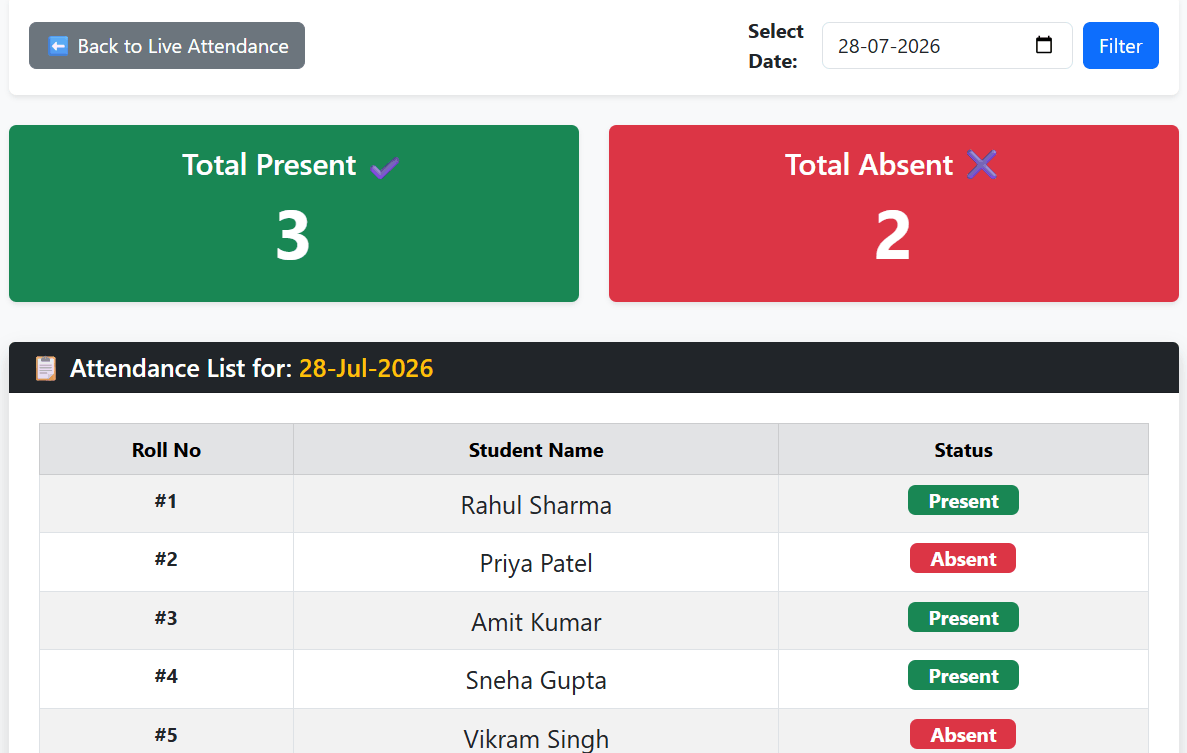
In this way, you can create an attendance system for students or for your company employees. If you run a school or college, you can easily create this type of live attendance system for your students. If you run a company, you can also create the same type of live attendance system for your employees.
This is how we can create a live attendance system using PHP, MySQL, and AJAX without refreshing the page.
Recommended Posts:-
