Most developers on the internet teach you how to build an open chat room system where any registered user can view all other users and send messages to anyone without admin permission. This approach is suitable for social media applications, but it is not secure for real-world business applications.
If you are a freelancer, doctor, lawyer, consultant, coaching institute, or run any online business, you need a private chat system similar to WhatsApp. In this type of system, your clients can communicate only with you. They cannot see your other clients’ messages.
This WhatsApp-style Live Chat System is designed to solve this real-world problem.
In this tutorial, we will build a complete WhatsApp-style private live chat system using PHP, MySQL, AJAX, jQuery, and Bootstrap. This is a real-time chat application where messages are displayed instantly without refreshing the page.
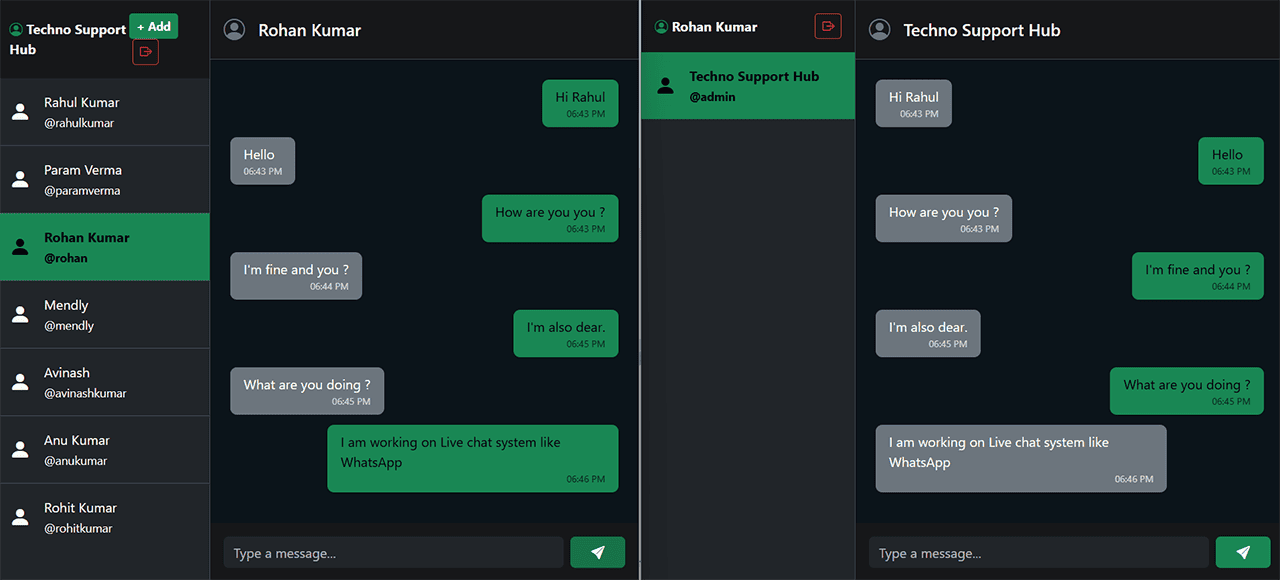
Suppose you own a business and want to add a private chat feature to your website. In this system, there is only one admin, and the admin can add unlimited contacts (clients). Each client can chat privately with the admin, just like WhatsApp.
Clients cannot see other clients or their messages. The admin can send messages to any client, and the client receives them instantly in real time. Likewise, when a client sends a message, it is immediately displayed to the admin without refreshing the page.
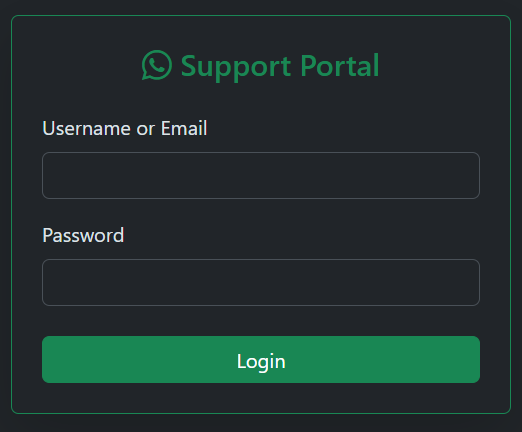
We will also create a Login form where both the admin and clients can securely log in to access the chat application.
After logging in, the admin can view all added contacts along with their names and email addresses. The admin can select any contact from the left sidebar and start chatting instantly.
When a client logs in, they will only see the admin's account. They can communicate only with the admin, making the system completely private and secure for business use.
Now let's see how to build this WhatsApp-style live chat system using PHP, MySQL, AJAX, jQuery, and Bootstrap.
1. Live Chat System Database Tables
First, we will create the database tables.
In this project, we need two tables:
Users Table
CREATE TABLE `users` (
  `id` int(11) NOT NULL AUTO_INCREMENT PRIMARY KEY,
  `full_name` varchar(100) NOT NULL,
  `username` varchar(50) NOT NULL UNIQUE,
  `email` varchar(100) NOT NULL UNIQUE,
  `password` varchar(255) NOT NULL,
  `role` enum('admin','user') DEFAULT 'user',
  `created_at` timestamp DEFAULT CURRENT_TIMESTAMP
) ;
The Users table contains a Role field. If the account belongs to the administrator, the role will be Admin. If the account belongs to a client, the role will be User.
This role-based system allows us to control who can access different features.
The Users table stores information such as:
- Full Name
- Email
- Username
- Password
- Role
- Created Date
This table is used to add new contacts (clients).
Just like WhatsApp allows you to add contacts, this system also lets the admin add contacts using a username, email, and password.
The added clients can log in using these credentials and start a live private conversation with the admin.
Insert an admin -
-- Default Admin -> User: admin | Email: admin@technosmarter.com | Pass: admin123
INSERT INTO `users` (`id`, `full_name`, `username`, `email`, `password`, `role`) VALUES
(1, 'Techno Support Hub', 'admin', 'admin@technosmarter.com', '$2y$04$jtZaFby6oxJu.eM3WbApp.CYDWq1cY8JPHL9MaaIJG2Mz0ZXJ5sdW', 'admin');
Messages Table
CREATE TABLE `messages` (
  `id` int(11) NOT NULL AUTO_INCREMENT PRIMARY KEY,
  `sender_id` int(11) NOT NULL,
  `receiver_id` int(11) NOT NULL,
  `message` text NOT NULL,
  `msg_time` timestamp DEFAULT CURRENT_TIMESTAMP
) ;
This table stores every chat message.
Each message is saved with:
- Sender ID
- Receiver ID
- Message
- Date & Time
Using these IDs, we can easily identify who sent the message and who received it.
2. PHP & MYSQL Database Connection
Now let's create the database connection file.
This file connects our PHP application with the MySQL database.
We will use PHP PDO, which is a secure way to connect with MySQL.
In this tutorial, we also use PHP PDO Prepared Statements, which help protect the application from SQL Injection attacks.
config.php
<?php session_start();
define('host', 'localhost');
define('user', 'root');
define('pass', '');
define('dbname', 'web');
try {
      $pdo = new PDO("mysql:host=".host.";dbname=".dbname.";charset=utf8mb4",user,pass,[PDO::ATTR_ERRMODE => PDO::ERRMODE_EXCEPTION]);
} catch (PDOException $e) {
    //die("Database Connection Crash: " . $e->getMessage());
}
?>
In the connection file, simply update your database credentials:
- Database Host
- Database Name
- Username
- Password
If any credentials are incorrect, the database connection will fail.
3. WhatsApp Style Private Chat System user interface (UI)
Now we will build the main WhatsApp-style chat interface.
On this page:
- All contacts will appear on the left sidebar.
- The selected conversation will appear on the right side.
- The design will look similar to WhatsApp.
To build this interface, we will use Bootstrap for responsive design and Bootstrap Icons for modern UI elements.
We will also use jQuery and AJAX to create real-time messaging without refreshing the page.
One of the biggest advantages of this project is that it works perfectly on low-cost shared hosting. You do not need VPS hosting or expensive servers.
index.php
<?php require("config.php"); if(!isset($_SESSION['slogged_in'])){ header("Location: login.php"); exit; }
$my_role = $_SESSION['role'];
$active_partner_id = (int)($_GET['chat'] ?? 0);
if(!$active_partner_id){
   if($my_role == 'admin'){
    $stmt = $pdo->prepare("SELECT id FROM users WHERE role='user' ORDER BY id DESC LIMIT 1
    ");
}else{
    $stmt = $pdo->prepare("SELECT id FROM users WHERE role='admin' LIMIT 1
    ");
}
$stmt->execute();
$active_partner_id = (int)$stmt->fetchColumn();
}
$stmt = $pdo->prepare("SELECT full_name FROM users WHERE id=:id LIMIT 1");
$stmt->execute(['id' => $active_partner_id]);
$partner_name = $stmt->fetchColumn() ?: 'Select a Contact';

if($my_role == 'admin'){
    $stmt = $pdo->prepare("SELECT * FROM users WHERE role='user' ORDER BY id DESC");

}else{
    $stmt = $pdo->prepare("SELECT * FROM users WHERE role='admin' LIMIT 1");
}
$stmt->execute();
$contacts = $stmt->fetchAll(PDO::FETCH_ASSOC);
?>
<!DOCTYPE html>
<html lang="en" data-bs-theme="dark">
<head>
    <meta charset="UTF-8">
    <title>WhatsApp Hub - <?= htmlspecialchars($_SESSION['name']) ?></title>

    <link href="https://cdn.jsdelivr.net/npm/bootstrap@5.3.3/dist/css/bootstrap.min.css" rel="stylesheet">
    <link href="https://cdn.jsdelivr.net/npm/bootstrap-icons@1.11.3/font/bootstrap-icons.min.css" rel="stylesheet">
    <script src="https://code.jquery.com/jquery-3.7.1.min.js"></script>
</head>
<body class="vh-100 overflow-hidden bg-black">

<div class="container-fluid h-100 p-0 d-flex">

    <!-- Sidebar -->
    <div class="col-md-4 col-lg-3 d-flex flex-column border-end border-secondary-subtle bg-dark p-0">

        <div class="p-3 bg-secondary-subtle d-flex justify-content-between align-items-center">
            <span class="fw-bold text-light">
                <i class="bi bi-person-circle text-success"></i>
                <?= htmlspecialchars($_SESSION['name']) ?>
            </span>

            <div>
                <?php if($my_role == 'admin'): ?>
                    <a href="add_user.php" class="btn btn-sm btn-success fw-bold">+ Add</a>
                <?php endif; ?>

                <a href="logout.php" class="btn btn-sm btn-outline-danger ms-1">
                    <i class="bi bi-box-arrow-right"></i>
                </a>
            </div>
        </div>

        <div class="list-group list-group-flush flex-grow-1 overflow-y-auto">

            <?php foreach($contacts as $c): ?>
                <a href="?chat=<?= $c['id'] ?>"
                   class="list-group-item list-group-item-action d-flex align-items-center gap-3 py-3 <?= $c['id'] == $active_partner_id ? 'bg-success text-black fw-bold' : 'text-light' ?>">

                    <i class="bi bi-person-fill fs-3"></i>

                    <div>
                        <div><?= htmlspecialchars($c['full_name']) ?></div>
                        <small>@<?= htmlspecialchars($c['username']) ?></small>
                    </div>

                </a>
            <?php endforeach; ?>

        </div>

    </div>

    <!-- Chat Section -->
    <div class="col-md-8 col-lg-9 d-flex flex-column h-100 p-0 bg-dark-subtle">

        <div class="p-3 bg-secondary-subtle border-bottom border-secondary-subtle d-flex align-items-center gap-3">
            <i class="bi bi-person-circle fs-3 text-secondary"></i>
            <h5 class="mb-0 text-light"><?= htmlspecialchars($partner_name) ?></h5>
        </div>

        <div id="chatBody"
             class="flex-grow-1 overflow-y-auto p-4 d-flex flex-column gap-2"
             style="background:#0b141a;">
        </div>

        <div class="p-3 bg-secondary-subtle d-flex gap-2">
            <input type="text"
                   id="msgInput"
                   class="form-control bg-dark border-0 text-light"
                   placeholder="Type a message...">

            <button id="sendBtn" class="btn btn-success px-4 fw-bold">
                <i class="bi bi-send-fill"></i>
            </button>
        </div>

    </div>

</div>

<script>
$(document).ready(function(){

    let partnerId = <?= $active_partner_id ?>;
    let chatBody = $("#chatBody");

    if(!partnerId){
        chatBody.html('<div class="text-center text-secondary mt-5">No partner selected</div>');
        return;
    }

   function loadChat(){
    $.get("get_chat.php",{partner:partnerId},function(data){

        chatBody.html(data);

        chatBody.scrollTop(
            chatBody[0].scrollHeight
        );

    });
}
    loadChat();
    setInterval(loadChat,1000);

    $("#sendBtn").click(function(){

        let msg = $("#msgInput").val().trim();

        if(msg == '') return;

        $.post("send_message.php",{
            partner_id: partnerId,
            message: msg
        },function(){

            $("#msgInput").val('');
            loadChat();

        });

    });

    $("#msgInput").keypress(function(e){
        if(e.which == 13){
            $("#sendBtn").click();
        }
    });

});
</script>
</body>
</html>
After the admin logs in, they will be redirected to this page.
The left sidebar displays:
- Add Contact Button
- List of All Contacts
The admin can simply click on any contact and start chatting.
When a client logs in, they will only see the admin's account and can chat only with the admin.
Clients cannot view messages or conversations of any other client, making this a secure private messaging system.
We also create an Add Contact button that allows the admin to add unlimited contacts.
To make messaging work in real time, we use JavaScript, jQuery, and AJAX.
We create two PHP files:
get_chat.php – Used to load all chat messages.
send_message.php – Used to send messages using AJAX.
Whenever the admin sends a message, it appears instantly on the client's screen.
Likewise, whenever a client sends a message, it appears instantly for the admin without refreshing the page.
4. Live Chat System Login Page
Just like WhatsApp uses a phone number for login, we will create a login system using:
Both the admin and clients can log in using this page.
An important part of this login system is the Role field.
After successful login, we check whether the logged-in account is an Admin or a User.
Based on the role, we can enable or disable different features.
For example, only the admin is allowed to add new contacts. Clients cannot create or manage contacts because this is a private business chat system.
If you want to allow clients to add contacts, you can modify the permissions according to your own requirements.
login.php
<?php require("config.php"); if(isset($_SESSION['slogged_in'])){ header("Location: index.php"); exit;}
?>
<!DOCTYPE html>
<html lang="en" data-bs-theme="dark">
<head>
    <meta charset="UTF-8">
    <title>Support Portal - Login</title>
    <link href="https://cdn.jsdelivr.net/npm/bootstrap@5.3.3/dist/css/bootstrap.min.css" rel="stylesheet">
    <link href="https://cdn.jsdelivr.net/npm/bootstrap-icons@1.11.3/font/bootstrap-icons.min.css" rel="stylesheet">
</head>
<body class="d-flex align-items-center justify-content-center vh-100 bg-dark">
<div class="card border-success shadow-lg" style="max-width:400px;width:100%;">
    <div class="card-body p-4">
        <h4 class="text-center text-success mb-4">
            <i class="bi bi-whatsapp"></i> Support Portal
        </h4>
        <?php
if(isset($_POST['submit'])){
    $login_var    = trim($_POST['login_var']);
    $password = $_POST['password'];
    $stmt = $pdo->prepare("SELECT * FROM users WHERE username = :username OR email = :email limit 1");
    $stmt->execute(['username'=>$login_var, 'email'=>$login_var]);
    $user = $stmt->fetch();
    if($user && password_verify($password, $user['password'])){
                $_SESSION['slogged_in'] = 1;
        $_SESSION['user_id'] = $user['id'];
        $_SESSION['role']    = $user['role'];
        $_SESSION['name']    = $user['full_name'];
        header("Location: index.php");
        exit;
    }
    echo '<div class="alert alert-danger text-center py-2">Invalid login credentials! </div>';
}
?>
<form method="POST">
            <div class="mb-3">
                <label class="form-label">Username or Email</label>
                <input type="text" name="login_var" class="form-control" required>
            </div>

            <div class="mb-4">
                <label class="form-label">Password</label>
                <input type="password" name="password" class="form-control" required>
            </div>

            <button type="submit" name="submit" class="btn btn-success w-100">
                Login
            </button>
        </form>

    </div>
</div>
</body>
</html>
5. Add User (WhatsApp-style add contact feature)
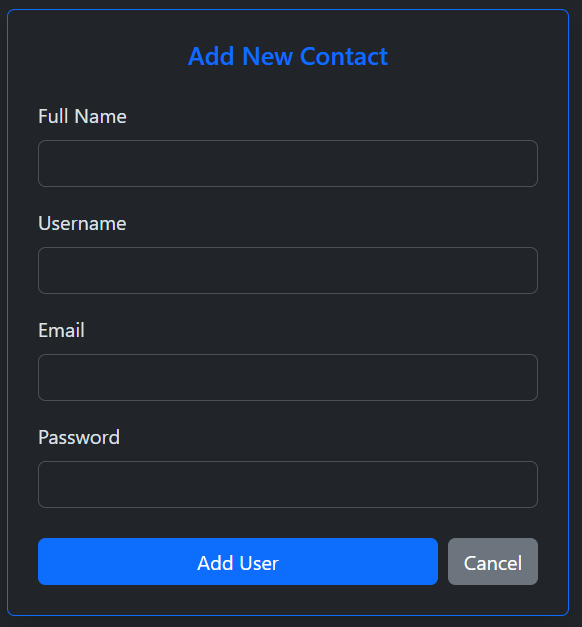
Just like WhatsApp allows you to save unlimited contacts, this system also allows the admin to add unlimited clients.
Only users who have a valid username and password can access the chat application.
This makes the application secure.
Using the Add User feature, the admin can create unlimited contacts by entering:
- Full Name
- Username
- Email
- Password
Once a user is added, they automatically appear in the left sidebar of the main chat page (index.php).
add_user.php
<?php require("config.php");
if(!isset($_SESSION['slogged_in']) || $_SESSION['role'] != 'admin'){
    exit('<div class="alert alert-danger">Access Denied!</div>');
}
?>
<!DOCTYPE html>
<html lang="en" data-bs-theme="dark">
<head>
<meta charset="UTF-8">
<meta name="viewport" content="width=device-width,initial-scale=1">
<title>Add Contact</title>
<link href="https://cdn.jsdelivr.net/npm/bootstrap@5.3.3/dist/css/bootstrap.min.css" rel="stylesheet">
</head>
<body class="bg-dark d-flex justify-content-center align-items-center vh-100">

<div class="card border-primary shadow" style="max-width:450px;width:100%;">
    <div class="card-body p-4">

        <h5 class="text-center text-primary mb-4">Add New Contact</h5>
        <?php
if(isset($_POST['submit'])){
    $full_name = trim($_POST['full_name']);
    $username  = trim($_POST['username']);
    $email     = trim($_POST['email']);
    $password  = password_hash($_POST['password'], PASSWORD_BCRYPT);
    $stmt = $pdo->prepare("INSERT INTO users(full_name, username, email, password, role)VALUES(:full_name, :username, :email, :password, 'user')");

    if($stmt->execute([
        'full_name' => $full_name,
        'username'  => $username,
        'email'     => $email,
        'password'  => $password
    ])){

        header("Location: index.php");
        exit;

    }else{

        echo '<div class="alert alert-danger py-2 text-center">
               Something went wrong
              </div>';
    }
}
?>
<form method="post">

            <div class="mb-3">
                <label class="form-label">Full Name</label>
                <input type="text" name="full_name" class="form-control"
                    value="<?= htmlspecialchars($_POST['full_name'] ?? '') ?>" required>
            </div>

            <div class="mb-3">
                <label class="form-label">Username</label>
                <input type="text" name="username" class="form-control"
                    value="<?= htmlspecialchars($_POST['username'] ?? '') ?>" required>
            </div>

            <div class="mb-3">
                <label class="form-label">Email</label>
                <input type="email" name="email" class="form-control"
                    value="<?= htmlspecialchars($_POST['email'] ?? '') ?>" required>
            </div>

            <div class="mb-4">
                <label class="form-label">Password</label>
                <input type="password" name="password" class="form-control" required>
            </div>

            <div class="d-flex gap-2">
                <button class="btn btn-primary flex-grow-1" name="submit">Add User</button>
                <a href="index.php" class="btn btn-secondary">Cancel</a>
            </div>

        </form>

    </div>
</div>

</body>
</html>
6. Send a message from the chat system
Whenever a user sends a message, WhatsApp stores it on its server.
Similarly, in our chat system, every message is stored inside the MySQL database.
The send_message.php file saves:
- Sender ID
- Receiver ID
- Message
- Date & Time
Because every message is linked with both sender and receiver IDs, we can easily display conversations anywhere in the application.
send_message.php
<?php include 'config.php';
if(!isset($_SESSION['slogged_in']) || !isset($_POST['message']) || !isset($_POST['partner_id'])) exit;
$user_id = (int)$_SESSION['user_id'];
$partner_id = (int)$_POST['partner_id'];
$msg = trim($_POST['message']);

if(!empty($msg)) {
    // PDO Insert:
  $stmt = $pdo->prepare("
    INSERT INTO messages (sender_id, receiver_id, message)
    VALUES (:sender_id, :receiver_id, :message)
");
$stmt->execute([
    'sender_id'   => $user_id,
    'receiver_id' => $partner_id,
    'message'     => $msg
]);
}
?>
7. Load Chat in a chat system like WhatsApp
Earlier, we discussed that all messages should appear without refreshing the page.
For that purpose, we create a file called get_chat.php.
This file is called continuously using AJAX and returns the latest conversation.
The response is then displayed automatically inside the chat window.
get_chat.php
<?php require("config.php");
if(!isset($_SESSION['slogged_in']) || !isset($_GET['partner'])){ exit;}
$current_user_id = (int)$_SESSION['user_id'];
$partner_id      = (int)$_GET['partner'];
$stmt = $pdo->prepare("SELECT * FROM messages WHERE (sender_id = :current_user_id AND receiver_id = :partner_id )
    OR (sender_id = :partner_id_2 AND receiver_id = :current_user_id_2) ORDER BY id ASC
");
$stmt->execute([
    'current_user_id'   => $current_user_id,
    'partner_id'        => $partner_id,
    'partner_id_2'      => $partner_id,
    'current_user_id_2' => $current_user_id
]);
$messages = $stmt->fetchAll(PDO::FETCH_ASSOC);
foreach($messages as $message){
    $time = date("h:i A", strtotime($message['msg_time']));
    $text = htmlspecialchars($message['message']);
    if($message['sender_id'] == $current_user_id){
        echo '
        <div class="align-self-end bg-success text-black p-2 px-3 rounded-3 shadow-sm mb-1" style="max-width:75%;">
            <div>'.$text.'</div>
            <small class="d-block text-end opacity-75" style="font-size:.7rem;">'.$time.'</small>
        </div>';

    } else {
        echo '
        <div class="align-self-start bg-secondary text-light p-2 px-3 rounded-3 shadow-sm mb-1" style="max-width:75%;">
            <div>'.$text.'</div>
            <small class="d-block text-end opacity-75" style="font-size:.7rem;">'.$time.'</small>
        </div>';
    }
}
?>
In this code, we load all messages between the sender and receiver and display them instantly in our WhatsApp-style chat interface without refreshing the page.
8. Chat system Logout
logout.php
<?php  session_start(); session_destroy();
header("location:login.php");
?>
Finally, we create a Logout feature.
Both the admin and clients can safely log out of the chat application whenever they want.
This is an important part of any secure chat system.
Using this tutorial, you can easily build your own WhatsApp-style private live chat system for business websites.
In this project, we learned how to create a secure real-time chat application using PHP, MySQL, AJAX, jQuery, and Bootstrap. The system supports private messaging, role-based login, contact management, and real-time messaging and works efficiently even on low-cost shared hosting, making it suitable for real-world business applications.
Recommended Posts:-
