
In the current digital era, certificate verification is a significant challenge. Paper-based certificates can be easily edited, which increases the risk of forgery. In this tutorial, we will learn how to create a dynamic certificate generator with QR code verification and an admin panel in PHP.
This system will help in many ways:
- Easy Generation: Admin can easily generate certificates.
- QR Integration: A QR code will be generated for every certificate.
- Instant Verification: Certificates can be verified by scanning the QR code to check validity, issue dates, and other details.
- Franchise Management: Admin can create franchise users with a wallet balance system.
- Multi-Role Panel: The admin panel supports multiple roles, specifically Admin and Franchise User.
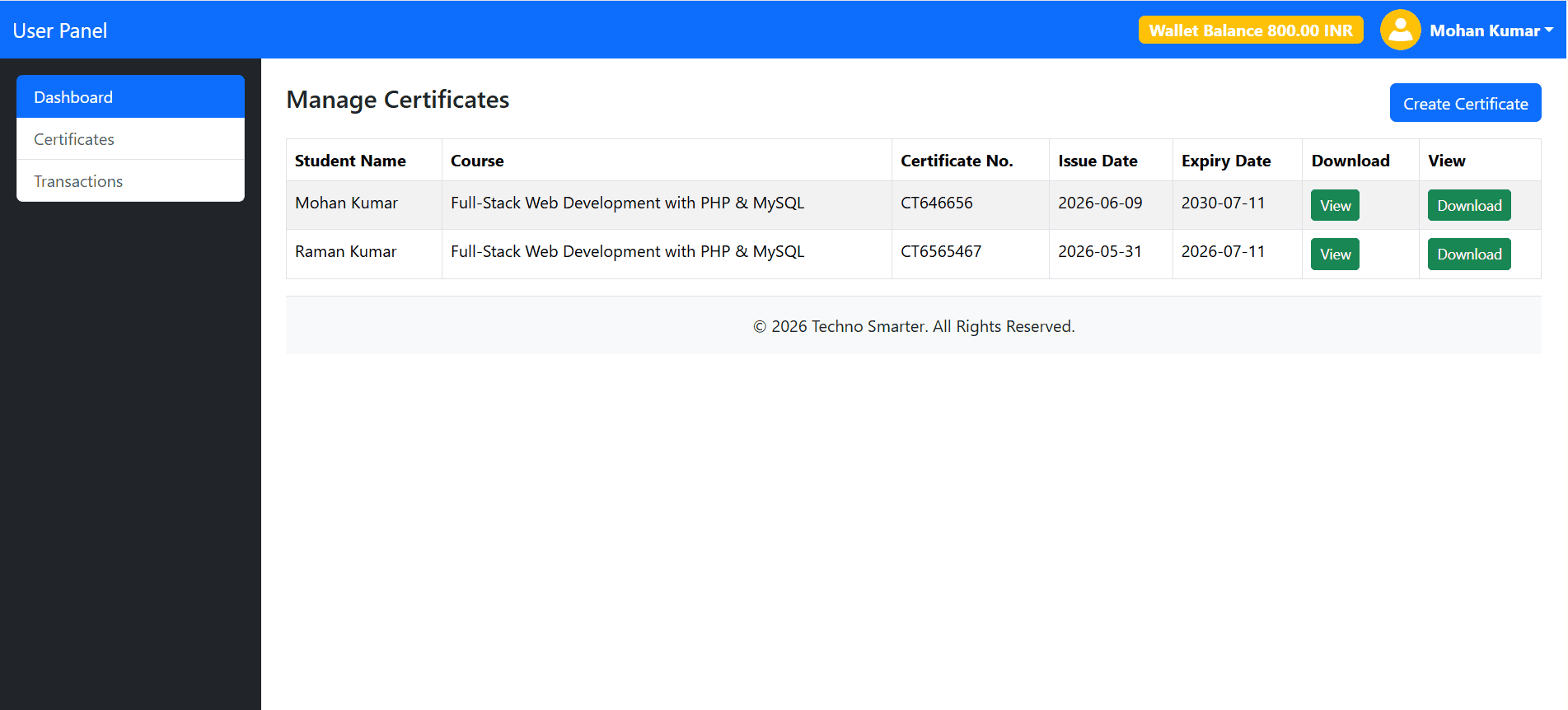
- Wallet-Based Creation: Franchise users can log in and generate certificates using their wallet balance. When a franchise creates a certificate, the amount is automatically deducted from its wallet balance.
This certificate generator can be used by institutes, colleges, coaching centers, training organizations, and businesses to create and verify certificates online.
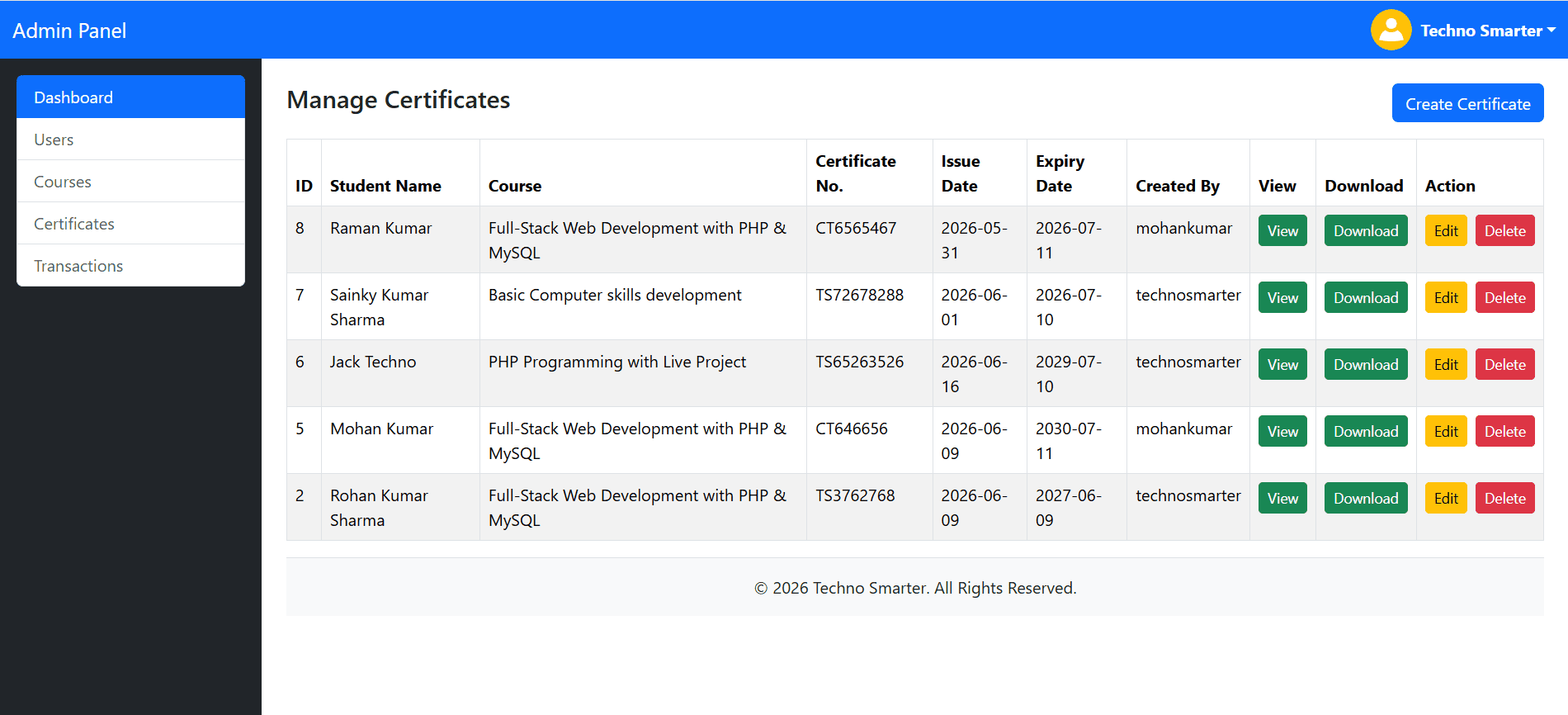
We will create a complete certificate system with QR code verification and an Admin Panel (Multi-role: Admin & Franchise User) using PHP and a MySQL database. We will use HTML2Canvas and jsPDF to generate certificates in PDF format. If you are a student or a developer, this project will help you a lot in understanding how to build a PHP certificate project. We will use Bootstrap to create a responsive admin panel where the admin can create users with any role, define certificate courses, manage certificates, and view a list of certificates and transactions made by franchise users.
Project File Structure
Create the following file and folder structure inside your project directory:
web/
├── admin/
│   ├── assets/
│   │   ├── css/
│   │   │   └── certificate.css
│   │   └── images/
│   │       ├── bg.png
│   │       ├── graduation-cap.png
│   │       ├── loading.gif
│   │       ├── technosmarter.png
│   │       └── user.png
│   ├── certificate.php
│   ├── certificates.php
│   ├── courses.php
│   ├── footer.php
│   ├── header.php
│   ├── index.php
│   ├── login.php
│   ├── logout.php
│   ├── transactions.php
│   └── users.php
├── config.php
└── verify.php
Let’s create a dynamic certificate system in PHP
1. Create database base tables –
First, we will create the database tables for users, certificate courses, certificate management, and transaction records.
users
CREATE TABLE `users` (
  `uid` int(11) NOT NULL PRIMARY KEY AUTO_INCREMENT,
  `fname` varchar(50) DEFAULT NULL,
  `username` varchar(100) DEFAULT NULL,
  `email` varchar(100) DEFAULT NULL,
  `role` varchar(20) DEFAULT NULL,
  `wallet_balance` decimal(10,2) NOT NULL DEFAULT 0.00,
  `password` varchar(255) DEFAULT NULL,
  `udate` datetime DEFAULT NULL
) ;
courses
CREATE TABLE `courses` (
  `course_id` int(11) NOT NULL PRIMARY KEY AUTO_INCREMENT,
  `course_name` varchar(255) DEFAULT NULL,
  `course_duration` varchar(50) DEFAULT NULL
);
certificates
CREATE TABLE `certificates` (
  `cid` int(11) NOT NULL PRIMARY KEY AUTO_INCREMENT,
  `student_name` varchar(50) DEFAULT NULL,
  `course_id` int(11) DEFAULT NULL,
  `cert_number` varchar(255) DEFAULT NULL,
  `issue_date` date DEFAULT NULL,
  `expiry_date` date DEFAULT NULL,
  `uid` int(11) DEFAULT NULL,
  `token` varchar(255) DEFAULT NULL,
  `cert_created` datetime NOT NULL
) ;
transactions
CREATE TABLE `transactions` (
  `tid` int(11) NOT NULL PRIMARY KEY AUTO_INCREMENT,
  `uid` int(11) DEFAULT NULL,
  `amount` decimal(10,2) DEFAULT NULL,
  `description` text DEFAULT NULL,
  `txn_date` datetime DEFAULT NULL
) ;
The Users table stores all registered users, including both admin and franchise users. The Courses table is used to define the courses available for certification. The Certificates table stores the dynamic certificate data, along with a unique token ID. This token is unique, as it generates the verification link embedded in the QR code; when scanned, it redirects the user directly to the verification page on your website. Finally, the Transactions table keeps a record of all payment deductions for franchise users.
2. Create a PHP connection file –
To create a robust web application, we need a stable database connection. We will create a connection file to link our PHP files to the MySQL database. In this project, we will use PHP PDO (PHP Data Objects) with prepared statements because it is fully secure and protects your application against SQL injection.
config.php
<?php  session_start();
define('DBNAME','web');
define('DBUSER','root');
define('DBPASS','');
define('DBHOST','localhost');
try {
 $dbc = 'mysql:host=' .DBHOST . ';dbname=' . DBNAME.';utf8';
 $dbc= new PDO($dbc,DBUSER,DBPASS,array(PDO::MYSQL_ATTR_INIT_COMMAND => "SET NAMES utf8"));
   $dbc->setAttribute(PDO::ATTR_ERRMODE, PDO::ERRMODE_WARNING);
  //echo "Your page is connected with the database successfully.";
} catch(PDOException $e) {
  //echo "Issue -> Connection failed: " . $e->getMessage();
}
?>
- Server Credentials: Define your database name, host, username, and password. If you are using XAMPP or WAMP, set the host to localhost, the username to root, and leave the password empty. Make sure to use the specific name of the database you have created.
- Connection Initialization: Initialize the database connection using a PHP PDO connection string.
- Error Handling: If there is an issue with the connection—such as an incorrect password, database name, username, or host—we use a try-catch block to handle the error. This prevents the system from crashing and provides a cleaner experience.
3. Login Page for Admin Panel
As we discussed, we will build an admin panel that supports both admin and franchise users using Bootstrap. This admin panel will serve as the central control hub for your certificate system.
Now, let’s create the login page. Both admins and franchise users will use the same login form. Create a folder named admin in your project, and inside it, create a file named login.php.
admin/login.php
<?php require("../config.php"); ?>
<!DOCTYPE html>
<html lang="en">
<head>
    <meta charset="utf-8">
    <meta name="viewport" content="width=device-width, initial-scale=1">
    <title>Admin Login - Techno Smarter</title>

    <link href="https://cdn.jsdelivr.net/npm/bootstrap@5.3.8/dist/css/bootstrap.min.css" rel="stylesheet">
</head>
<body style="background:#f1f1f1;">

<div class="container vh-100 d-flex justify-content-center align-items-center">
    <div class="card shadow-sm" style="max-width: 400px; width: 100%;">
        <div class="card-body p-4">

            <h3 class="text-center mb-4">Admin Panel</h3>
            <?php
            if(isset($_POST['submit']))
            {
                $login_val=$_POST['login_val'];
                $password=$_POST['password'];
              $stmt = $dbc->prepare("SELECT count(*) from users WHERE username=:username OR email=:email limit 1");
                   $stmt->execute(['username'=>$login_val,'email'=>$login_val]);
        $count_user= $stmt->fetchColumn();
            if($count_user>0){
              $stmt = $dbc->prepare("SELECT uid,password,role,fname from users WHERE username=:username OR email=:email limit 1");
              $stmt->execute(['username'=>$login_val,'email'=>$login_val]);
                  $row = $stmt->fetch(PDO::FETCH_ASSOC);
               if(password_verify($password,$row['password'])){
           $_SESSION["logged_in"]="1";
             $_SESSION["uid"]= $row['uid'];
             $_SESSION['role']=$row['role'];
             $_SESSION['fname']=$row['fname'];
             header("location:index.php");
          }
else
   {
 echo '<div class="alert alert-warning" role="alert">
    Please enter valid password.
</div>';
   }
            }
            else
               {
   echo '<div class="alert alert-warning" role="alert">
    Please enter a valid username or email.
</div>';
               }

            }
            ?>

            <form action="" method="POST">
                <div class="mb-3">
                    <label class="form-label">Username or Email </label>

                    <input type="text"  name="login_val" value="<?php if(isset($login_val)){ echo $login_val;};?>" class="form-control" required>
                </div>

                <div class="mb-3">
                    <label class="form-label">Password</label>
                    <input type="password" name="password" class="form-control" required>
                </div>

                <button type="submit" name="submit" class="btn btn-primary w-100">
                    Login
                </button>
                <br><br>
            </form>

        </div>
    </div>
</div>

</body>
</html>
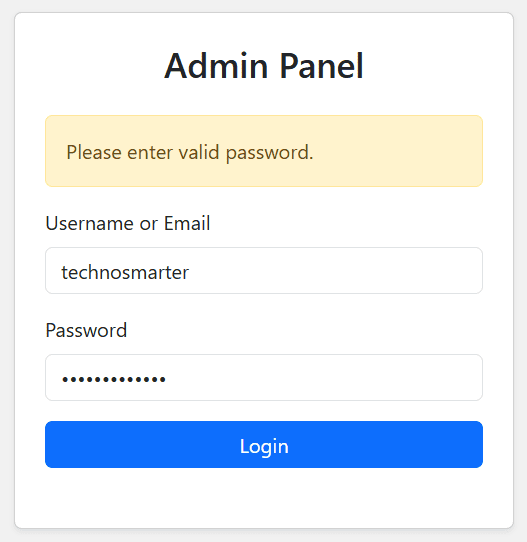
If you look at the code, it is a standard PHP login form, but there is one key detail for managing different users: the user role.
PHP
$_SESSION['role'] = $row['role'];
This role is used to identify the user type: admin for the administrator and user for franchise users. With this, you can easily control access to specific features using if conditions or switch statements. This way, the same admin panel dynamically adapts to show only the relevant features after a franchise user logs in.
Testing the Login
First, insert an admin user into your database to test the login:
Execute SQL Query -
INSERT INTO `users` (`uid`, `fname`, `username`, `email`, `role`, `wallet_balance`, `password`, `udate`) VALUES
(1, 'Techno Smarter', 'technosmarter', 'technosmarterinfo@gmail.com', 'admin', 0.00, '$2y$04$jtZaFby6oxJu.eM3WbApp.CYDWq1cY8JPHL9MaaIJG2Mz0ZXJ5sdW', '2026-06-09 13:52:02'),
Now, test the login using these credentials:
Username: technosmarter
Password: admin123
Upon a successful login, you will be redirected to the index.php page, which serves as the dashboard for both the admin and the franchise user. Let’s move on to creating that dashboard.
4. Certificate Admin Panel dashboard (Admin + Franchise User)
The admin panel is the backbone of the certificate system. However, it is not limited to admin features; we will also integrate franchise features into the same interface. This is what we call a "Multi-role User Panel" PHP project. The dashboard will feature a header, a sidebar menu, and a main content area containing data summary cards (such as the total number of users, created certificates, available courses, and transaction counts).
Let’s create the dashboard files:
admin/index.php
<?php require("../config.php");
if(!isset($_SESSION['logged_in']))
{
    header("location:login.php");
    exit;
}


   include("header.php");
    ?>
<!-- Main Content -->
        <div class="col-md-9 col-lg-10 p-4">

            <h2>Dashboard</h2>
            <?php
            if($_SESSION['role']=='admin') {?>


            <div class="row mt-4">

                <div class="col-md-4 mb-3">
                    <div class="card">
                        <div class="card-body">
                            <h5>Total Users</h5>
                            <h3>
                                <?php  $stmt=$dbc->prepare("SELECT count(*) from users");
                    $stmt->execute(); echo  $stmt->fetchColumn(); ?>

                            </h3>
                        </div>
                    </div>
                </div>


                <div class="col-md-4 mb-3">
                    <div class="card">
                        <div class="card-body">
                            <h5>Total Certificates</h5>
                            <h3> <?php  $stmt=$dbc->prepare("SELECT count(*) from certificates");
                    $stmt->execute(); echo  $stmt->fetchColumn(); ?></h3>
                        </div>
                    </div>
                </div>
                    <div class="col-md-4 mb-3">
                    <div class="card">
                        <div class="card-body">
                            <h5>Total Courses</h5>
                            <h3> <?php  $stmt=$dbc->prepare("SELECT count(*) from courses");
                    $stmt->execute(); echo  $stmt->fetchColumn(); ?></h3>
                        </div>
                    </div>
                </div>

                  <div class="col-md-4 mb-3">
                    <div class="card">
                        <div class="card-body">
                            <h5>Total Transactions</h5>
                            <h3> <?php  $stmt=$dbc->prepare("SELECT count(*) from transactions");
                    $stmt->execute(); echo  $stmt->fetchColumn(); ?></h3>
                        </div>
                    </div>
                </div>


            </div>
        <?php } else { ?>
 <div class="row mt-4">


                <div class="col-md-4 mb-3">
                    <div class="card">
                        <div class="card-body">
                            <h5>Total Certificates</h5>
                            <h3> <?php  $stmt=$dbc->prepare("SELECT count(*) from certificates where certificates.uid=:uid");
                    $stmt->execute(['uid'=>$_SESSION['uid']]); echo  $stmt->fetchColumn(); ?></h3>
                        </div>
                    </div>
                </div>
                  <div class="col-md-4 mb-3">
                    <div class="card">
                        <div class="card-body">
                            <h5>Total Transactions</h5>
                          <h3> <?php  $stmt=$dbc->prepare("SELECT count(*) from transactions where transactions.uid=:uid");
                    $stmt->execute(['uid'=>$_SESSION['uid']]); echo  $stmt->fetchColumn(); ?></h3>
                        </div>
                    </div>
                </div>


            </div>

        <?php } ?>

        </div>

    </div>
   <?php include("footer.php"); ?>
admin/header.php
<!DOCTYPE html>
<html lang="en">
<head>
    <meta charset="utf-8">
    <meta name="viewport" content="width=device-width, initial-scale=1">
    <title>Panel - Techno Smarter</title>

    <link href="https://cdn.jsdelivr.net/npm/bootstrap@5.3.8/dist/css/bootstrap.min.css" rel="stylesheet">
    <script src="https://cdn.jsdelivr.net/npm/bootstrap@5.3.8/dist/js/bootstrap.bundle.min.js"></script>
</head>
<body>

<!-- Main Layout -->
<div class="container-fluid">
    <div class="row">
<!-- Top Navbar -->


<nav class="navbar navbar-expand-lg navbar-dark bg-primary">
    <div class="container-fluid">

        <a class="navbar-brand" href="#">
            <?php echo ($_SESSION['role']=='admin') ? 'Admin' : 'User'; ?> Panel
        </a>

        <div class="d-flex align-items-center ms-auto">

            <?php
            if($_SESSION['role']=='user')
            {
                $stmt = $dbc->prepare("SELECT wallet_balance FROM users WHERE uid=:uid LIMIT 1");
                $stmt->execute(['uid'=>$_SESSION['uid']]);
                $global = $stmt->fetch(PDO::FETCH_ASSOC);
                $global_wallet_balance=$global['wallet_balance'];
            ?>
                <span class="badge bg-warning me-3 fs-6">
                   Wallet Balance <?php echo number_format($global_wallet_balance,2);?> INR
                </span>
            <?php } ?>

            <div class="dropdown">
                <a href="#"
                   class="d-flex align-items-center text-white text-decoration-none dropdown-toggle"
                   data-bs-toggle="dropdown">

                    <img src="https://technosmarter.com/qa/assets/image/avatar.png"
                         alt="Admin"
                         width="40"
                         height="40"
                         class="rounded-circle me-2">

                    <strong><?php echo $_SESSION['fname']; ?></strong>

                </a>

                <ul class="dropdown-menu dropdown-menu-end">
                    <li><a class="dropdown-item" href="#">Profile</a></li>
                    <li><a class="dropdown-item" href="#">Settings</a></li>
                    <li><hr class="dropdown-divider"></li>
                    <li><a class="dropdown-item" href="logout.php">Logout</a></li>
                </ul>
            </div>

        </div>

    </div>
</nav>

        <!-- Sidebar -->
        <div class="col-md-3 col-lg-2 bg-dark text-white min-vh-100  p-3">

          <?php if($_SESSION['role']=='admin'){?>

            <div class="list-group">
                <a href="index.php" class="list-group-item list-group-item-action active">
                    Dashboard
                </a>

                <a href="users.php" class="list-group-item list-group-item-action">
                    Users
                </a>

    <a href="courses.php" class="list-group-item list-group-item-action">
             Courses
                </a>


                <a href="certificates.php" class="list-group-item list-group-item-action">
                Certificates
                </a>

                <a href="transactions.php" class="list-group-item list-group-item-action">
                Transactions
                </a>

            </div>
        <?php }  else {
            ?>
             <div class="list-group">
                <a href="index.php" class="list-group-item list-group-item-action active">
                    Dashboard
                </a>
                <a href="certificates.php" class="list-group-item list-group-item-action">
                Certificates
                </a>

                <a href="transactions.php" class="list-group-item list-group-item-action">
                Transactions
                </a>


            </div>


         <?php }

         ?>


        </div>
        <div class="col-md-9 col-lg-10 p-4">
admin/footer.php
 <footer class="bg-light text-center py-3 border-top">
    © <?php echo date('Y'); ?> Techno Smarter. All Rights Reserved.
</footer>
</div>
</div>
</div>
</body>
</html>
In the PHP code for these files, you can see that we use if($_SESSION['role'] == 'admin') to distinguish between the admin and franchise users. Key features include:
1. Dynamic Title: The header displays the "Admin" or "User" panel title accordingly.
2. Role-Based Sidebar: Sidebar menu items adjust based on whether the logged-in user is an admin or a franchise user.
3. User Profile: Admin or franchise user avatar, including dropdown items for logout, profile, and settings.
4. Wallet Balance: A balance display that is only visible to franchise users.
A login session cannot be properly terminated without a logout function. Let’s create that now.
5. Admin Panel Logout file –
This file will be used to safely log out of the admin panel.
admin/logout.php
<?php session_start();
unset($_SESSION['logged_in']); unset($_SESSION['uid']); unset($_SESSION['role']); unset($_SESSION['fname']);
header("location:login.php");
?>
We use the unset function to clear the session data. You should unset the logged-in status, the role, and the fname (admin/user full name) to effectively end the session.
6. Admin & franchise User management –
To keep the system organized and secure, we’ve implemented a Role-Based Access Control (RBAC) system. This ensures that users only have access to the features they actually need. We primarily define two roles: Admin and Franchise User.
Admin Role: The Admin has full control over the system, including managing all certificate records, overseeing franchise accounts, and accessing global settings.
Franchise User Role: Franchise users have a more restricted view. They can log in to generate certificates for their specific students, but they cannot delete records or access the administrative configuration of the entire platform.
How it works: The system checks the user's role during the login process. Based on whether they are logged in as an Admin or a Franchise user, the dashboard dynamically shows or hides specific menu items. This separation of concerns makes the platform scalable, allowing multiple franchises to use the same system while keeping their data segmented and secure.
To manage these users, create a file named users.php inside the admin folder:
admin/users.php
<?php require '../config.php';

if(!isset($_SESSION['logged_in']))
{
    header("location:login.php");
    exit;
}

include("header.php");
if($_SESSION['role']!='admin')
{
   echo '<div class="alert alert-danger">Access denied. You do not have permission to view this page.</div>';
    exit;
}
$detect = $_GET['detect'] ?? '';


switch($detect)
{
//add user
case 'add':

if(isset($_POST['submit']))
{
    $stmt = $dbc->prepare("SELECT count(*) FROM users WHERE username=:username OR email=:email LIMIT 1 ");
    $stmt->execute([
        'username'=>trim($_POST['username']),
        'email'=>trim($_POST['email'])
    ]);

    $count_user = $stmt->fetchColumn();

    if($count_user==0)
    {
        $stmt = $dbc->prepare("INSERT INTO users(fname,username,email,role,wallet_balance,password,udate)VALUES(:fname,:username,:email,:role,:wallet_balance,:password,:udate)");
         $stmt->execute([
            'fname'=>trim($_POST['fname']),
            'username'=>trim($_POST['username']),
            'email'=>trim($_POST['email']),
            'role'=>$_POST['role'],
            'wallet_balance'=>$_POST['wallet_balance'],
            'password'=>password_hash($_POST['password'],PASSWORD_DEFAULT),
            'udate'=>date('Y-m-d H:i:s')
        ]);

        echo '<div class="alert alert-success">User added successfully.</div>';
    }
    else
    {
        echo '<div class="alert alert-danger">Username or email already exists.</div>';
    }
}
?>

<div class="card">
    <div class="card-header">
        Add User
    </div>

    <div class="card-body">

        <form method="post">

            <div class="mb-3">
                <label class="form-label">Full Name</label>
                <input type="text" name="fname" class="form-control" required>
            </div>

            <div class="mb-3">
                <label class="form-label">Username</label>
                <input type="text" name="username" class="form-control" required>
            </div>

            <div class="mb-3">
                <label class="form-label">Email</label>
                <input type="email" name="email" class="form-control" required>
            </div>

            <div class="mb-3">
                <label class="form-label">Role</label>

                <select name="role" class="form-select">
                    <option value="admin">Admin</option>
                    <option value="user">User</option>
                </select>
            </div>

            <div class="mb-3">
                <label class="form-label">Wallet Balance</label>
                <input type="number" step="0.01" name="wallet_balance" value="0.00" class="form-control">
            </div>

            <div class="mb-3">
                <label class="form-label">Password</label>
                <input type="password" name="password" class="form-control" required>
            </div>

            <button type="submit" name="submit" class="btn btn-primary">
                Add User
            </button>

        </form>

    </div>
</div>

<?php
break;
case 'edit':
//edit user
$uid = intval($_GET['uid']);
$stmt = $dbc->prepare("SELECT * FROM users WHERE uid=:uid LIMIT 1");
$stmt->execute(['uid'=>$uid]);
$user = $stmt->fetch(PDO::FETCH_ASSOC);
if(!$user)
{
    echo '<div class="alert alert-danger">User not found.</div>';
    break;
}
if(isset($_POST['update']))
{
 $stmt = $dbc->prepare("UPDATE users SET fname=:fname,username=:username,email=:email,role=:role,wallet_balance=:wallet_balance WHERE uid=:uid LIMIT 1");
   $stmt->execute([
        'fname'=>trim($_POST['fname']),
        'username'=>trim($_POST['username']),
        'email'=>trim($_POST['email']),
        'role'=>$_POST['role'],
        'wallet_balance'=>$_POST['wallet_balance'],
        'uid'=>$uid
    ]);
    echo '<div class="alert alert-success">User updated successfully.</div>';
    $stmt = $dbc->prepare("SELECT * FROM users WHERE uid=:uid LIMIT 1");
    $stmt->execute(['uid'=>$uid]);
    $user = $stmt->fetch(PDO::FETCH_ASSOC);
}
?>

<div class="card">
    <div class="card-header">
        Edit User
    </div>

    <div class="card-body">

        <form method="post">

            <div class="mb-3">
                <label class="form-label">Full Name</label>
                <input type="text" name="fname" value="<?php echo htmlspecialchars($user['fname']); ?>" class="form-control">
            </div>

            <div class="mb-3">
                <label class="form-label">Username</label>
                <input type="text" name="username" value="<?php echo htmlspecialchars($user['username']); ?>" class="form-control">
            </div>

            <div class="mb-3">
                <label class="form-label">Email</label>
                <input type="email" name="email" value="<?php echo htmlspecialchars($user['email']); ?>" class="form-control">
            </div>

            <div class="mb-3">
                <label class="form-label">Role</label>

                <select name="role" class="form-select">
                    <option value="admin" <?php if($user['role']=='admin') echo 'selected'; ?>>Admin</option>
                    <option value="user" <?php if($user['role']=='user') echo 'selected'; ?>>User</option>
                </select>
            </div>

            <div class="mb-3">
                <label class="form-label">Wallet Balance</label>
                <input type="number" step="0.01" name="wallet_balance" value="<?php echo $user['wallet_balance']; ?>" class="form-control">
            </div>

            <button type="submit" name="update" class="btn btn-success">
                Update User
            </button>

        </form>

    </div>
</div>

<?php
break;
//delete user
case 'del':

$uid = intval($_GET['uid']);

$stmt = $dbc->prepare("
DELETE FROM users
WHERE uid=:uid
LIMIT 1
");

$stmt->execute([
    'uid'=>$uid
]);

header("location:users.php");
exit;
break;
default:
//Users List

$stmt = $dbc->prepare("SELECT * FROM users ORDER BY uid DESC");
$stmt->execute();
$users = $stmt->fetchAll(PDO::FETCH_ASSOC);
?>
<div class="d-flex justify-content-between mb-3">
<h4>Manage Users</h4>

    <a href="?detect=add" class="btn btn-primary">
        Add User
    </a>

</div>

<div class="table-responsive">

    <table class="table table-bordered table-striped">

        <thead>
        <tr>
            <th>ID</th>
            <th>Name</th>
            <th>Username</th>
            <th>Email</th>
            <th>Role</th>
            <th>Wallet</th>
            <th>Action</th>
        </tr>
        </thead>

        <tbody>

        <?php foreach($users as $row){ ?>

        <tr>

            <td><?php echo $row['uid']; ?></td>
            <td><?php echo htmlspecialchars($row['fname']); ?></td>
            <td><?php echo htmlspecialchars($row['username']); ?></td>
            <td><?php echo htmlspecialchars($row['email']); ?></td>
            <td><?php echo ucfirst($row['role']); ?></td>
            <td>₹<?php echo $row['wallet_balance']; ?></td>

            <td>

                <a href="?detect=edit&uid=<?php echo $row['uid']; ?>"
                   class="btn btn-sm btn-warning">
                    Edit
                </a>

                <a href="?detect=del&uid=<?php echo $row['uid']; ?>"
                   onclick="return confirm('Delete User?')"
                   class="btn btn-sm btn-danger">
                    Delete
                </a>

            </td>

        </tr>

        <?php } ?>

        </tbody>

    </table>

</div>

<?php
break;
}
include("footer.php");
?>
7. Certificate Courses in Admin Panel –
This is an important part of the certificate admin panel. Certificates are issued based on specific course names and their respective durations—which is the primary purpose of the system, as we provide certificates to students upon the successful completion of a course.
Let’s create the course page file for the admin panel:
admin/course.php
<?php require '../config.php';

if(!isset($_SESSION['logged_in']))
{
    header("location:login.php");
    exit;
}

include("header.php");
if($_SESSION['role']!='admin')
{
   echo '<div class="alert alert-danger">Access denied. You do not have permission to view this page.</div>';
    exit;
}


$detect = $_GET['detect'] ?? '';

switch($detect)
{
//add user
case 'add':

if(isset($_POST['submit']))
{
    $stmt = $dbc->prepare("
    INSERT INTO courses
    (
        course_name,
        course_duration
    )
    VALUES
    (
        :course_name,
        :course_duration
    )
    ");

    $stmt->execute([
        'course_name'=>trim($_POST['course_name']),
        'course_duration'=>trim($_POST['course_duration'])
    ]);

    echo '<div class="alert alert-success">Course added successfully.</div>';
}
?>

<div class="card">
    <div class="card-header">
        Add Course
    </div>

    <div class="card-body">

        <form method="post">

            <div class="mb-3">
                <label class="form-label">Course Name</label>
                <input type="text" name="course_name" class="form-control" required>
            </div>

            <div class="mb-3">
                <label class="form-label">Course Duration</label>
                <input type="text" name="course_duration" class="form-control" placeholder="3 Months" required>
            </div>

            <button type="submit" name="submit" class="btn btn-primary">
                Add Course
            </button>

        </form>

    </div>
</div>

<?php
break;
case 'edit':

$course_id = intval($_GET['course_id']);

$stmt = $dbc->prepare("
SELECT *
FROM courses
WHERE course_id=:course_id
LIMIT 1
");

$stmt->execute([
    'course_id'=>$course_id
]);

$course = $stmt->fetch(PDO::FETCH_ASSOC);

if(!$course)
{
    echo '<div class="alert alert-danger">Course not found.</div>';
    break;
}

if(isset($_POST['update']))
{
    $stmt = $dbc->prepare("
    UPDATE courses SET
    course_name=:course_name,
    course_duration=:course_duration
    WHERE course_id=:course_id
    LIMIT 1
    ");

    $stmt->execute([
        'course_name'=>trim($_POST['course_name']),
        'course_duration'=>trim($_POST['course_duration']),
        'course_id'=>$course_id
    ]);

    echo '<div class="alert alert-success">Course updated successfully.</div>';

    $stmt = $dbc->prepare("
    SELECT *
    FROM courses
    WHERE course_id=:course_id
    LIMIT 1
    ");

    $stmt->execute([
        'course_id'=>$course_id
    ]);

    $course = $stmt->fetch(PDO::FETCH_ASSOC);
}
?>

<div class="card">
    <div class="card-header">
        Edit Course
    </div>

    <div class="card-body">

        <form method="post">

            <div class="mb-3">
                <label class="form-label">Course Name</label>

                <input type="text"
                       name="course_name"
                       value="<?php echo htmlspecialchars($course['course_name']); ?>"
                       class="form-control">
            </div>

            <div class="mb-3">
                <label class="form-label">Course Duration</label>

                <input type="text"
                       name="course_duration"
                       value="<?php echo htmlspecialchars($course['course_duration']); ?>"
                       class="form-control">
            </div>

            <button type="submit" name="update" class="btn btn-success">
                Update Course
            </button>

        </form>

    </div>
</div>

<?php
break;
//delete user
case 'del':

$course_id = intval($_GET['course_id']);

$stmt = $dbc->prepare("DELETE FROM courses WHERE course_id=:course_id LIMIT 1
");

$stmt->execute([
    'course_id'=>$course_id
]);

header("location:courses.php");
exit;

break;
default:

$stmt = $dbc->prepare("
SELECT *
FROM courses
ORDER BY course_id DESC
");

$stmt->execute();

$courses = $stmt->fetchAll(PDO::FETCH_ASSOC);
?>

<div class="d-flex justify-content-between mb-3">

    <h4>Manage Courses</h4>

    <a href="?detect=add" class="btn btn-primary">
        Add Course
    </a>

</div>

<div class="table-responsive">

    <table class="table table-bordered table-striped">

        <thead>
            <tr>
                <th>ID</th>
                <th>Course Name</th>
                <th>Duration</th>
                <th>Action</th>
            </tr>
        </thead>

        <tbody>

        <?php foreach($courses as $row){ ?>

            <tr>

                <td><?php echo $row['course_id']; ?></td>

                <td>
                    <?php echo htmlspecialchars($row['course_name']); ?>
                </td>

                <td>
                    <?php echo htmlspecialchars($row['course_duration']); ?>
                </td>

                <td>

                    <a href="?detect=edit&course_id=<?php echo $row['course_id']; ?>"
                       class="btn btn-sm btn-warning">
                        Edit
                    </a>

                    <a href="?detect=del&course_id=<?php echo $row['course_id']; ?>"
                       onclick="return confirm('Delete Course?')"
                       class="btn btn-sm btn-danger">
                        Delete
                    </a>

                </td>

            </tr>

        <?php } ?>

        </tbody>

    </table>

</div>

<?php
break;
}
include("footer.php");
?>
Admin can create new courses, edit, delete, and check the list of courses on this page.
8. Certificates Management page in the Admin panel –
The 'Certificate Management' page serves as the central hub of your system, where the certificate creation process begins. A professional admin panel should be user-friendly and error-resilient.
Workflow of this page:
1. Student Detail Input: Admin can enter the student's name, certificate number, issue date, expiry date, and select the corresponding course.
2. Unique Verification Token ID: A unique token number is assigned to each certificate. This ID is essential for verifying the certificate via the QR code.
3. Database Integration: All the details of student saves into the database.
4. View & Download certificate: The admin can view and download certificates using a button.
Access Control & Workflow:
We use a switch case to manage permissions for franchise users. While the admin has full control—including adding, editing, and deleting certificates—franchise users are restricted to creating their own certificates, viewing their own certificate list, and downloading files.
When a franchise user logs in with their credentials, the system filters the data so they only see the certificates they have created. Furthermore, when a franchise user generates a new certificate, the system automatically deducts the fee from their wallet balance. If the balance is insufficient, the system displays an "Insufficient Balance" message. Please note that only the admin has the authority to add balance to a franchise user's account.
Let’s create the certificate management page in the admin panel:
admin/certificates.php
<?php require '../config.php';

if(!isset($_SESSION['logged_in']))
{
    header("location:login.php");
    exit;
}

include("header.php");

$detect = $_GET['detect'] ?? '';
$role=$_SESSION['role'];
switch($role)
{
    case 'admin':
    switch($detect)
{

case 'add':

if(isset($_POST['submit']))
{
    $token = bin2hex(random_bytes(16));

    $stmt = $dbc->prepare("INSERT INTO certificates(student_name,course_id,cert_number,issue_date,expiry_date,uid,token,cert_created)VALUES(:student_name,:course_id,:cert_number,:issue_date,:expiry_date,:uid,:token,:cert_created)");
$stmt->execute([
        'student_name'=>trim($_POST['student_name']),
        'course_id'=>$_POST['course_id'],
        'cert_number'=>trim($_POST['cert_number']),
        'issue_date'=>$_POST['issue_date'],
        'expiry_date'=>$_POST['expiry_date'],
        'uid'=>$_SESSION['uid'],
        'token'=>$token,
        'cert_created'=>date('Y-m-d H:i:s')
    ]);

    echo '<div class="alert alert-success">Certificate created successfully.</div>';
}
$stmt = $dbc->prepare("SELECT * FROM courses ORDER BY course_name ASC");
$stmt->execute();
$courses = $stmt->fetchAll(PDO::FETCH_ASSOC);
?>

<div class="card">
    <div class="card-header">
        Create Certificate
    </div>

    <div class="card-body">

        <form method="post">

            <div class="mb-3">
                <label class="form-label">Student Name</label>
                <input type="text" name="student_name" class="form-control" required>
            </div>

            <div class="mb-3">
                <label class="form-label">Course</label>

                <select name="course_id" class="form-select" required>

                    <option value="">Select Course</option>

                    <?php foreach($courses as $course){ ?>

                    <option value="<?php echo $course['course_id']; ?>">
                        <?php echo htmlspecialchars($course['course_name']); ?>
                    </option>

                    <?php } ?>

                </select>

            </div>

            <div class="mb-3">
                <label class="form-label">Certificate Number</label>
                <input type="text" name="cert_number" class="form-control" required>
            </div>

            <div class="mb-3">
                <label class="form-label">Issue Date</label>
                <input type="date" name="issue_date" class="form-control" required>
            </div>

            <div class="mb-3">
                <label class="form-label">Expiry Date</label>
                <input type="date" name="expiry_date" class="form-control">
            </div>

            <button type="submit" name="submit" class="btn btn-primary">
                Create Certificate
            </button>

        </form>

    </div>
</div>

<?php
break;
case 'edit':

$cid = intval($_GET['cid']);

$stmt = $dbc->prepare("SELECT * FROM certificates WHERE cid=:cid LIMIT 1");
$stmt->execute([
    'cid'=>$cid
]);

$cert = $stmt->fetch(PDO::FETCH_ASSOC);

if(!$cert)
{
    echo '<div class="alert alert-danger">Certificate not found.</div>';
    break;
}

if(isset($_POST['update']))
{
    $stmt = $dbc->prepare("UPDATE certificates SET student_name=:student_name, course_id=:course_id, cert_number=:cert_number,issue_date=:issue_date,expiry_date=:expiry_date WHERE cid=:cid LIMIT 1");
    $stmt->execute([
        'student_name'=>trim($_POST['student_name']),
        'course_id'=>$_POST['course_id'],
        'cert_number'=>trim($_POST['cert_number']),
        'issue_date'=>$_POST['issue_date'],
        'expiry_date'=>$_POST['expiry_date'],
        'cid'=>$cid
    ]);

    echo '<div class="alert alert-success">Certificate updated successfully.</div>';

   $stmt = $dbc->prepare("SELECT c.cid, c.student_name, c.cert_number,c.issue_date,c.expiry_date,co.course_name,c.course_id
FROM certificates c
LEFT JOIN courses co ON co.course_id = c.course_id
WHERE c.cid=:cid
ORDER BY c.cid DESC
");
    $stmt->execute(['cid'=>$cid]);
    $cert = $stmt->fetch(PDO::FETCH_ASSOC);
}
$stmt = $dbc->prepare("SELECT * FROM courses ORDER BY course_name ASC");
$stmt->execute();
$courses = $stmt->fetchAll(PDO::FETCH_ASSOC);

?>

<div class="card">
    <div class="card-header">
        Edit Certificate
    </div>

    <div class="card-body">

        <form method="post">

            <div class="mb-3">
                <label class="form-label">Student Name</label>

                <input type="text"
                       name="student_name"
                       value="<?php echo htmlspecialchars($cert['student_name']); ?>"
                       class="form-control">
            </div>

            <div class="mb-3">
                <label class="form-label">Course</label>

              <select name="course_id" class="form-select">

                    <?php foreach($courses as $course){ ?>

                    <option value="<?php echo $course['course_id']; ?>"
                    <?php if($cert['course_id']==$course['course_id']) echo 'selected'; ?>>
                        <?php echo htmlspecialchars($course['course_name']); ?>
                    </option>

                    <?php } ?>

                </select>


            </div>

            <div class="mb-3">
                <label class="form-label">Certificate Number</label>

                <input type="text"
                       name="cert_number"
                       value="<?php echo htmlspecialchars($cert['cert_number']); ?>"
                       class="form-control">
            </div>

            <div class="mb-3">
                <label class="form-label">Issue Date</label>

                <input type="date"
                       name="issue_date"
                       value="<?php echo $cert['issue_date']; ?>"
                       class="form-control">
            </div>

            <div class="mb-3">
                <label class="form-label">Expiry Date</label>

                <input type="date"
                       name="expiry_date"
                       value="<?php echo $cert['expiry_date']; ?>"
                       class="form-control">
            </div>


            <button type="submit" name="update" class="btn btn-success">
                Update Certificate
            </button>

        </form>

    </div>
</div>

<?php
break;
case 'del':

$cid = intval($_GET['cid']);

$stmt = $dbc->prepare("DELETE FROM certificates WHERE cid=:cid LIMIT 1");

$stmt->execute([
    'cid'=>$cid
]);

header("location:certificates.php");
exit;

break;
default:

$stmt = $dbc->prepare("
SELECT c.*, co.course_name, u.username
FROM certificates c
LEFT JOIN courses co ON co.course_id=c.course_id
LEFT JOIN users u ON u.uid=c.uid
ORDER BY c.cid DESC
");

$stmt->execute();

$certificates = $stmt->fetchAll(PDO::FETCH_ASSOC);
?>

<div class="d-flex justify-content-between mb-3">

    <h4>Manage Certificates</h4>

    <a href="?detect=add" class="btn btn-primary">
        Create Certificate
    </a>

</div>

<div class="table-responsive">

<table class="table table-bordered table-striped">

    <thead>
        <tr>
            <th>ID</th>
            <th>Student Name</th>
            <th>Course</th>
            <th>Certificate No.</th>
            <th>Issue Date</th>
            <th>Expiry Date</th>
            <th>Created By</th>

            <th>View</th>
             <th>Download</th>
            <th>Action</th>
        </tr>
    </thead>

    <tbody>

    <?php foreach($certificates as $row){ ?>

    <tr>

        <td><?php echo $row['cid']; ?></td>

        <td><?php echo htmlspecialchars($row['student_name']); ?></td>

        <td><?php echo htmlspecialchars($row['course_name']); ?></td>

        <td><?php echo htmlspecialchars($row['cert_number']); ?></td>

        <td><?php echo $row['issue_date']; ?></td>

        <td><?php echo $row['expiry_date']; ?></td>

        <td><?php echo htmlspecialchars($row['username']); ?></td>
          <td>

            <a href="certificate.php?cid=<?php echo $row['cid']; ?>"
               class="btn btn-sm btn-success">
             View
            </a>
        </td>


        <td>

            <a href="certificate.php?cid=<?php echo $row['cid']; ?>&download=1"
               class="btn btn-sm btn-success">
                Download
            </a>
        </td>
<td>

    <div class="d-flex gap-2">
        <a href="?detect=edit&cid=<?php echo $row['cid']; ?>"
           class="btn btn-sm btn-warning">
            Edit
        </a>

        <a href="?detect=del&cid=<?php echo $row['cid']; ?>"
           onclick="return confirm('Delete Certificate?')"
           class="btn btn-sm btn-danger">
            Delete
        </a>
    </div>

        </td>

    </tr>

    <?php } ?>

    </tbody>

</table>

</div>

<?php
break;
}
    break;
    case 'user':
     switch($detect)
{

case 'add':
 $price=100;
if(isset($_POST['submit']))
{
    if( $global_wallet_balance <  $price)
    {
         echo '<div class="alert alert-warning" role="alert">
Sorry, Insufficient Balance
</div>';

    }
    else
    {
       $token = bin2hex(random_bytes(16));

    $stmt = $dbc->prepare("INSERT INTO certificates(student_name,course_id,cert_number,issue_date,expiry_date,uid,token,cert_created)VALUES(:student_name,:course_id,:cert_number,:issue_date,:expiry_date,:uid,:token,:cert_created)");
$stmt->execute([
        'student_name'=>trim($_POST['student_name']),
        'course_id'=>$_POST['course_id'],
        'cert_number'=>trim($_POST['cert_number']),
        'issue_date'=>$_POST['issue_date'],
        'expiry_date'=>$_POST['expiry_date'],
        'uid'=>$_SESSION['uid'],
        'token'=>$token,
        'cert_created'=>date('Y-m-d H:i:s')
    ]);
$uid=$_SESSION['uid'];
$stmt = $dbc->prepare("UPDATE users SET wallet_balance = wallet_balance - :price WHERE uid = :uid AND wallet_balance >= :price LIMIT 1
");

$stmt->execute([
    'price' => $price,
    'uid'   => $uid
]);
$stmt = $dbc->prepare("INSERT INTO transactions(uid,amount,description,txn_date)VALUES(:uid,:amount,:description,:txn_date)");
$description="Paid for ".$_POST['cert_number'];
$stmt->execute([
        'amount'=>$price,
        'description'=>$description,
        'uid'=>$_SESSION['uid'],
        'txn_date'=>date('Y-m-d H:i:s')
    ]);


    echo '<div class="alert alert-success">Certificate created successfully.</div>';
}
    }


$stmt = $dbc->prepare("SELECT * FROM courses ORDER BY course_name ASC");
$stmt->execute();
$courses = $stmt->fetchAll(PDO::FETCH_ASSOC);
?>

<div class="card">
    <div class="card-header">
        Create Certificate (Price <?php echo $price;?> RS Per/Certificate)
    </div>

    <div class="card-body">

        <form method="post">

            <div class="mb-3">
                <label class="form-label">Student Name</label>
                <input type="text" name="student_name" class="form-control" required>
            </div>

            <div class="mb-3">
                <label class="form-label">Course</label>

                <select name="course_id" class="form-select" required>

                    <option value="">Select Course</option>

                    <?php foreach($courses as $course){ ?>

                    <option value="<?php echo $course['course_id']; ?>">
                        <?php echo htmlspecialchars($course['course_name']); ?>
                    </option>

                    <?php } ?>

                </select>

            </div>

            <div class="mb-3">
                <label class="form-label">Certificate Number</label>
                <input type="text" name="cert_number" class="form-control" required>
            </div>

            <div class="mb-3">
                <label class="form-label">Issue Date</label>
                <input type="date" name="issue_date" class="form-control" required>
            </div>

            <div class="mb-3">
                <label class="form-label">Expiry Date</label>
                <input type="date" name="expiry_date" class="form-control">
            </div>

            <button type="submit" name="submit" class="btn btn-primary">
                Create Certificate
            </button>

        </form>

    </div>
</div>

<?php
break;
default:

$stmt = $dbc->prepare("
SELECT c.*, co.course_name, u.fname
FROM certificates c
LEFT JOIN courses co ON co.course_id=c.course_id
LEFT JOIN users u ON u.uid=c.uid
WHERE c.uid=:uid
");
$stmt->execute([
    'uid'=>$_SESSION['uid']
]);

$certificates = $stmt->fetchAll(PDO::FETCH_ASSOC);
?>

<div class="d-flex justify-content-between mb-3">

    <h4>Manage Certificates</h4>

    <a href="?detect=add" class="btn btn-primary">
        Create Certificate
    </a>

</div>

<div class="table-responsive">

<table class="table table-bordered table-striped">

    <thead>
        <tr>

            <th>Student Name</th>
            <th>Course</th>
            <th>Certificate No.</th>
            <th>Issue Date</th>
            <th>Expiry Date</th>

            <th>Download</th>
            <th>View</th>

        </tr>
    </thead>

    <tbody>

    <?php foreach($certificates as $row){ ?>

    <tr>


        <td><?php echo htmlspecialchars($row['student_name']); ?></td>

        <td><?php echo htmlspecialchars($row['course_name']); ?></td>

        <td><?php echo htmlspecialchars($row['cert_number']); ?></td>

        <td><?php echo $row['issue_date']; ?></td>

        <td><?php echo $row['expiry_date']; ?></td>


          <td>

            <a href="certificate.php?cid=<?php echo $row['cid']; ?>"
               class="btn btn-sm btn-success">
             View
            </a>
        </td>


        <td>

            <a href="certificate.php?cid=<?php echo $row['cid']; ?>&download=1"
               class="btn btn-sm btn-success">
                Download
            </a>
        </td>

    </tr>

    <?php } ?>

    </tbody>

</table>

</div>
<?php

}
    break;

}
include("footer.php");
?>
9. Certificate preview & Download in Amin Panel
The admin can preview any certificate and download it by clicking the "View" or "Download" buttons. When either an admin or a franchise user clicks these buttons, the system generates a professional-looking preview that can be exported as a PDF.
admin/certificate.php
<?php require '../config.php' ;
if(!isset($_SESSION['logged_in']))
{
    header("location:login.php");
    exit;
}
$cid=intval($_GET['cid'])?? 0;
if($_SESSION['role']=='user')
{
     $stmt=$dbc->prepare("SELECT COUNT(*) from certificates WHERE cid=:cid AND uid=:uid");
     $stmt->execute(['cid'=>$cid,'uid'=>$_SESSION['uid']]);
    $count=$stmt->fetchColumn();
    if($count<1)
    {
     echo 'No record found ..';
        exit;
    }

}
$stmt = $dbc->prepare("
SELECT c.*, co.course_name, u.fname , co.course_duration
FROM certificates c
LEFT JOIN courses co ON co.course_id=c.course_id
LEFT JOIN users u ON u.uid=c.uid
WHERE c.cid=:cid
");

$stmt->execute([
    'cid'=>$cid
]);
$certificates = $stmt->fetchAll(PDO::FETCH_ASSOC);
if($certificates)
{
     foreach($certificates as $row){
?>

<!DOCTYPE html>
<html lang="en">
<head>
    <meta charset="UTF-8">
    <meta name="viewport" content="width=device-width, initial-scale=1.0">
    <title>Certificate Live Preview (Demo)</title>
    <link rel="stylesheet" type="text/css" href="assets/css/certificate.css">
<style>
     /* Watermark Background (Elegant Seal) */
    .watermark-bg {
        position: absolute;
        top: 50%;
        left: 50%;
        transform: translate(-50%, -50%);
        width: 320px;
        height: 320px;
        background: url(assets/images/bg.png) no-repeat center;
        background-size: contain;

        opacity: 0.3; /* Super light background watermark */

    }

</style>
<script src="https://code.jquery.com/jquery-4.0.0.slim.min.js" crossorigin="anonymous"></script>

<script src="https://cdnjs.cloudflare.com/ajax/libs/html2canvas/1.4.1/html2canvas.min.js" crossorigin="anonymous" referrerpolicy="no-referrer"></script>
<script src="https://cdnjs.cloudflare.com/ajax/libs/jspdf/2.5.1/jspdf.umd.min.js" crossorigin="anonymous" referrerpolicy="no-referrer"></script>
</head>
<body>
    <div class="action-bar">
    <div id="loading" style="display:none;"><img src="assets/images/loading.gif" height="50"></div>
</div>

<div class="certificate-container" id="certificateArea">
    <div class="outer-border"></div>
    <div class="inner-border"></div>

    <div class="certificate-inner">

        <div class="watermark-bg"></div>

        <div class="certificate-header">
          <img src="assets/images/graduation-cap.png"
     alt="Graduation Cap"
     class="logo-placeholder">

            <h3 class="institute-name">TECHNO SMARTER ACADEMY</h3>
            <p class="institute-sub">An ISO 9001:2015 Certified Educational Institution</p>
        </div>

        <div class="certificate-title-box">
            <h1 class="main-title">CERTIFICATE OF COMPLETION</h1>
            <p class="sub-title">THIS IS PROUDLY PRESENTED TO</p>
        </div>

        <div class="student-name-box">
            <h2 class="student-name"><?php echo htmlspecialchars($row['student_name'] ?? $row['fname']); ?></h2>
            <div class="decorator-line"></div>
        </div>

        <div class="certificate-body">
            <p class="body-text">
                for successfully completing the <span class="course-duration"><?php echo htmlspecialchars($row['course_duration']); ?></span> professional training and evaluation course in <br>
                <span class="course-name">"<?php echo htmlspecialchars($row['course_name']); ?>"</span> <br>
                conducted by the authorized learning center, demonstrating exceptional skills and dedication.
            </p>
        </div>

        <div class="certificate-footer">

            <div class="footer-item date-section">
                <span class="value"><?php echo date('d-M-Y', strtotime($row['issue_date'])); ?></span>
                <div class="footer-line"></div>
                <span class="label">Date of Issue</span>
            </div>

            <div class="footer-item expiry-section">
                <span class="value"><?php echo date('d-M-Y', strtotime($row['expiry_date'])); ?></span>
                <div class="footer-line"></div>
                <span class="label">Valid Until</span>
            </div>

            <div class="footer-item qr-section">
                <img class="qr-code-img" crossorigin="anonymous" src="https://api.qrserver.com/v1/create-qr-code/?size=150x150&data=http://localhost/web/verify.php?token=<?php echo urlencode($row['token']);?>" alt="Verify QR">
                <span class="cert-id-tag"> No: <?php echo htmlspecialchars($row['cert_number']);?> </span>
            </div>

         <div class="footer-item signature-section">

    <img src="assets/images/technosmarter.png"
         alt="Authorized Signature"
         class="signature-img">

    <div class="footer-line"></div>

    <span class="label">Authorized Signatory</span>

</div>

        </div>
    </div>
</div>
<?php
if(isset($_GET['download'])){
?>
<script>
    function genPDF(quality = 3) {
    $("#dload").hide();
    $('#loading').show();
    window.scrollTo(0, 0);

    // Using jQuery selector [0] to get the DOM element for html2canvas
    html2canvas($('#certificateArea')[0], { scale: quality, useCORS: true, logging: false }).then(canvas => {
        const { jsPDF } = window.jspdf;
        const pdf = new jsPDF("l", "px", [828, 587]);
        const imgData = canvas.toDataURL('image/jpeg', 1.0);

        const pdfWidth = pdf.internal.pageSize.getWidth();
        const pdfHeight = (pdf.getImageProperties(imgData).height * pdfWidth) / pdf.getImageProperties(imgData).width;

        pdf.addImage(imgData, 'JPEG', 0, 0, pdfWidth, pdfHeight);
        pdf.save("Certificate_<?php echo str_replace(' ', '_', $row['cert_number']); ?>.pdf");

        $('#loading').hide();
    }).catch(err => {
        $('#loading').html('<p style="color:red;">Error generating PDF.</p>');
        $("#dload").show();
    });
}

$(window).on('load', () => {
    setTimeout(() => genPDF(5), 1000);
});

</script>
<?php } ?>

</body>
</html>
<?php } }  else { echo "No record found.."; } ?>
Key Points to Understand:
Real-time Preview: Render the certificate preview directly on the webpage using the HTML2Canvas library.
Download Option: Users can easily download the certificate as a PDF file. When the download button is clicked, the system generates the PDF using a combination of the HTML2Canvas and jsPDF libraries.
Verification Ready: A QR code is printed directly on the certificate. Users can scan this code to instantly verify the certificate's authenticity.
QR Server API: In this project, we use the QR Server API to generate the QR codes. However, you can also use the PHPqrcode library or any other QR generator API if you prefer. (We previously used the PHPqrcode library in our vCard generator system.
Create Dynamic QR Code Generator for vCard with Admin Panel in PHP
10. Design certificate with stylesheet.
The design is a crucial part of every certificate. We need to create a dedicated stylesheet to ensure it looks professional.
Create an assets folder, and inside that, create a css folder to store your certificate.css file. This is the standard structure for maintaining a clean project.
admin/assets/css/certificate.css
body{
    margin:0;
    min-height:100vh;
    display:flex;
    justify-content:center;
    align-items:center;
    background:#eef0f3;
}

.certificate-container{
    width:1000px;
    height:700px;
    padding:45px 50px;
    position:relative;
    overflow:hidden;
    box-sizing:border-box;
    background:#fdfaf5;
    box-shadow:0 10px 30px rgba(0,0,0,.15);
    font-family:Georgia,serif;
}

.outer-border,
.inner-border{
    position:absolute;
    pointer-events:none;
}

.outer-border{
    inset:15px;
    border:6px double #c5a059;
}

.inner-border{
    inset:27px;
    border:1.5px solid #c5a059;
}

.certificate-inner{
    position:relative;
    z-index:10;
    width:100%;
    height:100%;
    display:flex;
    flex-direction:column;
    justify-content:space-between;
    align-items:center;
}

.certificate-header,
.certificate-title-box,
.student-name-box,
.certificate-body{
    text-align:center;
}

.institute-name{
    margin:5px 0 0;
    font-size:26px;
    font-weight:700;
    color:#1e2d42;
    letter-spacing:2px;
}

.institute-sub,
.sub-title,
.footer-item .label{
    font-family:sans-serif;
    text-transform:uppercase;
}

.institute-sub{
    margin-top:4px;
    font-size:11px;
    color:#666;
    letter-spacing:1.5px;
}

.main-title{
    margin:0;
    font-size:36px;
    font-weight:700;
    color:#c5a059;
    letter-spacing:3px;
}

.sub-title{
    margin-top:8px;
    font-size:12px;
    color:#555;
    font-weight:600;
    letter-spacing:4px;
}

.student-name{
    margin:0 0 8px;
    font-size:36px;
    font-weight:600;
    font-style:italic;
    color:#1a1a1a;
}

.decorator-line{
    width:350px;
    height:2px;
    margin:auto;
    background:linear-gradient(to right,transparent,#c5a059,transparent);
}

.certificate-body{
    padding:0 40px;
}

.body-text{
    margin:0;
    font-size:15px;
    line-height:1.7;
    color:#444;
}

.course-name,
.course-duration{
    font-weight:700;
    color:#1e2d42;
}

.course-name{
    font-size:19px;
}

.certificate-footer{
    width:100%;
    margin-top:15px;
    padding:0 20px;
    display:flex;
    justify-content:space-between;
    align-items:flex-end;
    box-sizing:border-box;
}

.footer-item{
    width:23%;
    display:flex;
    flex-direction:column;
    align-items:center;
    text-align:center;
}

.footer-line{
    width:100%;
    height:1.5px;
    margin:8px 0;
    background:#c5a059;
}

.footer-item .value{
    font-size:14px;
    font-weight:700;
    color:#222;
}

.footer-item .label{
    font-size:10px;
    font-weight:700;
    color:#666;
    letter-spacing:1px;
}

.qr-section{
    width:22%!important;
}

.qr-code-img{
    width:75px;
    height:75px;
    padding:3px;
    border:1px solid #ddd;
    background:#fff;
    box-shadow:0 3px 10px rgba(0,0,0,.06);
}

.cert-id-tag{
    margin-top:6px;
    font:700 10px monospace;
    color:#555;
    letter-spacing:.5px;
}

.logo-placeholder{
    width:80px;
    height:auto;
    display:block;
    margin:0 auto 15px;
}

.signature-img{
    max-width:140px;
    height:auto;
    display:block;
    margin:0 auto 5px;
}
Now, click the view button to see a professional certificate with a QR code.
Important files – create an images folder inside the admin/assets folder and move these images.
1.assets/images/bg.png - Certificate background image (light gray bg )
2.assets/images/loading.gif - A loader gif image from the internet
3.assets/images/graduation - cap.png - Your website logo
11. Certificate verification link with QR code –
This is a critical security feature for your project. The purpose of this feature is to authenticate the validity of a certificate. Important: Please do not create this file inside the admin folder. Since this needs to be a public-facing page, create it in your project's root folder.
verify.php
<?php require("config.php");
$token='';
if(isset($_GET['token']))
{
	$token=$_GET['token'];
}
?>
<!DOCTYPE html>
<html>
<head>
    <meta charset="utf-8">
    <meta name="viewport" content="width=device-width, initial-scale=1">
    <title>Certificate Verification - Techno Smarter Academy (Demo)</title>
    <link href="https://cdn.jsdelivr.net/npm/bootstrap@5.3.8/dist/css/bootstrap.min.css" rel="stylesheet">
</head>
<body class="bg-light">

<div class="container py-5">

    <div class="row justify-content-center">

        <div class="col-md-8">

            <div class="card shadow">

                <div class="card-header bg-success text-white text-center">
                    <h3 class="mb-0">Certificate Verification</h3>
                </div>
                <?php
              $stmt = $dbc->prepare("
SELECT c.*, co.course_name, u.fname , co.course_duration
FROM certificates c
LEFT JOIN courses co ON co.course_id=c.course_id
LEFT JOIN users u ON u.uid=c.uid
WHERE c.token=:token
");

$stmt->execute([
    'token'=>$token
]);
$certificates = $stmt->fetchAll(PDO::FETCH_ASSOC);
if($certificates)
{
     foreach($certificates as $row){

                ?>

                <div class="card-body">

                    <div class="text-center mb-4">

                        <img src="admin/assets/images/graduation-cap.png"
                             alt="Techno Smarter Academy"
                             height="80">

                        <h4 class="mt-3">
                            Techno Smarter Academy
                        </h4>

                        <p class="text-muted">
                            Certificate Successfully Verified
                        </p>

                    </div>

                    <div class="alert alert-success text-center">
                        This certificate is valid and issued by Techno Smarter Academy.
                    </div>
                    <table class="table table-bordered">

                        <tr>
                            <th width="35%">Student Name</th>
                            <td><?php echo $row['student_name'];?></td>
                        </tr>

                        <tr>
                            <th>Course Name</th>
                            <td><?php echo $row['course_name'];?></td>
                        </tr>

                        <tr>
                            <th>Certificate No.</th>
                            <td><?php echo $row['cert_number'];?></td>
                        </tr>

                        <tr>
                            <th>Issue Date</th>
                            <td><?php echo date('d-M-Y', strtotime($row['issue_date'])); ?></td>
                        </tr>

                        <tr>
                            <th>Valid Until</th>
                            <td><?php echo date('d-M-Y', strtotime($row['expiry_date'])); ?></td>
                        </tr>

                    </table>

                </div>
            <?php  } }   else { echo '<br><div class="alert alert-danger">No record found .</div><br> '; } ?>

            </div>

        </div>

    </div>

</div>

</body>
</html>

The Security Process:
- QR Code Generation: For every certificate, the system generates a unique token linked to a dynamic QR code. When a user scans the QR code, they are automatically redirected to the verify.php page.
- Verification Page (verify.php): Once scanned, the system grabs the unique_token directly from the URL (for example: verify.php?token=XYZ123). You can think of this token as the certificate’s digital fingerprint.
- Data Retrieval: As soon as the page loads, it takes that token and performs a quick lookup in your database. If the token is found, the system retrieves the student’s record and displays all relevant details, such as their name, the course completed, and the date of issue. If the token does not exist in our system, it simply shows an "Invalid Certificate" error, ensuring that only authentic, system-generated certificates can be verified.
12. Transactions Page in Admin panel –
This page displays a complete list of transactions made by franchise users. It tracks all deductions from their wallet balance whenever a new certificate is generated, providing a clear history for each transaction.
admin/transactions.php
<?php require '../config.php';

if(!isset($_SESSION['logged_in']))
{
    header("location:login.php");
    exit;
}

include("header.php");

$detect = $_GET['detect'] ?? '';
$role=$_SESSION['role'];
switch($role)
{
    case 'admin':

switch($detect)
{
default:

$stmt = $dbc->prepare("
SELECT t.*, u.username FROM transactions t
LEFT JOIN users u
ON u.uid = t.uid
ORDER BY t.tid DESC
");

$stmt->execute();

$courses = $stmt->fetchAll(PDO::FETCH_ASSOC);
?>

<div class="d-flex justify-content-between mb-3">

    <h4>Franchise User Transactions</h4>

</div>

<div class="table-responsive">

    <table class="table table-bordered table-striped">

        <thead>
            <tr>
                <th>ID</th>
                <th>User</th>
                <th>Amount</th>
                <th>Description</th>
                  <th>Txn Date</th>
            </tr>
        </thead>

        <tbody>

        <?php foreach($courses as $row){ ?>

            <tr>

                <td><?php echo $row['tid']; ?></td>

                <td>
                    <?php echo htmlspecialchars($row['username']); ?>
                </td>

                <td>
                    <?php echo htmlspecialchars($row['amount']).' INR'?>
                </td>
                  <td>
                    <?php echo htmlspecialchars($row['description']); ?>
                </td>
<td>
                    <?php echo htmlspecialchars($row['txn_date']); ?>
                </td>


            </tr>

        <?php } ?>

        </tbody>

    </table>

</div>

<?php
break;
}
    break;
    case 'user':

switch($detect)
{
default:

$stmt = $dbc->prepare("
SELECT t.*, u.username FROM transactions t
LEFT JOIN users u
ON u.uid = t.uid
WHERE t.uid=:uid
ORDER BY t.tid DESC
");

$stmt->execute(['uid'=>$_SESSION['uid']]);

$courses = $stmt->fetchAll(PDO::FETCH_ASSOC);
?>

<div class="d-flex justify-content-between mb-3">

    <h4>Franchise User Transactions</h4>

</div>

<div class="table-responsive">

    <table class="table table-bordered table-striped">

        <thead>
            <tr>
                <th>ID</th>
                <th>User</th>
                <th>Amount</th>
                <th>Description</th>
                  <th>Txn Date</th>
            </tr>
        </thead>

        <tbody>

        <?php foreach($courses as $row){ ?>

            <tr>

                <td><?php echo $row['tid']; ?></td>

                <td>
                    <?php echo htmlspecialchars($row['username']); ?>
                </td>

                <td>
                    <?php echo htmlspecialchars($row['amount']).' INR'?>
                </td>
                  <td>
                    <?php echo htmlspecialchars($row['description']); ?>
                </td>
<td>
                    <?php echo htmlspecialchars($row['txn_date']); ?>
                </td>


            </tr>

        <?php } ?>

        </tbody>

    </table>

</div>

<?php
break;
}

    break;

}

include("footer.php");
?>
That’s it! You have now built a complete, professional, and secure certificate management system. We’ve covered everything from setting up your database and creating an admin panel to handling secure login roles and generating verifiable PDF certificates.
By combining the Admin and Franchise roles into one system, you’ve created a scalable platform where multiple users can work efficiently. Plus, with the QR code verification and wallet balance system, you have built a real-world, functional web application that is ready to be used.
I hope this tutorial helped you understand how to manage roles and secure your data using PHP and MySQL.
Note: This project is shared for learning and educational purposes. Please test and customize the code according to your requirements before using it in a production environment.
⚡ Want the complete source code as an instant ZIP download?
Buy & Download Source Code
The complete tutorial is already provided above if you'd rather implement it yourself.
Recommended Posts:-
